TABLE OF CONTENTS
- Product Overview
- Quick Reference
- What's in the Box
- Massage Heads & Their Uses
- Installing or Changing a Massage Head
- Charging the Zeno Go
- Switching the Massager ON and OFF
- Selecting the Intensity Level
- How to Use
- Automatic Shut-Off
- Battery & Runtime
- Safety Instructions
- Cleaning & Maintenance
- Still stuck?
Product Overview
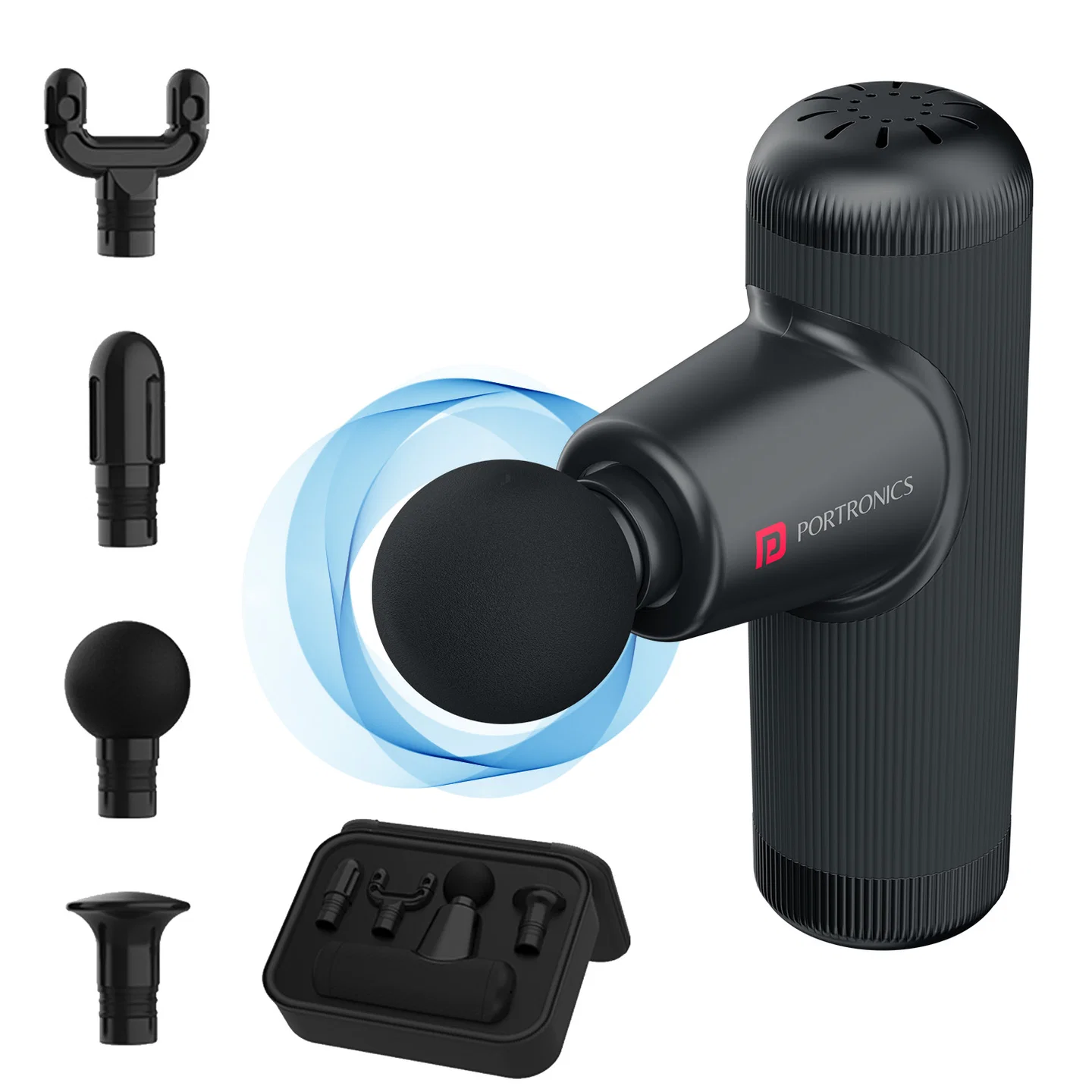
The Portronics Zeno Go is a rechargeable mini massager designed for on-the-go muscle relaxation and recovery. It comes with four interchangeable massage heads and four intensity levels, allowing you to choose a massage style for different muscle areas.
Quick Reference
| Feature | Details |
|---|---|
| Product | Portronics Zeno Go |
| Product Code | POR 3144 |
| Product Type | Rechargeable mini massager |
| Massage Heads | 4: Round, Flat, Precision and Dual |
| Intensity Levels | 4 levels, from low to high |
| Battery | Lithium-ion, 7.4V, 2000mAh |
| Charging Port | USB Type-C |
| Charging Input | 5V/2A |
| Charging Time | Approximately 4 hours |
| Runtime | Up to 6 hours, depending on speed and pressure |
| Auto-Off | After 5 minutes of inactivity or 15 minutes of continuous use |
| Warranty | 12 months |
What's in the Box
| Item | Quantity |
|---|---|
| Zeno Go Mini Massager | 1 |
| Massage Heads | 4 |
| Charging Cable | 1 |
| Carry Case | 1 |
Massage Heads & Their Uses
| Massage Head | Recommended Area |
|---|---|
| Round | Larger muscles |
| Flat | Soft tissues |
| Precision | Joints and deep-tissue areas |
| Dual | Neck and back |
Choose the attachment that feels comfortable for the intended area. Do not use the massager without an attachment.
Installing or Changing a Massage Head
- Make sure the massager is switched OFF before changing an attachment.
- Choose the massage head you want to use.
- Align the connecting end of the head with the massager stem.
- Carefully insert the attachment into the stem.
- Make sure it is fully inserted and secure before switching on the massager.
- To remove a head, hold it on both sides and pull it straight off.
Do not force an attachment into the stem.
Charging the Zeno Go
- Connect the USB Type-C end of the charging cable to the massager's charging port.
- Connect the other end to a compatible USB power adapter.
- The LED light around the base flashes while charging.
- When fully charged, the LED light remains steady.
- Fully charge the device before using it for the first time.
- Charging time: approximately 4 hours.
- Charging input: 5V/2A.
- The massager does not operate while charging.
- The indicator flickers when battery power is low.
Switching the Massager ON and OFF
To switch ON:
- Press and hold the ON/OFF button for 3 seconds.
- The Level 1 indicator lights up.
- The massager starts vibrating at the lowest intensity.
To switch OFF:
Press and hold the ON/OFF button for 3 seconds.
Selecting the Intensity Level
- Switch the massager ON.
- It starts at the lowest intensity level.
- Short-press the power button to cycle through the four intensity levels, from low to high.
- Select the level that feels comfortable for the intended use.
Start at the lowest level before moving to a higher setting.
How to Use
- Choose and install the appropriate massage head while the device is switched OFF.
- Switch the massager ON by holding the power button for 3 seconds.
- It starts at Level 1.
- Short-press the power button to select one of the four intensity levels.
- Glide the massage head across the intended soft-tissue area or tendons.
- Apply light to moderate pressure as needed.
- Keep the device moving comfortably; do not press forcefully on one spot.
The device is intended for uses such as pre-workout warm-up, post-workout recovery, sore-muscle relief, relaxation and massage of different muscle areas.
Automatic Shut-Off
The massager includes automatic shut-off functions:
- It switches OFF after 5 minutes of inactivity.
- It also switches OFF after 15 minutes of continuous use.
Do not use the massager for more than 20 minutes at a time, even if it has switched off automatically.
Battery & Runtime
- The average runtime is up to 6 hours, depending on the selected intensity and the pressure applied.
- The battery indicator flickers when battery power is low.
- Recharge the device when the low-battery indication appears.
- If the device will not be used for a long period, charge it once every 3 months to help maintain battery life.
Safety Instructions
- Do not use the massager while it is charging.
- Do not use it for more than 20 minutes at a time.
- Do not use it while bathing, showering or outdoors in bad weather.
- Do not place the massager in water or any other liquid.
- Do not use it without a massage attachment.
- Keep it away from loose clothing, jewellery and long hair.
- Do not insert objects into any opening.
- Do not operate it where aerosol products are being used or where oxygen is being administered.
- Do not use it if the massager or charging cable is damaged, if it is not working properly, or if it has been dropped or exposed to water.
- Do not carry the massager by its charging cable.
- Keep it away from children.
Cleaning & Maintenance
- Wipe the surface with a slightly damp towel.
- Dry the device with a soft cloth.
- Keep the massager away from liquids and heat.
- Do not use the device if the casing or charging cable is damaged.
- If it will not be used for an extended period, charge it once every 3 months.
Still stuck?
If the issue persists after performing all troubleshooting steps, please raise a support request.
Our support team will assist you further.
Support
- Visit: www.portronics.com
- Support Portal: support.portronics.com
Was this article helpful?
That’s Great!
Thank you for your feedback
Sorry! We couldn't be helpful
Thank you for your feedback
Feedback sent
We appreciate your effort and will try to fix the article