TABLE OF CONTENTS
- 1. Introduction
- 2. Package Contents
- 3. Buttons & Layout
- 4. Technical Specifications
- 5. What Vayu Cop Combines
- 6. Safety Instructions
- 7. How to Use — Jump Starter
- 8. How to Use — Tyre Inflator
- 9. How to Use — Vacuum Cleaner & Blower
- 10. How to Use — LED Flashlight
- 11. How to Use — Power Bank
- 12. Still Facing Issues?
1. Introduction
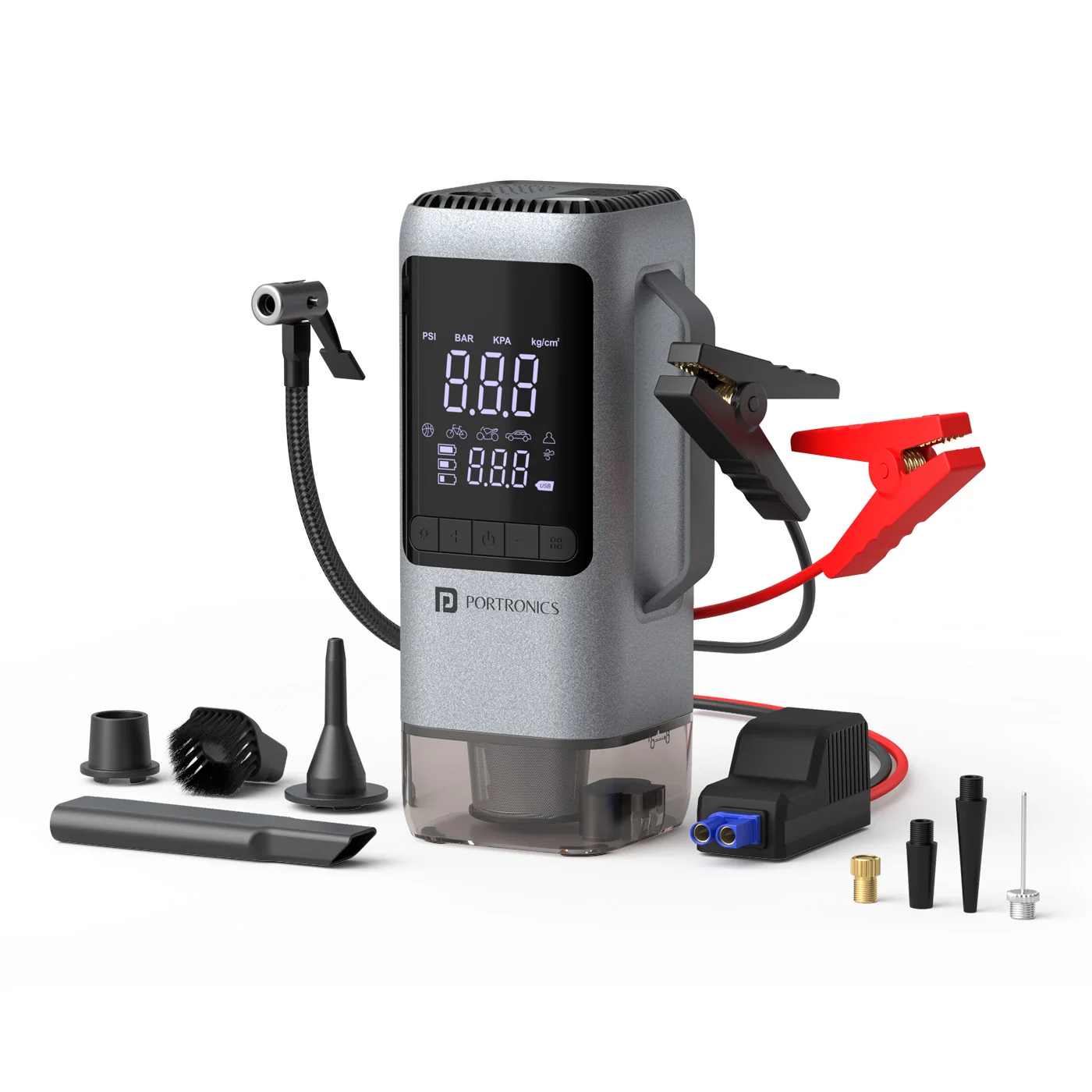
Thank you for choosing Vayu Cop — a 6-in-1 emergency multi-tool designed for car and bike use. It combines a jump starter, tyre inflator, vacuum cleaner, blower, LED flashlight, and power bank in one compact, portable device, built for real roadside emergencies.
2. Package Contents
- Vayu Cop
- Multifunction Nozzles
- Air Hose
- Charging Cable
- Crocodile (Smart) Clips
- User Manual
3. Buttons & Layout
| # | Button | Function |
|---|---|---|
| 1 | LED Button | Turns the flashlight on, cycles to SOS, then off |
| 2 | Increase Pressure ("+") | Raises the target inflation pressure |
| 3 | ON/OFF Button | Powers the device, starts/stops the active function |
| 4 | Decrease Pressure ("–") | Lowers the target inflation pressure |
| 5 | Mode Button | Cycles between Inflator, Vacuum, and Blower modes |
4. Technical Specifications
Jump Starter
| Specification | Details |
|---|---|
| Working Voltage | 14.8V |
| Max Current | <8A |
| Start Voltage Range | DC 7.5V – 8.5V |
| Max Peak Current | 800A (±10%) |
Inflator
| Specification | Details |
|---|---|
| Max Pressure | 150 PSI |
| Pressure Units | PSI, BAR, KPA, KG/CM² |
| Charging Input | 5V ⎓ 3A |
| USB-A Output | 5V ⎓ 1A |
5. What Vayu Cop Combines
- Jump Starter — for 12V vehicle engines up to 3.5L petrol (not for diesel above 1.2L)
- Tyre Inflator — inflates car/bike tyres, sport balls, and inflatables up to 150 PSI
- Vacuum Cleaner — for cleaning car interiors
- Blower — for dust removal from vents, dashboards, and tight spaces
- LED Flashlight — with SOS mode for roadside emergencies
- Power Bank — for emergency top-ups of a phone or small device
6. Safety Instructions
Jump Starter Safety
- Not suitable for diesel engines above 1.2L.
- Do not use if the clamps are damaged.
- Never connect the clamps to the wrong polarity.
- Keep away from fuel, open flames, and heat sources.
- Do not let the clamps touch each other.
Inflator Safety
- Allow the unit to cool down after 10 minutes of continuous use.
- Do not aim the air hose at your face, eyes, or animals.
Battery Safety
- Charge only with recommended 5V/2A chargers.
- Do not puncture, burn, or disassemble the battery.
- Do not store the device in extreme heat (above 45°C).
- Avoid wet conditions.
- If swelling, odor, or leakage occurs, stop using it immediately.
General Usage
- Keep out of reach of children.
- Do not use the device near explosive gases (e.g. petrol pumps).
- Store the device in a cool, dry place.
7. How to Use — Jump Starter
- Ensure the device's own battery is above 75%.
- Check clamp polarity: Red → Positive, Black → Negative.
- Insert the smart clamp cable into the jump starter port.
- Connect the clamps to the car battery terminals — Red to +, Black to −.
- When the clamp indicator turns green, you can start the car.
- Start the car within 30 seconds.
- Immediately disconnect and remove the clamps once the engine starts.
If the light turns red and the buzzer beeps, this indicates wrong polarity, a low car battery, or a low device battery.
8. How to Use — Tyre Inflator
- Connect the air hose to the inflation port.
- Attach the correct nozzle (car tyre, bike tyre, ball needle, etc.).
- Set the desired pressure using the "+" and "–" buttons.
- Press Start — the pump begins inflating.
- The device auto-stops once the target PSI is reached.
9. How to Use — Vacuum Cleaner & Blower
Vacuum Cleaner
- Press the Mode button repeatedly until the vacuum air-flow icon is selected.
- Press Start to activate the vacuum.
- Use it to clean car interiors — vents, corners, mats, and dashboards.
- After use, empty the dust container and clean the filter if required.
Blower
- Press the Mode button repeatedly until the blower air-flow icon is selected.
- Press Start to activate the blower.
- Use it to clear dust from AC vents, dashboards, crevices, and tight spaces.
- Turn the device off after use.
10. How to Use — LED Flashlight
- Press the light button once → LED ON.
- Long press → SOS Mode.
- Press again → OFF.
Ideal for roadside emergencies at night.
11. How to Use — Power Bank
- Connect your smartphone's charging cable to the device's USB port.
- Charging begins automatically.
- Suitable for emergency top-ups only — this is not a high-capacity power bank.
12. Still Facing Issues?
If the issue persists after performing all troubleshooting steps, please raise a support request.
Our support team will assist you further.
Support
- Visit: www.portronics.com
- Support Portal: support.portronics.com
Was this article helpful?
That’s Great!
Thank you for your feedback
Sorry! We couldn't be helpful
Thank you for your feedback
Feedback sent
We appreciate your effort and will try to fix the article