TABLE OF CONTENTS
- Product Overview
- Quick Reference
- Parts & Controls
- Before First Use
- Checking the Battery Level
- Charging a Device with the Detachable USB-C Cable
- Charging a Device Through the USB-C Port
- Magnetic Wireless Charging
- Recharging the Moji 10
- Getting the Best Charging Performance
- Safety & Care
- Still stuck?
Product Overview
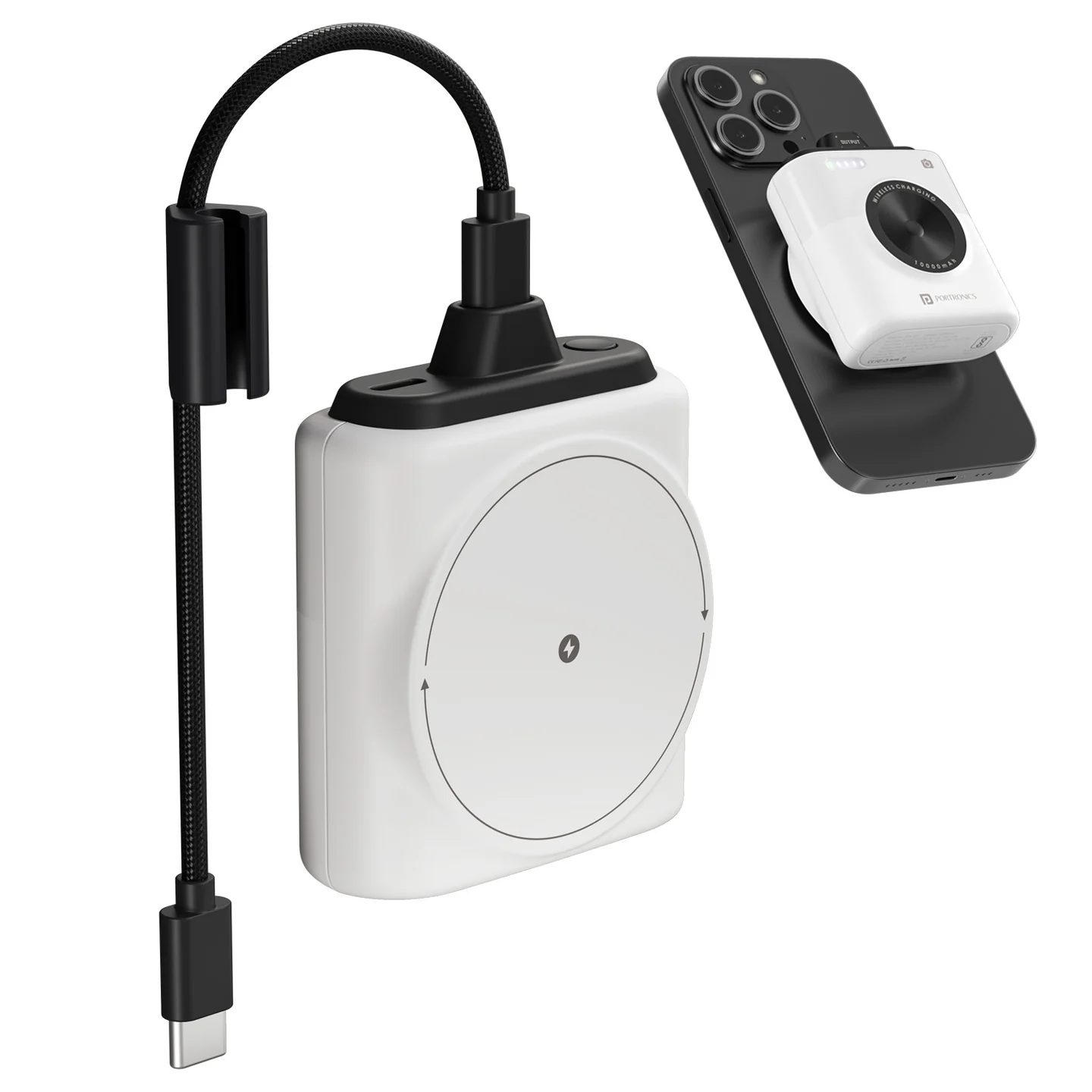
The Portronics Moji 10 is a compact 10,000mAh magnetic wireless power bank with a detachable USB-C cable, a bidirectional USB-C port and LED battery indicators. It supports wired charging for compatible devices and magnetic wireless charging for compatible smartphones.
Quick Reference
| Feature | Details |
|---|---|
| Product | Portronics Moji 10 |
| Product Codes | POR 2811 (White) / POR 2812 (Mocha) |
| Battery Capacity | 10,000mAh |
| Wired Output | Up to 20W USB-C Power Delivery |
| Wireless Output | Up to 15W for compatible devices |
| USB-C Port | Bidirectional: input and output |
| Cable | Detachable USB-C cable |
| Battery Indicator | LED indicators |
| Warranty | 12 months, as listed by Portronics |
Actual charging speed depends on the connected device, cable, adapter and supported charging standard. Not every device will charge at the maximum rated speed.
Parts & Controls
| Part | Function |
|---|---|
| Magnetic Wireless Charging Area | Charges a compatible phone when correctly aligned |
| Detachable USB-C Cable | Provides wired charging for compatible USB-C devices |
| USB-C Input/Output Port | Recharges the power bank or charges a compatible device |
| LED Indicators | Show the power bank's charging status and remaining battery level |
Before First Use
- Recharge the power bank using a compatible USB-C charger and cable.
- Keep the power bank on a flat, stable and non-flammable surface while charging.
- Watch the LED indicators to confirm that charging has started.
- Disconnect the charger when charging is complete.
Use a compatible, good-quality charger and cable. Avoid damaged cables or adapters.
Checking the Battery Level
- Check the LED indicators on the power bank to see the remaining battery level.
- When recharging the power bank, the indicator flashes to show charging is in progress.
- If the power bank enters protection mode due to an abnormal condition, recharge it to reactivate it.
The LED indicators show battery status; they may not indicate an exact percentage.
Charging a Device with the Detachable USB-C Cable
- Connect the detachable USB-C cable to the power bank's USB-C output connection, where required.
- Connect the USB-C end to the charging port of a compatible phone or other device.
- Check that the connector is fully inserted and the device shows charging.
- When finished, disconnect the cable carefully and store it without sharply bending it.
The wired USB-C output supports up to 20W, depending on the connected device.
Charging a Device Through the USB-C Port
- Connect a compatible USB-C cable to the power bank's USB-C input/output port.
- Connect the other end to your compatible device.
- Check that charging has started.
- Disconnect the cable carefully when finished.
The USB-C port is bidirectional: it can supply power to a device or be used to recharge the power bank.
Magnetic Wireless Charging
- Confirm that your phone supports wireless charging and is compatible with the magnetic charging arrangement.
- For the initial test, remove the phone case if charging does not start.
- Place the phone on the centre of the designated wireless charging area.
- Adjust the phone's position until it is aligned with the charging coil.
- Check the phone's charging indicator.
- If charging does not start, reposition the phone and remove metal objects or accessories between the phone and power bank.
Moji 10 supports wireless charging up to 15W. Actual output depends on phone compatibility.
Recharging the Moji 10
- Connect a compatible USB-C cable to the power bank's USB-C port.
- Connect the other end to a suitable power adapter.
- Confirm that the LED indicator begins flashing.
- Allow the power bank to recharge.
- Disconnect the charger when charging is complete.
Charging time depends on the adapter, cable and remaining battery level.
Getting the Best Charging Performance
- Use a compatible USB-C PD charger and good-quality cable.
- Confirm that your device supports the charging speed you expect.
- Align the phone carefully for wireless charging.
- Remove metal objects from the wireless charging area.
- If charging is slow, test with one device and a compatible cable.
- Do not charge the power bank and another device simultaneously unless the connected setup supports it and it does not cause abnormal heating.
A 20W wired or 15W wireless rating is a maximum, not a guarantee that every device will charge at that speed.
Safety & Care
- Charge the power bank on a flat, non-flammable surface.
- Do not charge it on a bed, sofa or near heaters and other flammable materials.
- Keep it away from water, moisture and direct sunlight.
- Keep coins, keys and other metal objects away from the charging area and ports.
- Do not drop, crush, puncture, disassemble or attempt to repair the power bank.
- Stop using it immediately if it becomes swollen, cracked, unusually hot or otherwise damaged.
- Do not leave the power bank charging unattended or overnight.
- Store it in a cool, dry place.
- Dispose of the product through an authorised electronic-waste collection point, not household waste.
Still stuck?
If the issue persists after performing all troubleshooting steps, please raise a support request.
Our support team will assist you further.
Support
- Visit: www.portronics.com
- Support Portal: support.portronics.com
Was this article helpful?
That’s Great!
Thank you for your feedback
Sorry! We couldn't be helpful
Thank you for your feedback
Feedback sent
We appreciate your effort and will try to fix the article