TABLE OF CONTENTS
- Product Overview
- Quick Reference
- Ports & Controls
- Charging the Power Bank
- Checking Battery and Charging Status
- Charging a Phone or Other Device
- Important: Included Cable and 65W Output
- Understanding the 65W Peak Output
- Charging Two Devices
- Getting the Best Charging Performance
- Safety Instructions
- Storage & Maintenance
- Still stuck?
Product Overview
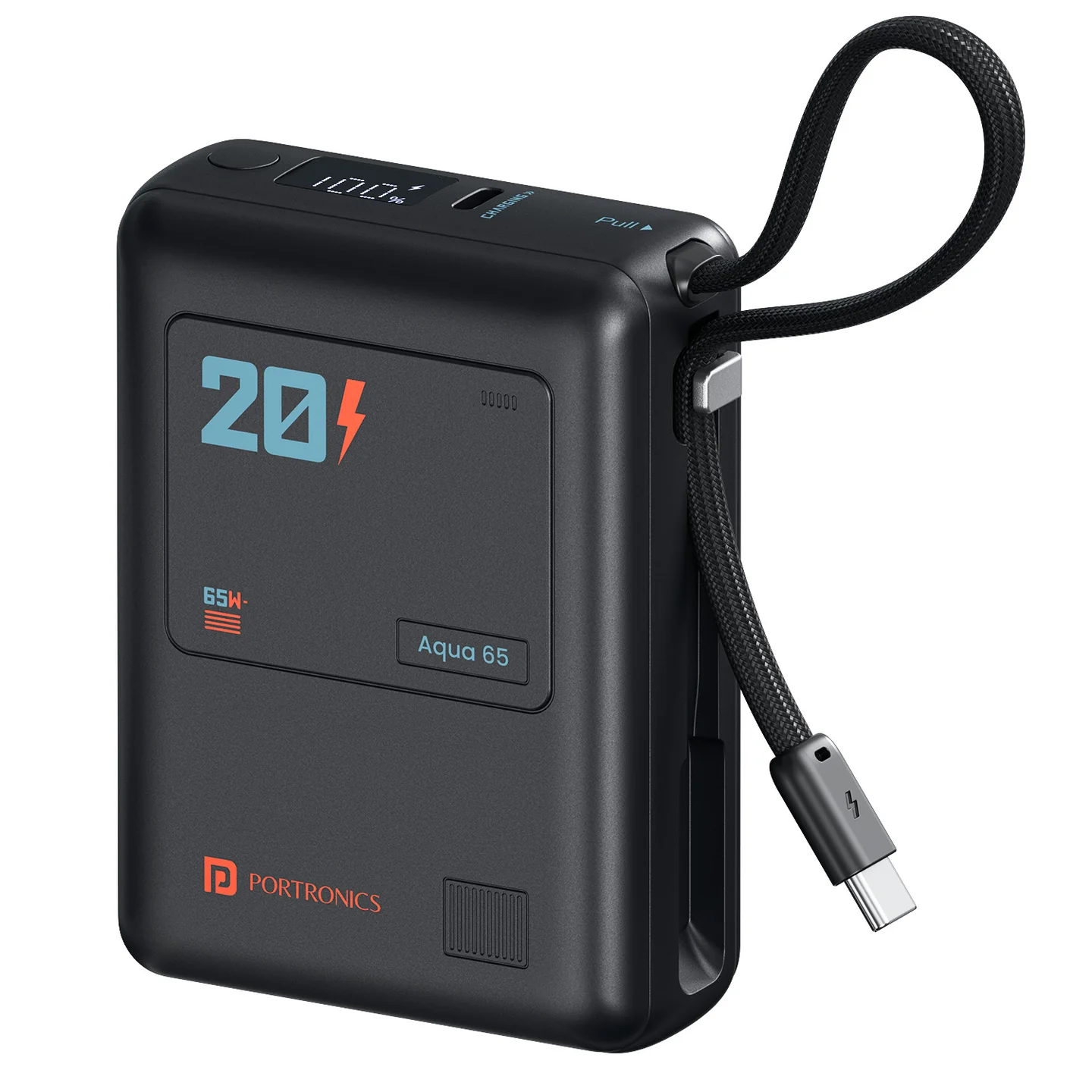
The Portronics Aqua 65 is a 20,000mAh USB-C Power Delivery power bank designed for compatible smartphones, tablets and laptops. It has two USB-C charging paths: a built-in USB-C cable and a USB-C input/output port. An LED display shows the battery and charging status.
Quick Reference
| Feature | Details |
|---|---|
| Product | Portronics Aqua 65 |
| Product Code | POR 3021 |
| Battery Capacity | 20,000mAh |
| Battery Energy | 77Wh |
| Battery Type | Lithium-polymer |
| Maximum USB-C Output | Up to 65W |
| Maximum USB-C Input | Up to 40W per input path, depending on the adapter and charging profile |
| USB-C Connections | Type-C1 port and built-in Type-C cable (Type-C2) |
| Included Cable | USB-C charging cable, supports up to 60W |
| LED Display | Battery percentage and charging status |
| Compatibility | Compatible USB-C phones, tablets, laptops and other devices within supported input ratings |
Actual charging speed depends on the connected device, cable, adapter, remaining battery capacity and operating temperature.
Ports & Controls
| Part | Function |
|---|---|
| USB-C Input/Output Port (Type-C1) | Recharges the power bank or charges a compatible device |
| Built-in USB-C Cable (Type-C2) | Recharges the power bank or charges a compatible device |
| Power Button | Shows battery status when pressed |
| LED Indicators / Display | Shows remaining battery and charging progress |
Charging the Power Bank
- Connect one end of a compatible USB-C charging cable to a suitable wall charger.
- Connect the other end to either supported USB-C input path on the power bank: the USB-C port or built-in USB-C cable.
- The LED indicators flash to show that charging is in progress.
- Allow the power bank to recharge.
- Disconnect it when charging is complete.
The USB-C input supports up to 40W, depending on the charging profile and adapter used. A higher-rated charger will not force the power bank to draw more than it supports.
Checking Battery and Charging Status
- While the power bank is charging, the LED indicators flash to show charging progress.
- When charging a device, the indicator lights turn on to show that output is active.
- If pressing the Power Button does not show a battery indicator, the power bank may be in protection mode. Connect it to a charger and begin recharging to try to restore normal operation.
The indicator shows battery/charging status; it may not represent an exact measure of usable energy.
Charging a Phone or Other Device
- Connect a compatible USB-C charging cable to one of the power bank's output connections, or use the built-in USB-C cable.
- Connect the other end to the phone, tablet, laptop or other compatible device.
- Check that the device's charging indicator appears.
- For other digital devices, follow the same connection steps and confirm the device's USB-C input rating is supported.
- Disconnect the cable when charging is complete.
Aqua 65 supports USB-C output up to 65W for compatible devices.
Important: Included Cable and 65W Output
The included USB-C cable supports up to 60W and is not a 5A E-Marked cable.
To reach the power bank's peak 65W output, use a certified 5A E-Marked USB-C-to-USB-C cable (not included), and a device/adapter setup that supports the required charging profile.
A cable rated for 60W can still charge compatible devices, but it may not deliver the full 65W peak.
Understanding the 65W Peak Output
The power bank can provide up to 65W peak output through USB-C. To manage operating temperature and protect the battery, this peak may be sustained for approximately 5–10 minutes, after which the output may reduce automatically.
A reduction in output after the peak period is expected behaviour and can depend on temperature, battery level and device demand.
Charging Two Devices
Aqua 65 supports charging through the USB-C port and built-in USB-C cable. You can connect compatible devices through both charging paths.
- Check that each device supports USB-C charging.
- Use suitable cables and connectors.
- If charging is slower than expected with two devices connected, disconnect one device and test the outputs separately.
- Total power available can depend on device requirements and the power bank's operating conditions. Do not assume each device will receive 65W simultaneously.
Getting the Best Charging Performance
- Use a compatible USB-C PD charger.
- Use a certified 5A E-Marked USB-C-to-USB-C cable if you need the full 65W peak.
- Confirm that your device supports the required PD charging profile.
- Avoid using damaged or low-quality cables.
- Keep the power bank uncovered and allow heat to dissipate.
- If output reduces after several minutes at peak power, allow the power bank to cool and continue using it normally.
Safety Instructions
- Charge under supervision.
- Unplug the charger when leaving home or when charging is complete.
- Use certified chargers and cables that comply with local safety standards.
- Do not drop, crush, puncture or strike the power bank.
- Do not expose it to water, fire or temperatures above 60°C.
- Do not place it in a pocket, airtight bag or under bedding while in use or charging.
- Do not cover it with clothing or pillows; allow heat to dissipate.
- Do not disassemble or attempt to repair the power bank.
- Stop using it if it becomes bulged, deformed, leaking or shows a sharp drop in capacity.
- If the power bank enters protection mode, connect it to a charger to try to restore operation.
- Keep it away from children.
- Dispose of it through an authorised electronic-waste collection point rather than household waste.
Storage & Maintenance
- If unused for an extended period, store the power bank at around 50% charge in a cool, dry place.
- Avoid long-term storage at 0% or 100% charge.
- Fully charge the product before first use.
- Keep the power bank uncovered during use and charging.
- Disconnect the cable after the power bank or connected device is fully charged to avoid unnecessary power loss.
Still stuck?
If the issue persists after performing all troubleshooting steps, please raise a support request.
Our support team will assist you further.
Support
- Visit: www.portronics.com
- Support Portal: support.portronics.com
Was this article helpful?
That’s Great!
Thank you for your feedback
Sorry! We couldn't be helpful
Thank you for your feedback
Feedback sent
We appreciate your effort and will try to fix the article