TABLE OF CONTENTS
- Product Overview
- Quick Reference
- Parts & Controls
- Checking the Battery Level
- Charging a Device with the Built-in USB-C Cable
- Charging a Device Through the USB-C Port
- Recharging the Aero 10
- Charging Multiple Devices
- Getting the Best Charging Performance
- Protection Mode
- Safety & Care
- Still stuck?
Product Overview
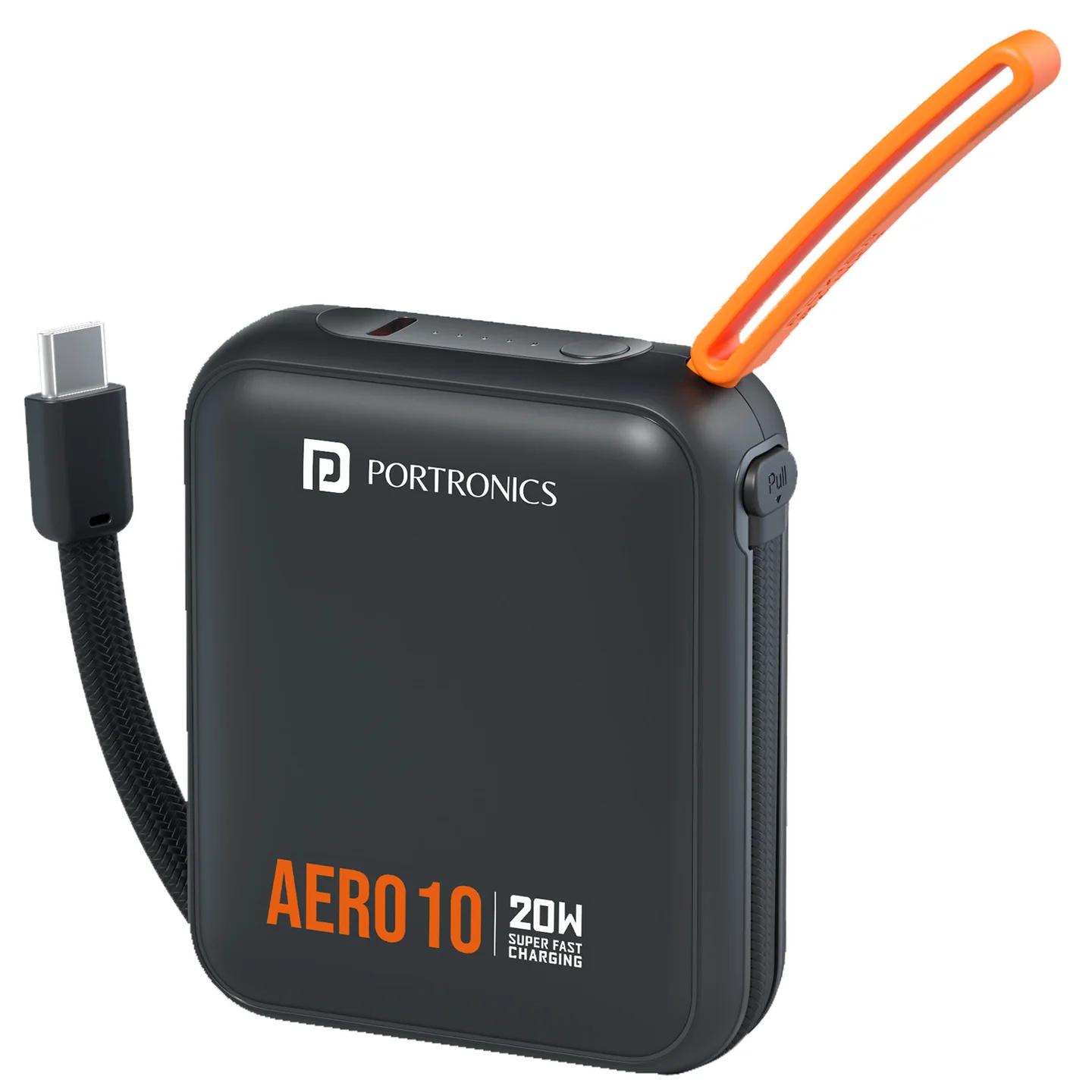
The Portronics Aero 10 is a compact 10,000mAh power bank with a detachable built-in USB-C cable, a USB-C input/output port and an LED battery indicator. It supports wired fast charging up to 20W for compatible phones and other USB-C devices. An integrated lanyard makes it easy to carry.
Quick Reference
| Feature | Details |
|---|---|
| Product | Portronics Aero 10 |
| Product Codes | POR 3456 (Black), POR 3457 (Navy Blue), POR 3458 (Mocha) |
| Battery Capacity | 10,000mAh |
| Battery Energy | 38.5Wh |
| Maximum Output | Up to 20W |
| Built-in Cable | Detachable flat-braided USB-C cable |
| USB-C Port | Input and output |
| Battery Indicator | LED indicator |
| Carry Feature | Integrated lanyard |
| Warranty | 12 months |
Actual charging speed depends on the connected device, cable, adapter, remaining battery capacity and supported charging protocol.
Parts & Controls
| Part | Function |
|---|---|
| USB-C Input/Output Port | Recharges the power bank or charges a compatible device |
| Detachable USB-C Cable | Charges compatible USB-C devices and can also be used to recharge the power bank |
| Power Button | Activates the power bank and displays battery status |
| LED Indicator | Shows the battery/charging status |
| Integrated Lanyard | Helps with carrying the power bank |
Checking the Battery Level
- Press the Power Button once.
- Check the LED indicator/display for the remaining battery status.
- When the power bank is being recharged, the indicator shows that charging is in progress.
- The display/indicator may turn off automatically after a few seconds to conserve power.
The indicator provides an estimate of remaining battery capacity.
Charging a Device with the Built-in USB-C Cable
- Gently pull out the detachable USB-C cable.
- Connect it to the USB-C charging port on your phone or other compatible device.
- Make sure the connector is fully inserted.
- Check that the device shows charging.
- When finished, disconnect the cable carefully and return it to its stored position.
The USB-C output supports up to 20W for compatible devices. Do not pull the cable by its wire or force the connector into position.
Charging a Device Through the USB-C Port
- Connect a compatible USB-C cable to the power bank's USB-C Input/Output port.
- Connect the other end to your phone, earbuds case, smartwatch or other compatible device.
- Check that charging has started.
- Disconnect the cable carefully when finished.
The USB-C port supports both input and output. The device will only draw the charging power its hardware and charging protocol support.
Recharging the Aero 10
- Connect a compatible USB-C cable to the power bank's USB-C input/output port, or use the built-in cable as supported.
- Connect the other end to a compatible USB charger.
- Check the LED indicator to confirm that charging is in progress.
- Allow the power bank to recharge.
- Disconnect it when charging is complete.
The supported input profiles are:
| Input Voltage | Current |
|---|---|
| 5V | 3A |
| 9V | 2A |
| 12V | 1.5A |
Use a compatible, good-quality charger and cable. Actual input power and charging time depend on the adapter and supported charging profile.
Charging Multiple Devices
Aero 10 has a built-in USB-C cable and a USB-C input/output port. The available charging power depends on the connected devices and operating conditions.
- Use compatible USB-C charging connections.
- If charging is slower than expected, disconnect one device and test the outputs separately.
- Do not assume each connected device will receive the maximum 20W simultaneously.
Getting the Best Charging Performance
- Check that the connected device supports USB-C charging and the required fast-charging protocol.
- Use a compatible, good-quality cable and charger.
- Ensure the connector is fully inserted.
- Avoid damaged cables and adapters.
- Keep the power bank uncovered so heat can dissipate.
- If charging is slower than expected, test with one device at a time.
A 20W maximum rating does not mean every connected device will charge at 20W.
Protection Mode
If the power bank detects an abnormal condition, such as overcharging or over-discharging, it may temporarily stop output.
- Disconnect the connected device.
- Connect the power bank to a compatible charger.
- Begin recharging.
- Check whether the LED indicator returns to normal.
- If the power bank remains unresponsive or behaves abnormally, stop using it and contact support.
Safety & Care
- Use the provided cable or a certified, high-quality compatible cable and charger.
- Charge the power bank on a flat, non-flammable surface.
- Do not charge it on a bed, sofa or near heaters or other flammable materials.
- Do not leave it charging unattended or overnight.
- Keep it away from water, moisture and direct sunlight.
- Keep coins, keys and other metal objects away from ports and connectors.
- Do not store or use it where it can be crushed or bent.
- If it becomes unusually hot, unplug it and allow it to cool.
- Do not disassemble, puncture, crush or attempt to repair the power bank.
- Stop using it immediately if it becomes swollen, cracked, deformed, leaks or exposes wires.
- For long-term storage, keep it around 50–60% charged in a cool, dry place.
- Dispose of the product through an authorised electronic-waste collection point, not household waste.
Still stuck?
If the issue persists after performing all troubleshooting steps, please raise a support request.
Our support team will assist you further.
Support
- Visit: www.portronics.com
- Support Portal: support.portronics.com
Was this article helpful?
That’s Great!
Thank you for your feedback
Sorry! We couldn't be helpful
Thank you for your feedback
Feedback sent
We appreciate your effort and will try to fix the article