TABLE OF CONTENTS
- Product Overview
- Quick Reference
- Parts & Controls
- Opening the Quadripod Stand
- Adjusting the Height and Angle
- Attaching a Phone
- Pairing the Bluetooth Remote
- Taking Photos with the Remote
- Remote Battery
- Folding and Storing the Stand
- Care & Maintenance
- Troubleshooting
- Safety Precautions
- Still stuck?
Product Overview
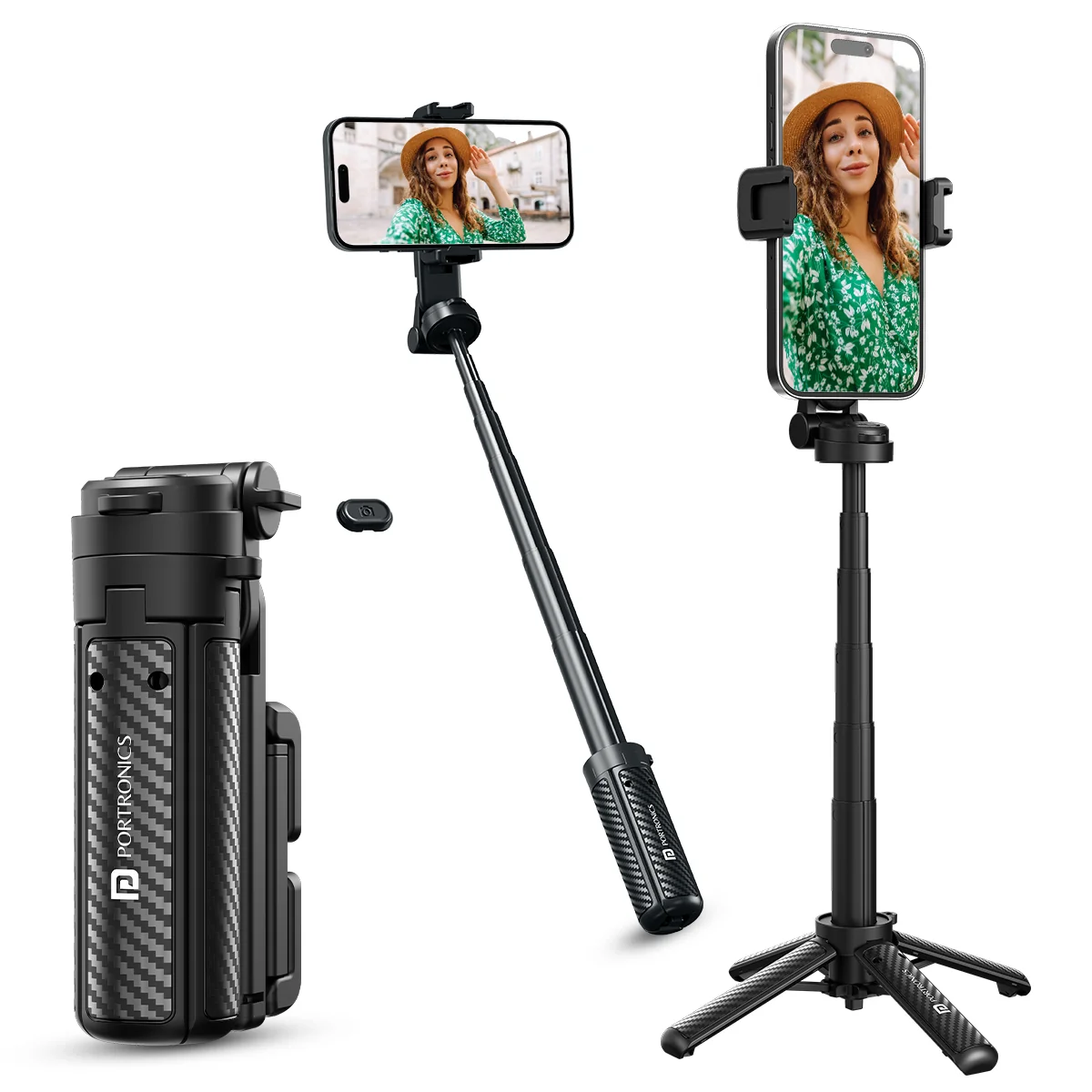
The Portronics Lumistick Air (POR 3141) is an adjustable selfie stick with a four-leg quadripod stand and a detachable Bluetooth remote. It can be used as a handheld selfie stick or opened into a stand for hands-free photos, videos, vlogging and video calls.
The phone is held using an adjustable phone clip. The telescopic rod adjusts the height, while the holder can be repositioned for different shooting angles.
Quick Reference
| Feature | Details |
|---|---|
| Product | Portronics Lumistick Air |
| Product Code | POR 3141 |
| Colour | Black |
| Product Type | Adjustable Selfie Stick with Quadripod Stand |
| Main Material | Aluminium Alloy and ABS |
| Maximum Bearing Capacity | 500g |
| Folded Size | 62.5 × 36.5 × 110mm |
| Extended Size | 172 × 172 × 440mm |
| Phone Compatibility | Android and iOS |
| Remote | Detachable Bluetooth remote |
| Remote Battery Capacity | 55mAh |
| Remote Operating Range | Up to 10m |
| Phone Rotation | 360° rotation |
| Angle Adjustment | Up to 180° tilt |
| Warranty | 6 months |
Do not place a phone or other device exceeding the stated 500g maximum bearing capacity on the holder.
Parts & Controls
| Part | Function |
|---|---|
| Cell Phone Holder / Clip | Holds the phone in position |
| Remote Control Slot | Holds the detachable Bluetooth remote |
| Aluminium Alloy Telescopic Rod | Adjusts the selfie stick height |
| Adjustable Sleeve | Helps adjust the stand / rod position |
| Quadripod Support Legs | Open outward to create the tripod base |
| Bottom Switch | Releases the support legs |
| Bluetooth Remote | Triggers the phone camera shutter wirelessly |
| Capture Button | Takes a photo when the remote is paired |
| Remote Indicator Light | Flashes while pairing and stops flashing after successful connection |
Opening the Quadripod Stand
- Hold the Lumistick Air securely.
- Pull up a section of the support column to open the quadripod.
- Press the bottom switch to release the support legs.
- Open all support legs outward until the base is fully spread.
- Place the stand on a flat, stable surface.
- Check that the legs are fully open before attaching your phone.
Take care when opening and folding the legs to avoid pinching your fingers.
Adjusting the Height and Angle
- Open the quadripod support legs.
- Pull the telescopic rod to the required height.
- Adjust the holder to a suitable angle.
- Rotate or tilt the phone holder for the desired framing.
- Check that the adjustable sections are stable before releasing the phone.
The product listing specifies 360° phone rotation and up to 180° tilt adjustment.
Attaching a Phone
- Pull the phone clip open to an appropriate size.
- Place the phone into the clip.
- Adjust the clip so that it holds the phone securely.
- Check that the phone is stable before extending or repositioning the selfie stick.
The Lumistick Air uses an adjustable phone clip. It does not require a magnetic ring or magnetic attachment sheet.
Important: Do not exceed the maximum bearing capacity of 500g.
Pairing the Bluetooth Remote
- Remove the remote control from its slot.
- Slide the switch on the back of the remote to turn it ON.
- The remote indicator light will begin flashing.
- On your phone, open Settings → Bluetooth.
- Turn Bluetooth ON and search for Lumistick Air.
- Select Lumistick Air from the available devices.
- Wait until the phone displays Connected.
- The remote indicator light will stop flashing after successful pairing.
The remote can operate from up to 10 metres away, subject to the phone and surrounding conditions.
Taking Photos with the Remote
- Pair the remote with your phone.
- Open the phone's camera application.
- Position the phone and move to the desired location.
- Press the remote's Capture Button to take a photo.
The remote is detachable, so it can be used separately from the selfie stick.
Remote Battery
The remote has a 55mAh battery.Do not force an incompatible cable or use an unverified charging accessory.
Folding and Storing the Stand
- Remove the phone from the holder.
- Retract the telescopic rod.
- Fold the support legs inward carefully.
- Return the remote to its storage slot.
- Store the product in a dry place.
Keep fingers clear of the moving joints and support legs while folding the stand.
Care & Maintenance
- Wipe the product with a soft, dry cloth.
- Do not use the product in wet or humid conditions.
- Do not expose it to water or moisture.
- Avoid dropping, hitting or throwing the product.
- Do not disassemble or modify the selfie stick or remote.
- Store it carefully to avoid pinching your hands.
- Keep it away from fire and heat sources.
- Do not store it in low-temperature or humid locations.
- Do not place it on high, unstable or uneven surfaces.
Troubleshooting
| Issue | Possible Cause | Recommended Action |
|---|---|---|
| Phone does not stay in the holder | Clip is not adjusted correctly | Open the clip, position the phone and adjust it securely |
| Remote does not pair | Remote is OFF or phone Bluetooth is OFF | Turn ON the remote and Bluetooth, then search for Lumistick Air |
| Remote indicator keeps flashing | Pairing has not completed | Select Lumistick Air in Bluetooth settings and wait for Connected |
| Remote cannot take a photo | Remote is disconnected or camera app is not open | Reconnect the remote and open the phone camera |
| Stand feels unstable | Support legs are not fully open or surface is uneven | Fully spread the legs and use a flat, stable surface |
| Height or angle is unsuitable | Rod or holder needs adjustment | Reposition the telescopic rod and holder, then check stability |
Safety Precautions
- Check that the phone is securely held before extending or moving the stand.
- Do not exceed the maximum bearing capacity of 500g.
- Open and fold the quadripod carefully to avoid pinching your hands.
- Use the stand on a flat, stable surface; avoid high places and uneven surfaces.
- Do not hit, throw, disassemble or modify the product.
- Keep the product away from fire, heat, moisture and humid locations.
- Do not use an unsuitable or unverified charging accessory for the remote.
- This product is not suitable for children under 3 years old to operate alone.
Still stuck?
If the issue persists after performing all troubleshooting steps, please raise a support request.
Our support team will assist you further.
Support
- Visit: www.portronics.com
- Support Portal: support.portronics.com
Was this article helpful?
That’s Great!
Thank you for your feedback
Sorry! We couldn't be helpful
Thank you for your feedback
Feedback sent
We appreciate your effort and will try to fix the article