TABLE OF CONTENTS
- Product Overview
- Key Technologies
- How to Set Up the Device
- Controls and Functions
- Air Quality Indicator
- Placement Guidelines
- Filter Replacement and Maintenance
- Safety Instructions
- Troubleshooting
- Practical Usage Tips
- Still Facing Issues?
Product Overview
The Portronics Air X is a HEPA air purifier designed to improve indoor air quality by removing dust, smoke, allergens, odours, and harmful airborne particles. It uses multi-layer filtration, UV sterilization, and negative ion technology to create cleaner air.
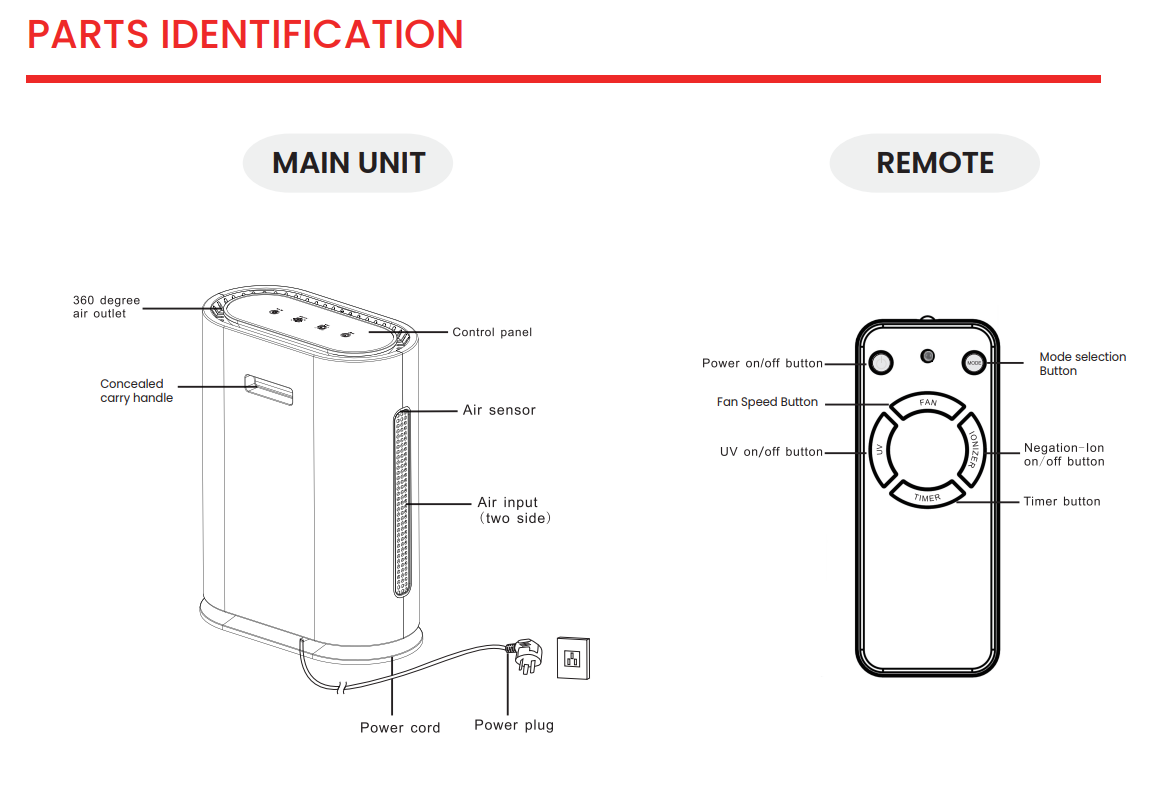
Key Specifications
- CADR: 249 m³/hr
- Recommended room size: Up to 50 m³
- Noise level: Less than 45 dB
- Fan speeds: 4 levels
- Controls: Touch panel and remote
Key Technologies
1. Multi-layer HEPA Filtration
The device uses a 4-stage filtration system:
- Pre-filter: Blocks hair and large dust particles
- Activated carbon filter: Removes odours and gases
- True HEPA filter: Captures fine particles
- Cold catalyst filter: Breaks down harmful substances
2. Negative Ion Technology
The purifier releases up to 20 million negative ions to neutralize pollutants and enhance air freshness.
3. UV Sterilization
Built-in UV light helps eliminate bacteria, viruses, and microorganisms.
How to Set Up the Device
Step 1: Remove Filter Cover
- Switch off the purifier and unplug it
- Open the front cover
- Remove the filter
- Remove the plastic wrapping from the filter
Note: Operating the purifier without removing the plastic cover can reduce performance and may damage the unit.
Step 2: Reinstall the Filter
- Insert the filter with the handle facing outward
- Close the cover securely
Step 3: Power On
- Plug the device into a power socket
- Press the power button
- Select the desired fan speed, timer, or ionizer mode
Controls and Functions
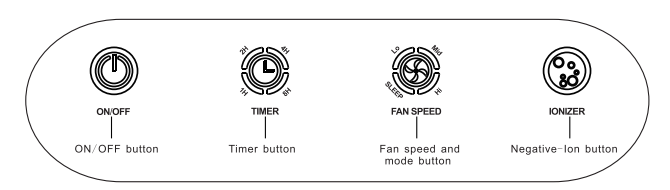
Touch panel and remote functions include:
- Power: Turn the purifier on or off
- Timer: Set for 1, 2, 4, or 8 hours
- Fan Speed: Sleep, Low, Medium, or High
- Ionizer: Activate negative ion mode
A short beep confirms each operation.
Air Quality Indicator
The air purifier provides real-time air quality feedback through color-coded indicators:
- Blue Light: Indicates good air quality (AQI below 80)
- Green Light: Indicates moderate air quality (AQI between 81 and 150)
- Red Light: Indicates poor air quality (AQI above 150)
Please note that the displayed AQI is an approximate reference value and may not exactly match readings from external devices or applications.
In Auto Mode, the purifier automatically adjusts the fan speed and airflow based on the detected air quality to maintain optimal performance.
Placement Guidelines
For optimal performance:
- Maintain at least 50 cm distance from walls
- Do not block air inlets or outlets
- Keep away from heat and moisture
- Ensure proper airflow around the unit
Filter Replacement and Maintenance
Filter Replacement
- When all four timer keys start blinking, it means the filter needs to be replaced.
- After replacing the filter, press and hold the "Timer" button for 5 seconds.
- A "beep" sound will confirm that the timer has been reset and the machine has started tracking usage time again.
- Replacement filters must be purchased separately
Cleaning
- Wipe the unit with a soft, dry cloth
- Clean air inlet panels monthly
Safety Instructions
- Do not touch the plug with wet hands
- Do not insert fingers into air outlets
- Keep away from children
- Do not disassemble the unit
- Use only the recommended power supply
Troubleshooting
Issue Solution Device not turning on Check power connection and socket Poor air purification Clean air inlets or replace filters. Unusual noise Ensure no blockage near air inlets
Practical Usage Tips
- Use Auto Mode for regular operation
- Use Sleep Mode during nighttime for quiet performance
- Keep the purifier running continuously for best results
- Place the unit near pollution sources such as doors or windows for better efficiency
Still Facing Issues?
- If the issue persists after performing all troubleshooting steps, please Click here raise a support request. Our support team will assist you further.
TABLE OF CONTENTS
- Product Overview
- Key Technologies
- How to Set Up the Device
- Controls and Functions
- Air Quality Indicator
- Placement Guidelines
- Filter Replacement and Maintenance
- Safety Instructions
- Troubleshooting
- Practical Usage Tips
- Still Facing Issues?
Product Overview
The Portronics Air X is a HEPA air purifier designed to improve indoor air quality by removing dust, smoke, allergens, odours, and harmful airborne particles. It uses multi-layer filtration, UV sterilization, and negative ion technology to create cleaner air.
Key Specifications
- CADR: 249 m³/hr
- Recommended room size: Up to 50 m³
- Noise level: Less than 45 dB
- Fan speeds: 4 levels
- Controls: Touch panel and remote
Key Technologies
1. Multi-layer HEPA Filtration
The device uses a 4-stage filtration system:
- Pre-filter: Blocks hair and large dust particles
- Activated carbon filter: Removes odours and gases
- True HEPA filter: Captures fine particles
- Cold catalyst filter: Breaks down harmful substances
2. Negative Ion Technology
The purifier releases up to 20 million negative ions to neutralize pollutants and enhance air freshness.
3. UV Sterilization
Built-in UV light helps eliminate bacteria, viruses, and microorganisms.
How to Set Up the Device
Step 1: Remove Filter Cover
- Switch off the purifier and unplug it
- Open the front cover
- Remove the filter
- Remove the plastic wrapping from the filter
Note: Operating the purifier without removing the plastic cover can reduce performance and may damage the unit.
Step 2: Reinstall the Filter
- Insert the filter with the handle facing outward
- Close the cover securely
Step 3: Power On
- Plug the device into a power socket
- Press the power button
- Select the desired fan speed, timer, or ionizer mode
Controls and Functions
Touch panel and remote functions include:
- Power: Turn the purifier on or off
- Timer: Set for 1, 2, 4, or 8 hours
- Fan Speed: Sleep, Low, Medium, or High
- Ionizer: Activate negative ion mode
A short beep confirms each operation.
Air Quality Indicator
The air purifier provides real-time air quality feedback through color-coded indicators:
- Blue Light: Indicates good air quality (AQI below 80)
- Green Light: Indicates moderate air quality (AQI between 81 and 150)
- Red Light: Indicates poor air quality (AQI above 150)
Please note that the displayed AQI is an approximate reference value and may not exactly match readings from external devices or applications.
In Auto Mode, the purifier automatically adjusts the fan speed and airflow based on the detected air quality to maintain optimal performance.
Placement Guidelines
For optimal performance:
- Maintain at least 50 cm distance from walls
- Do not block air inlets or outlets
- Keep away from heat and moisture
- Ensure proper airflow around the unit
Filter Replacement and Maintenance
Filter Replacement
- When all four timer keys start blinking, it means the filter needs to be replaced.
- After replacing the filter, press and hold the "Timer" button for 5 seconds.
- A "beep" sound will confirm that the timer has been reset and the machine has started tracking usage time again.
- Replacement filters must be purchased separately
Cleaning
- Wipe the unit with a soft, dry cloth
- Clean air inlet panels monthly
Safety Instructions
- Do not touch the plug with wet hands
- Do not insert fingers into air outlets
- Keep away from children
- Do not disassemble the unit
- Use only the recommended power supply
Troubleshooting
| Issue | Solution |
|---|---|
| Device not turning on | Check power connection and socket |
| Poor air purification | Clean air inlets or replace filters. |
| Unusual noise | Ensure no blockage near air inlets |
Practical Usage Tips
- Use Auto Mode for regular operation
- Use Sleep Mode during nighttime for quiet performance
- Keep the purifier running continuously for best results
- Place the unit near pollution sources such as doors or windows for better efficiency
Still Facing Issues?
- If the issue persists after performing all troubleshooting steps, please Click here raise a support request. Our support team will assist you further.
Was this article helpful?
That’s Great!
Thank you for your feedback
Sorry! We couldn't be helpful
Thank you for your feedback
Feedback sent
We appreciate your effort and will try to fix the article