TABLE OF CONTENTS
- Product Overview
- Quick Reference
- What's in the Box
- Charging
- Battery Indicator
- Jump Starting a Vehicle
- Supported Engine Size
- How to Jump Start
- Tyre Inflation
- Preset Inflation Modes
- USB Emergency Charging
- Safety Alerts
- Safety Guidelines
- Still stuck?
Product Overview
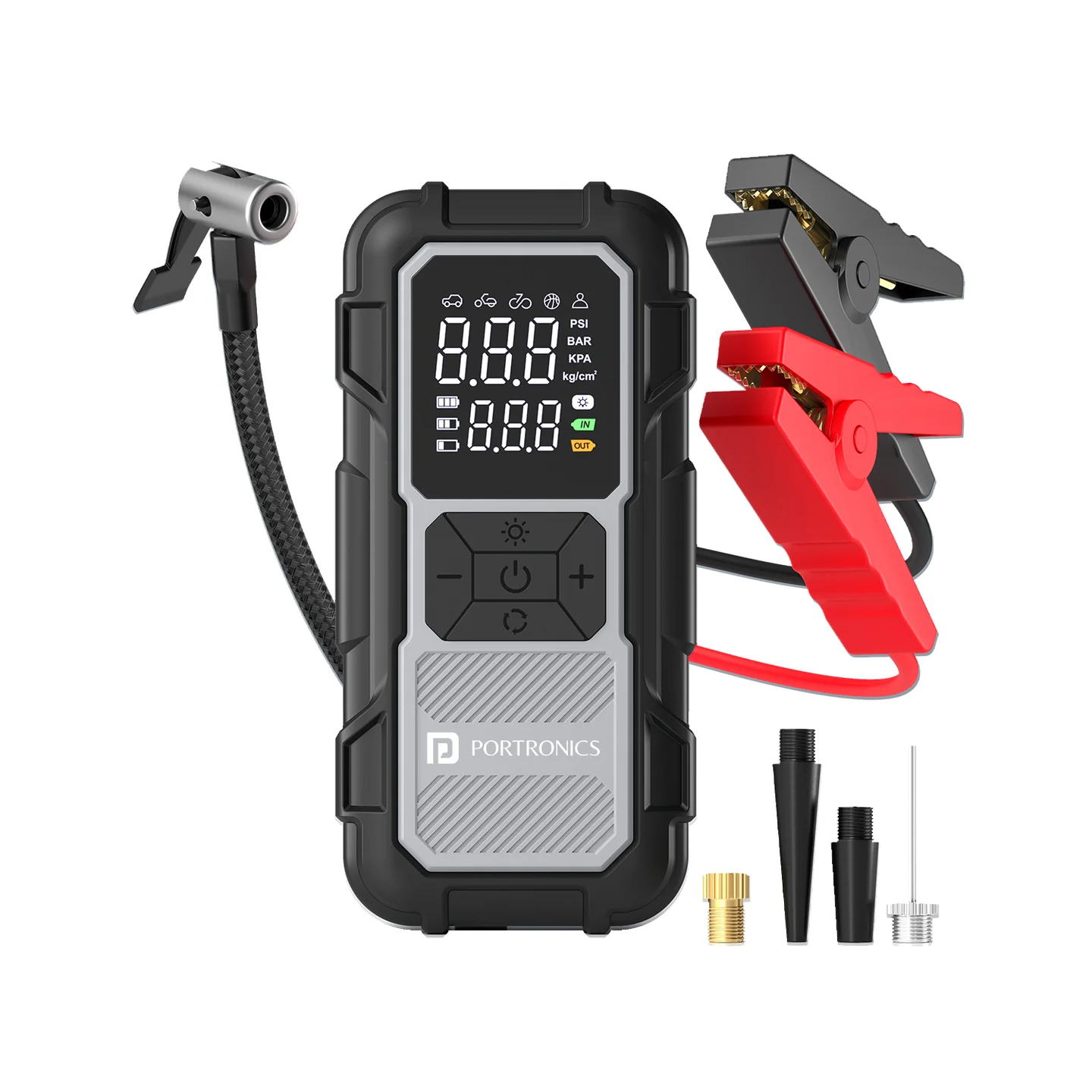
The Portronics Vayucop Neo is a 2-in-1 emergency device combining a 12V vehicle jump starter and cordless tyre inflator, with a digital pressure display, preset inflation modes, Type-C charging and 5W USB emergency charging.
Quick Reference
| Feature | Details |
|---|---|
| Product | Portronics Vayucop Neo |
| Model Code | POR 2896 |
| Type | 2-in-1 Jump Starter + Tyre Inflator |
| Maximum Inflation | Up to 150 PSI |
| Battery | 4 × 2000mAh |
| Charging | Type-C |
| USB Output | 5W |
| Pressure Units | PSI, BAR, KPA, KG/CM² |
| Inflation Modes | Car, Motorcycle, Bicycle, Ball, Custom |
| Jump Start | 12V vehicles |
| Maximum Supported Engine | Petrol up to 3.5L; Diesel up to 1.2L |
Important: Do not use the jump-start function for petrol engines above 3.5L or diesel engines above 1.2L.
What's in the Box
| Item | Quantity |
|---|---|
| Vayucop Neo | 1 |
| Smart Jumper Cable | 1 |
| Air Hose | 1 |
| USB Charging Cable | 1 |
| Air Nozzles | 4 |
| User Manual | 1 |
Charging
- Connect the Type-C cable to the charging port.
- Connect it to a suitable power source.
- The battery icon flashes while charging and remains steady when fully charged.
Battery Indicator
| Display | Meaning |
|---|---|
| 1 cell | Below 30% |
| 2 cells | Around 50% |
| 3 cells | Fully charged |
| Flashing icon | Charging |
| Steady icon | Fully charged |
Jump Starting a Vehicle
Supported Engine Size
| Fuel Type | Maximum Supported Engine |
|---|---|
| Petrol | 3.5L |
| Diesel | 1.2L |
How to Jump Start
- Switch the vehicle off.
- Connect the smart jumper cable to the Vayucop Neo.
- Connect Red clamp to positive (+).
- Connect Black clamp to negative (−).
- Confirm the connection is correct.
- Start the vehicle.
- Remove the clamps immediately after the engine starts.
Use only with compatible 12V vehicle batteries.
Tyre Inflation
- Connect the air hose securely to the tyre valve.
- Switch on the inflator.
- Select the required mode.
- Check the pressure unit.
- Set the target pressure using + / − if required.
- Press the power button to start inflation.
- The inflator stops automatically when the target pressure is reached.
- Disconnect the hose.
Preset Inflation Modes
| Mode | Preset |
|---|---|
| Car | 36 PSI |
| Motorcycle | 32 PSI |
| Bicycle | 30 PSI |
| Ball | 8 PSI |
| Custom | User-defined |
Always check the recommended pressure for the tyre or inflatable before use.
USB Emergency Charging
The USB output provides 5W emergency charging for compatible devices.
Safety Alerts
| Alert | Meaning |
|---|---|
| C-L / C-H | Charging temperature too low / too high |
| F-L / F-H | Operating temperature too low / too high |
| Urr | Voltage issue |
| Irr | Excess current detected |
Safety Guidelines
- Use only with compatible 12V vehicles.
- Do not jump start petrol engines above 3.5L or diesel engines above 1.2L.
- Ensure the device is sufficiently charged before jump starting.
- Red clamp = positive (+); Black clamp = negative (−).
- Do not let the clamps touch each other.
- Do not use damaged clamps or cables.
- Keep away from fuel, flames and excessive heat.
- Remove clamps immediately after successful ignition.
- Stop use if the device becomes excessively hot or shows an abnormal alert.
Still stuck?
If the issue persists after performing all troubleshooting steps, please raise a support request.
Our support team will assist you further.
Support
- Visit: www.portronics.com
- Support Portal: support.portronics.com
Was this article helpful?
That’s Great!
Thank you for your feedback
Sorry! We couldn't be helpful
Thank you for your feedback
Feedback sent
We appreciate your effort and will try to fix the article