TABLE OF CONTENTS
- Product Overview
- Quick Reference
- What's in the Box
- Parts & Controls
- Charging the Volt Blast
- Using the Air Blower
- Using the Car Jump Starter
- Battery Display
- Care & Safety
- Still stuck?
Product Overview
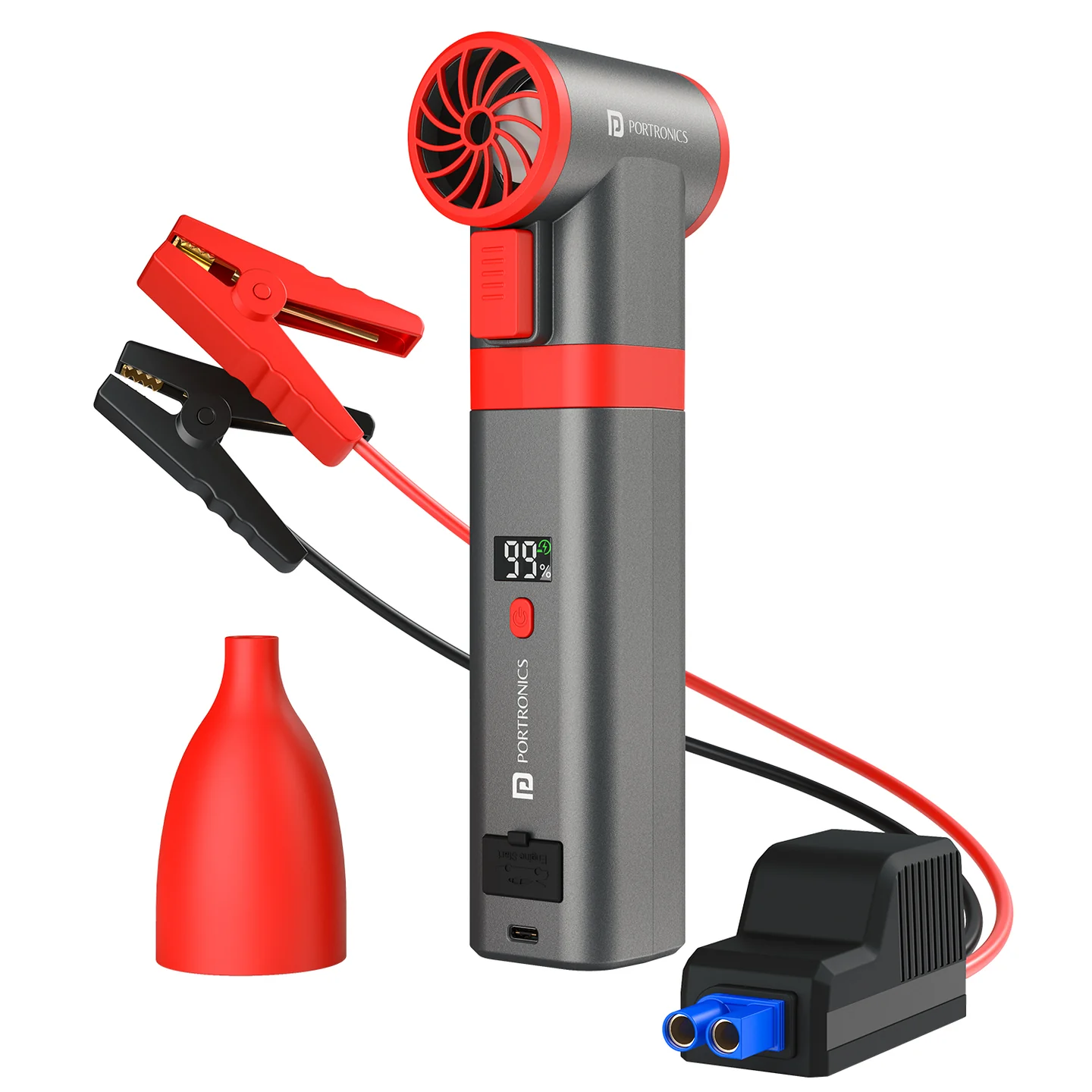
The Portronics Volt Blast is a 2-in-1 car jump starter and high-speed air blower. Use the blower to remove dust from car interiors, keyboards and other hard-to-reach areas, or use the included jumper cable for a compatible 12V vehicle battery emergency.
Quick Reference
| Feature | Details |
|---|---|
| Product | Portronics Volt Blast |
| Product Code | POR 2893 |
| Functions | 12V car jump starter and high-speed air blower |
| Blower Motor | Brushless, up to 130,000 RPM |
| Battery | 4 × 2000mAh cells (8000mAh total) |
| Charging | USB Type-C, 5V/2A |
| Charging Time | Approx. 0.5–3 hours, as stated in the manual |
| Airflow Control | Trigger-based, adjustable speed |
| Battery Display | Real-time battery level |
What's in the Box
| Item | Quantity |
|---|---|
| Volt Blast | 1 |
| Type-C Charging Cable | 1 |
| Car Jump Starter Cable | 1 |
| Blowing Nozzle | 1 |
| User Manual | 1 |
Parts & Controls
| Part | Function |
|---|---|
| Trigger Button | Starts airflow and controls airflow intensity |
| Battery Display | Shows remaining battery level |
| Power Button | Activates the display / device |
| Jump Starter Port | Connects the jumper cable |
| Type-C Charging Port | Charges the device |
| Air Inlet / Outlet | Draws and directs airflow |
| Blowing Nozzle | Concentrates airflow for cleaning |
| Red Clamp | Positive (+) battery terminal |
| Black Clamp | Negative (−) battery terminal |
Charging the Volt Blast
- Connect the USB-A end of the supplied cable to a suitable 5V/2A power adapter.
- Connect the Type-C end to the Volt Blast charging port.
- Check the indicator/display for charging status.
- Charge before using the jump starter.
| Indicator | Meaning |
|---|---|
| Solid / constant | Device is working or charging is complete |
| Flashing | Low battery / about to shut down |
| Slow blinking | Device is charging |
Important: The manual advises that the battery should be above 50% before jump-starting.
Using the Air Blower
- Align the blowing nozzle with the top of the device and attach it securely.
- Press the Power Button to activate the display.
- Press the trigger to start airflow.
- Adjust trigger pressure to control airflow: a light press gives lower airflow; a fuller press gives higher airflow.
- Release the trigger when finished.
Use the blower for dust on car dashboards, keyboards and other hard-to-reach areas. Keep the air inlet and outlet unobstructed.
Automatic shut-off: The manual states that the device shuts off after 30 seconds of inactivity.
Using the Car Jump Starter
Before starting: Use only with a compatible 12V vehicle system. Ensure the Volt Blast battery is above 50%. Switch off the vehicle before connecting the clamps.
| Jump-start output | 12V vehicle jump start |
|---|---|
| Petrol engine compatibility | Up to 3.5L |
| Diesel engine compatibility | Up to 1.2L |
- Connect the jumper cable to the Jump Starter Port on the Volt Blast.
- Open the vehicle hood and locate the battery.
- Connect the red clamp to positive (+).
- Connect the black clamp to negative (−).
- Check that both clamps are secure and correctly placed.
- Start the vehicle.
- Once the engine starts, disconnect the clamps immediately.
- Remove the jumper cable from the Volt Blast.
Jump-Starting Safety
- Use only with a compatible 12V vehicle system.
- Connect red to positive (+) and black to negative (−).
- Never allow the clamps to touch each other.
- Keep battery terminals clean and ensure the clamps are secure.
- The manual advises a 30-second gap between jump-start attempts.
- Do not use damaged jumper cables or exceed the device's output limits.
- Stop if the device is overheated or the connections seem unsafe.
- The supplied instructions do not specify a maximum engine capacity. Confirm vehicle compatibility before use if you are unsure.
Battery Display
The screen shows the remaining battery level. Check it before jump-starting and recharge the device when the battery is low.
Care & Safety
- Keep the product away from children.
- Do not use with wet hands or expose it to rain, splashing water or immersion.
- Do not block the air inlet or outlet or insert objects into them.
- Keep away from heat, fire, petrol, gas and flammable substances.
- Stop use if the unit swells, overheats, smells unusual or operates abnormally.
- Do not disassemble the device.
- Do not pull, twist or modify the charging cable.
- Store in a dry, dust-free place.
- If unused for a long time, charge it at least once every three months.
Still stuck?
If the issue persists after performing all troubleshooting steps, please raise a support request.
Our support team will assist you further.
Support
- Visit: www.portronics.com
- Support Portal: support.portronics.com
Was this article helpful?
That’s Great!
Thank you for your feedback
Sorry! We couldn't be helpful
Thank you for your feedback
Feedback sent
We appreciate your effort and will try to fix the article