TABLE OF CONTENTS
- Product Overview
- Quick Reference
- What's in the Box
- Parts & Controls
- Checking the Battery Level
- Charging Your Phone with a Type-C Connection
- Wireless Charging
- Using the Magnetic Phone Stand
- Recharging the Chyro Power Bank
- Charging More Than One Device
- Charging Performance Tips
- Safety Instructions
- Care & Maintenance
- Still stuck?
Product Overview
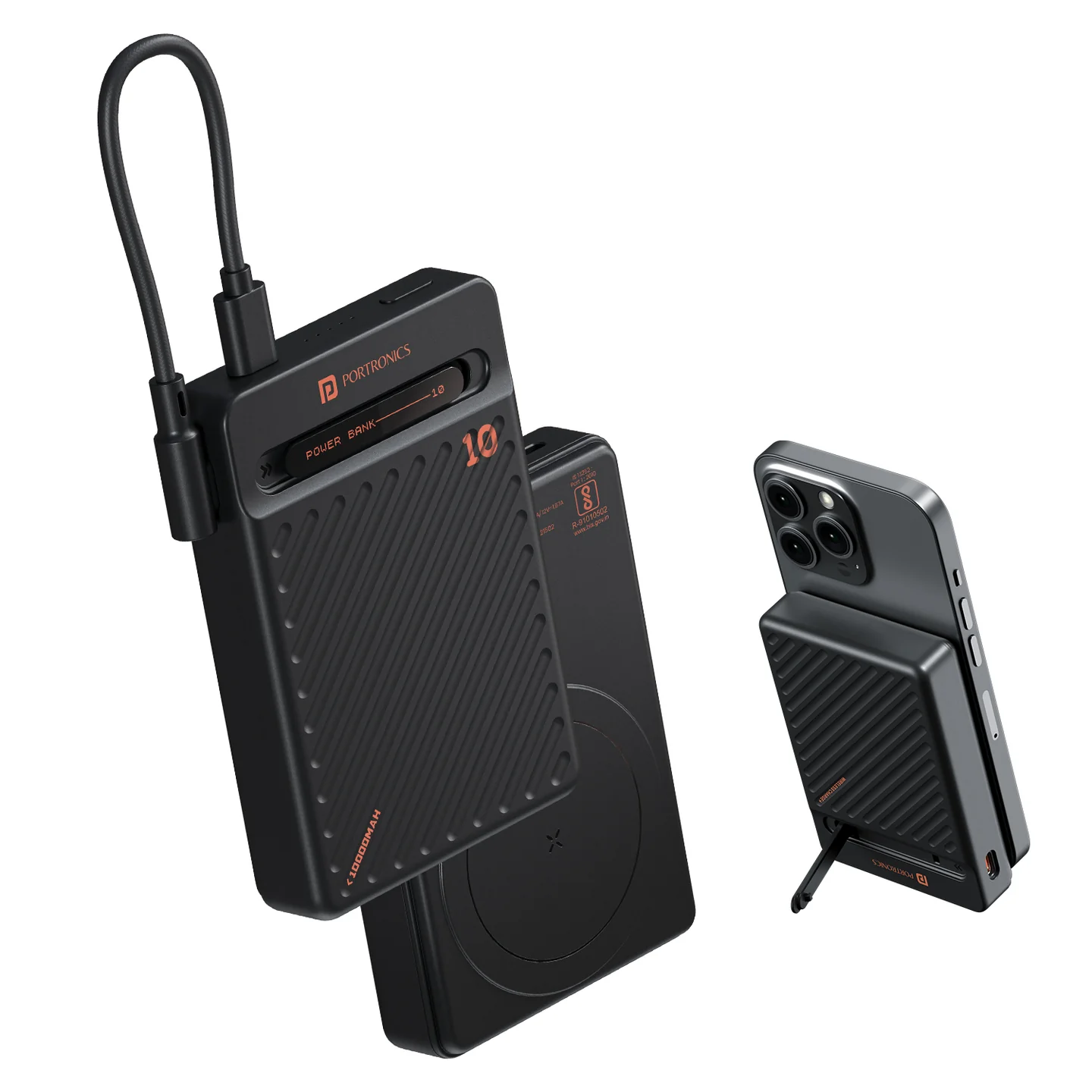
The Portronics Chyro is a 10,000mAh magnetic wireless power bank with wired USB-C fast charging, a detachable Type-C cable and a built-in magnetic phone stand. It supports charging compatible phones wirelessly or through either Type-C connection.
Quick Reference
| Feature | Details |
|---|---|
| Product | Portronics Chyro |
| Product Codes | POR 2663 (Black) / POR 2664 (Mocha) |
| Battery Capacity | 10,000mAh / 38.5Wh |
| Battery Type | Li-polymer, 3.85V |
| Maximum Wired Output | Up to 20W |
| Maximum Wireless Output | Up to 15W |
| Charging Inputs | Type-C1 and Type-C2 |
| Charging Outputs | Type-C1, Type-C2 and wireless charging |
| Type-C Input | Up to 65W, depending on input and charger profile |
| Size | Approx. 98 × 67 × 18mm, excluding cable |
| Weight | Approx. 198g |
| Features | Magnetic wireless charging, LED battery indicators, detachable Type-C cable and phone stand |
| Warranty | 12 months, as listed by Portronics |
Actual charging speed depends on the connected device, adapter, cable and supported charging standard. Not every phone will charge at the maximum rated speed.
What's in the Box
| Item | Quantity |
|---|---|
| Chyro Power Bank | 1 |
| USB Charging Cable | 1 |
| User Guide | 1 |
Parts & Controls
| Part | Function |
|---|---|
| Magnetic Wireless Charging Area | Aligns with compatible phones for wireless charging |
| Type-C Cable / Connection | Charges compatible devices or recharges the power bank |
| Type-C Input/Output Port | Supports power-bank input and device output |
| Power Button | Shows remaining battery level and turns the power bank off |
| LED Indicators | Show approximate remaining battery level and charging status |
| Built-in Phone Stand | Holds a compatible phone for hands-free viewing |
Checking the Battery Level
- When the power bank is off, press the Power Button once to display the remaining battery level.
- While charging the power bank, the LED indicators blink to show charging progress.
- While the power bank is powering a device, the indicators show the remaining battery percentage.
- Double-press the Power Button to turn the power bank off when it is not in use.
LED Battery Indicator
| Approximate Battery Level | Indicator Behaviour |
|---|---|
| 0–25% | First LED blinks; other LEDs remain off |
| 26–50% | First LED stays on; second LED blinks |
| 51–75% | First two LEDs stay on; third LED blinks |
| 76–100% | First three LEDs stay on; fourth LED blinks |
| Abnormal indication | All LEDs blink |
The indicators show an approximate battery level rather than an exact capacity measurement.
Charging Your Phone with a Type-C Connection
- Connect your phone to the power bank using the detachable Type-C cable or a compatible cable connected to the Type-C port.
- Check that the connector is fully inserted.
- Confirm that the phone shows charging.
- When charging is complete, disconnect the cable carefully.
Chyro supports wired output up to 20W. Actual speed depends on your phone and its charging protocol.
Wireless Charging
- Confirm that your phone supports Qi-compatible wireless charging. Magnetic alignment is intended for compatible devices and cases.
- Remove the phone case for the initial test, especially if charging does not start.
- Place the phone face-up and centre it on the designated magnetic wireless charging area.
- Adjust the phone's position until the magnetic alignment is correct.
- Check the phone's charging indicator.
- If charging does not begin, reposition the phone and remove any metal or magnetic objects between the phone and charging surface.
Wireless charging supports output up to 15W, depending on the phone and compatibility.
Using the Magnetic Phone Stand
- Position the phone on the magnetic charging area.
- Open or adjust the built-in stand as required.
- Place the power bank and phone on a stable surface.
- Check that the phone is held securely before using the stand for video calls or media viewing.
Do not use the stand if the phone is not firmly attached.
Recharging the Chyro Power Bank
- Connect a compatible USB-C cable or the supplied charging cable to a Type-C input on the power bank.
- Connect the other end to a compatible USB-C charger.
- Check that the LED indicators blink to show charging has started.
- Allow the power bank to recharge.
- Disconnect it when you are finished charging.
The Type-C input supports different Power Delivery profiles, up to the listed maximum. Use a compatible charger and cable for the best results.
Charging More Than One Device
The power bank supports Type-C1, Type-C2 and wireless charging. When charging multiple devices, the actual power available to each device depends on its requirements and the power bank's operating conditions.
For best results:
- Check that each connected device supports the charging standard it uses.
- Use suitable cables for wired charging.
- Keep the phone correctly aligned for wireless charging.
- If charging is slower than expected with multiple devices connected, disconnect one device and test again.
Charging Performance Tips
- Use a compatible charger and cable.
- Keep the charging surface and connectors clean and dry.
- Remove the phone case when testing wireless charging.
- Align the phone centrally with the magnetic charging area.
- Avoid using damaged cables or adapters.
- Remember that the 20W wired and 15W wireless ratings are maximums, not guaranteed speeds for every device.
Safety Instructions
- Charge the power bank on a flat, non-flammable surface.
- Do not charge it on a bed, sofa or near heaters or other flammable materials.
- Do not leave it charging unattended or overnight.
- Keep the power bank away from direct sunlight, moisture and liquids.
- Keep loose metal objects away from the charging area and terminals.
- Do not disassemble, puncture, crush or attempt to repair the power bank.
- Stop using the power bank immediately if it becomes swollen, develops cracks, exposes wires or behaves abnormally.
- If the power bank is damaged, keep it away from flammable materials and seek safe handling/disposal guidance.
- Keep the device at least 20cm from medical implants that may be affected by magnetic fields.
- Dispose of the product through an authorised electronic-waste collection point, not household waste.
Care & Maintenance
- Wipe the exterior with a soft, dry cloth.
- Store it in a cool, dry place away from direct sunlight.
- Keep Type-C connectors and the wireless charging area dry.
- Avoid dropping, crushing or placing heavy objects on the power bank.
- Do not use the product if the casing, cable or connector is damaged.
Still stuck?
If the issue persists after performing all troubleshooting steps, please raise a support request.
Our support team will assist you further.
Support
- Visit: www.portronics.com
- Support Portal: support.portronics.com
Was this article helpful?
That’s Great!
Thank you for your feedback
Sorry! We couldn't be helpful
Thank you for your feedback
Feedback sent
We appreciate your effort and will try to fix the article