TABLE OF CONTENTS
- Product Overview
- Quick Reference
- What's in the Box
- Parts & Controls
- Before You Begin
- Filling the Water Tank
- Connecting Power
- Selecting the Mist Timer
- Selecting the Lighting Mode
- Refilling the Water
- Cleaning & Maintenance
- Troubleshooting Tips
- Safety & Care
- Still stuck?
Product Overview
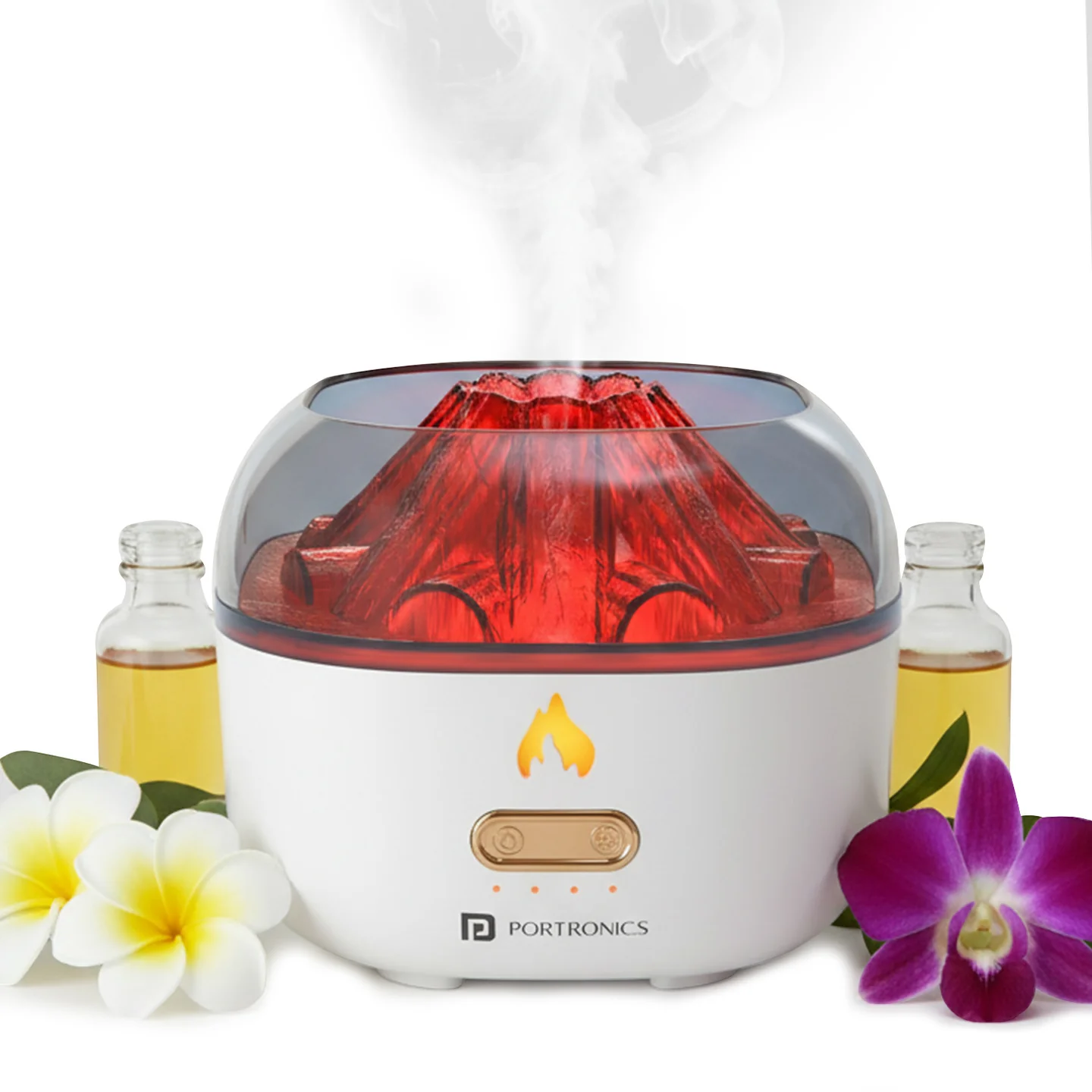
The Portronics Magma Pro is a 2-in-1 cool-mist humidifier and aroma diffuser with Flame-style and Colour Gradient lighting. It uses a 200ml water tank and is powered through USB Type-C. You can select a mist timer from 1 to 4 hours and control the lighting separately.
Quick Reference
| Feature | Details |
|---|---|
| Product | Portronics Magma Pro |
| Product Code | POR 3278 |
| Colour | White |
| Water Tank Capacity | 200ml |
| Rated Power | 6W |
| Power Input | DC 5V/2A |
| Power Connection | USB Type-C |
| Mist Timer Settings | 1, 2, 3 and 4 hours, plus OFF |
| Lighting Modes | Flame-style warm light and Colour Gradient light |
| Auto Shut-Off | At the selected timer setting or when water runs out |
| Operation | USB-powered; keep connected to power while in use |
| Noise Level | Under 36dB, as listed by Portronics |
What's in the Box
| Item | Quantity |
|---|---|
| Magma Pro Humidifier | 1 |
| Power Cable | 1 |
| User Manual | 1 |
Parts & Controls
| Part / Control | Function |
|---|---|
| Mist / Timer Button | Selects the mist timer: 1H, 2H, 3H, 4H or OFF |
| Light Button | Cycles through Flame-style warm light, Colour Gradient light and OFF |
| Water Tank | Holds up to 200ml of water |
| Mist Outlet | Releases cool mist |
| Type-C Port | Connects the power cable |
| Top Cover | Opens for refilling and cleaning |
Before You Begin
- Place the diffuser on a flat, stable surface.
- Make sure the device is switched OFF and unplugged before filling or cleaning.
- Use clean, room-temperature water.
- If using fragrance, add only a few drops of water-soluble essential oil.
- Do not overfill the tank; keep the water below the inner fill line.
- Keep the unit upright during operation.
Filling the Water Tank
- Switch the mist OFF and unplug the power cable.
- Hold the base and lift the top cover straight upwards.
- Fill the tank with clean, room-temperature water. Do not exceed the inner fill line.
- If desired, add 2–3 drops of water-soluble essential oil.
- Align the top cover and press it straight down until it sits flush.
Do not pour water through the centre opening. When emptying the tank, pour the remaining water out through the side slot.
Connecting Power
- Make sure the top cover is correctly fitted and the tank is filled.
- Connect the supplied Type-C power cable to the diffuser.
- Connect the other end to a compatible 5V/2A power adapter.
- Place the diffuser upright on a stable surface.
- Use the Mist / Timer and Light buttons to select the required settings.
The Magma Pro must remain connected to a power source while operating.
Selecting the Mist Timer
Use the Mist / Timer button to cycle through the timer settings. Each short press selects the next setting and its corresponding LED turns on.
| Button Action | Timer Setting |
|---|---|
| 1st short press | 1 hour |
| 2nd short press | 2 hours |
| 3rd short press | 3 hours |
| 4th short press | 4 hours |
| 5th short press | Mist OFF |
The diffuser automatically stops misting when the selected timer ends or when the water runs out.
To stop mist immediately: Long-press the Mist / Timer button at any time.
First-use tip: If mist does not start immediately after the first timer selection, wait approximately 30–45 seconds. This allows the cotton core to become saturated.
Selecting the Lighting Mode
Use the separate Light button to cycle through the lighting settings.
| Button Action | Lighting Setting |
|---|---|
| 1st press | Flame-style warm light |
| 2nd press | Colour Gradient light |
| 3rd press | Lights OFF |
To turn the lights OFF immediately: Long-press the Light button at any time.
The mist and lighting controls operate separately, so you can adjust the lighting without changing the mist timer.
Refilling the Water
- Switch the mist OFF.
- Unplug the power cable.
- Lift the top cover straight upwards.
- Pour the remaining water out through the side slot, not through the centre opening.
- Refill with clean, room-temperature water, keeping it below the inner fill line.
- Add a few drops of water-soluble essential oil only, if desired.
- Align and close the top cover.
- Reconnect power and select the required mist timer.
Cleaning & Maintenance
Daily
- Empty the tank after use.
- Wipe it dry with a soft cloth.
Weekly
- Unplug the diffuser and empty the tank.
- Add a little warm water and one drop of mild dish soap.
- Gently swish the solution and wipe the tank.
- Rinse and dry before using again.
Do not use benzene, thinner or corrosive cleaners. Do not clean the diffuser while it is connected to power.
Troubleshooting Tips
| Issue | What to Check |
|---|---|
| No mist | Check the water level, make sure the lid is seated, use a 5V/2A adapter and wait 30–45 seconds after refilling |
| Weak mist | Reduce overfilling, clean the tank and outlet, and check the cotton core |
| Lights do not respond | Make sure the lights are not in OFF mode; press the Light button again |
| Water leakage | Do not overfill, keep the unit level and ensure the lid is fully inserted |
Safety & Care
- Use clean, room-temperature water.
- If using fragrance, add only a few drops of water-soluble essential oil.
- Do not operate the diffuser without water.
- Keep the unit upright; do not tilt or invert it while in use.
- Keep it away from children, pets, heat sources and direct sunlight.
- Unplug before filling, emptying, cleaning or moving the unit.
- Do not disassemble, scratch or insert objects into the mist outlet.
- Wipe spills immediately to avoid damage.
- Keep the Type-C port and power connection dry.
- Use a compatible 5V/2A power adapter.
Still stuck?
If the issue persists after performing all troubleshooting steps, please raise a support request.
Our support team will assist you further.
Support
- Visit: www.portronics.com
- Support Portal: support.portronics.com
Was this article helpful?
That’s Great!
Thank you for your feedback
Sorry! We couldn't be helpful
Thank you for your feedback
Feedback sent
We appreciate your effort and will try to fix the article