TABLE OF CONTENTS
- Product Overview
- Quick Reference
- What's in the Box
- Parts & Controls
- Before You Begin
- How to Add Water
- Connecting Power
- Selecting the Mist Mode
- Selecting the Lighting Mode
- Using the Humidifier and Night Lamp
- Automatic Shut-Off
- Cleaning & Maintenance
- Safety & Care
- Still stuck?
Product Overview
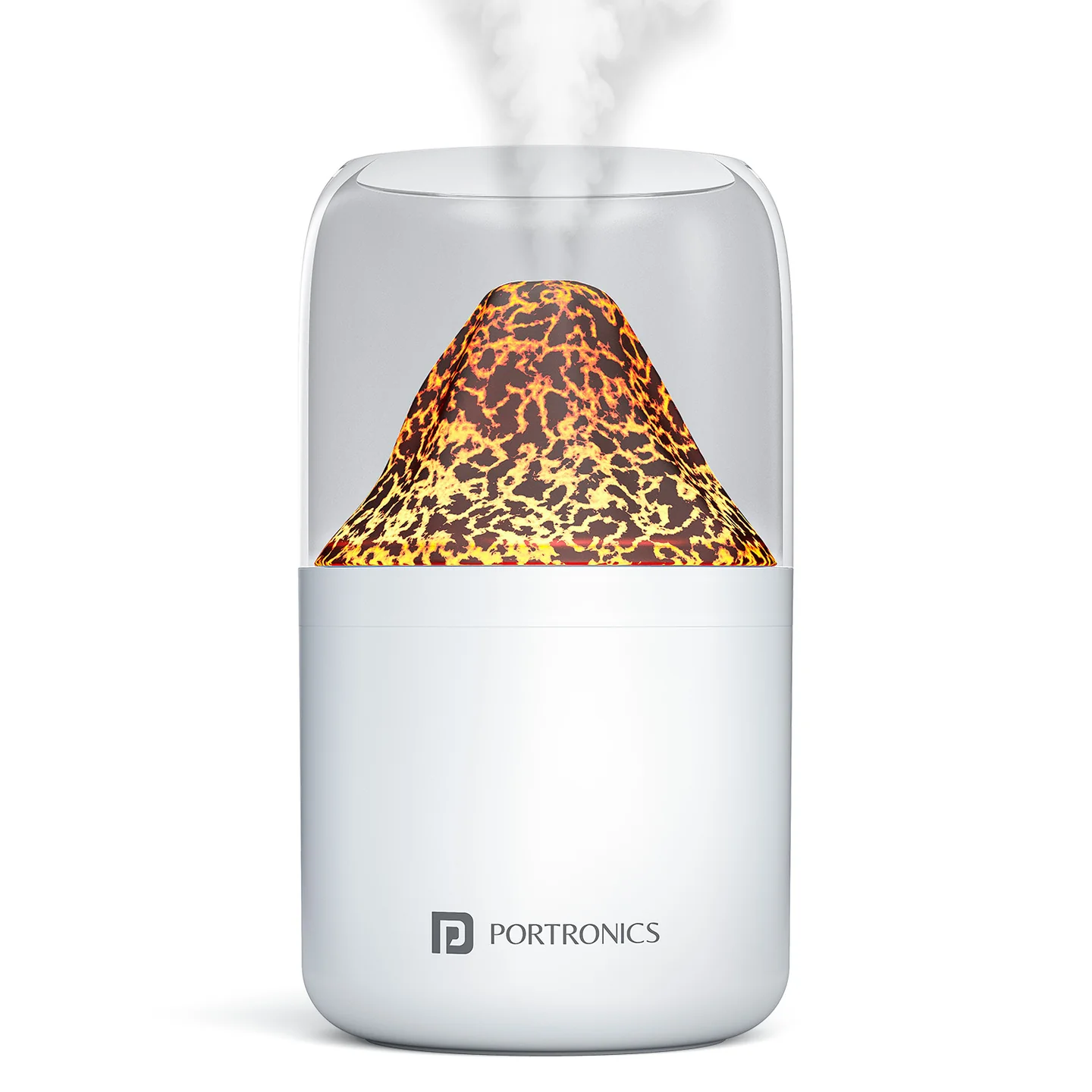
The Portronics Magma is a compact cool-mist humidifier with a built-in night lamp. It offers continuous and intermittent mist modes, along with flame and colourful RGB lighting. The device is powered through a USB Type-C connection.
Quick Reference
| Feature | Details |
|---|---|
| Product | Portronics Magma Humidifier with Night Lamp |
| Product Code | POR 3104 |
| Colour | White |
| Water Tank Capacity | 280ml |
| Power | 1.8W |
| Power Input | DC 5V/1A |
| Connection | USB Type-C |
| Mist Modes | 2 |
| Light Modes | 2 |
| Dimensions | 145.5 × 85 × 85mm |
What's in the Box
| Item | Quantity |
|---|---|
| Magma Humidifier Unit | 1 |
| Power Cable | 1 |
| User Manual | 1 |
Parts & Controls
| Part / Control | Function |
|---|---|
| Control Button | Controls the mist and lighting modes |
| USB Type-C Port | Connects the power cable |
| Twist-Off Top Cover | Opens the water tank for filling |
| Mist Outlet | Releases cool mist |
Before You Begin
- Place Magma on a flat, stable surface.
- Make sure the device is switched off and disconnected from power before filling or cleaning.
- Use clean, room-temperature water only.
- Do not operate the humidifier without water.
- Keep the mist outlet clear and away from electronics and flammable items.
How to Add Water
- Rotate the top cover counter-clockwise to open it.
- Fill the tank with clean, room-temperature tap water.
- Do not exceed the maximum fill line.
- Place the top cover back on the unit.
- Rotate it clockwise until it is securely closed.
Do not overfill the tank. Always unplug the unit before refilling.
Connecting Power
- Make sure the humidifier is on a flat, stable surface.
- Connect the supplied power cable to the USB Type-C port.
- Connect the other end to a compatible 5V/1A USB power source.
- Use the control button to select the required mist and lighting modes.
Use the original power cable supplied with the product.
Selecting the Mist Mode
Short-press the Control Button to cycle through the mist settings:
| Button Action | Mist Setting | Automatic Shut-Off |
|---|---|---|
| Short press — 1st | Continuous mist | After 4 hours |
| Short press — 2nd | Intermittent mist: 30 seconds ON / 30 seconds OFF | After 8 hours |
| Short press — 3rd | Mist OFF | — |
The humidifier stops misting automatically at the end of the selected mode's maximum operating period.
Selecting the Lighting Mode
Long-press the Control Button to cycle through the lighting settings:
| Button Action | Lighting Setting |
|---|---|
| Long press — 1st | Flame light mode |
| Long press — 2nd | Colourful RGB light |
| Long press — 3rd | Light OFF |
The lighting function can be controlled separately from the mist modes.
Using the Humidifier and Night Lamp
- Fill the water tank without exceeding the maximum fill line.
- Secure the top cover by turning it clockwise.
- Connect the supplied Type-C power cable to a compatible 5V/1A power source.
- Short-press the control button to select continuous or intermittent mist.
- Long-press the control button to select flame or RGB lighting.
- Keep the mist outlet unobstructed while the device is operating.
Automatic Shut-Off
Magma includes automatic shut-off for its mist modes:
- Continuous mist: switches off after 4 hours.
- Intermittent mist: switches off after 8 hours.
The mist can also be switched off manually by short-pressing the control button until the third mist setting is selected.
Cleaning & Maintenance
- Clean the water tank every few days to help prevent odour or mould.
- Unplug the device before cleaning or refilling.
- Wipe the exterior with a soft cloth.
- Use clean, room-temperature water only.
- Do not allow water to enter the Type-C port.
- Do not block the mist outlet.
- Do not operate the humidifier without water.
Safety & Care
- Use clean, room-temperature water only.
- Do not overfill the water tank.
- Unplug the device before cleaning or refilling.
- Place it on a flat, stable surface.
- Keep it away from electronics and flammable items.
- Do not operate the humidifier without water.
- Keep it out of reach of children and pets.
- Use the original power cable supplied.
- Do not block the mist outlet.
- Do not immerse the unit in water or other liquids.
- Keep the Type-C port dry.
Still stuck?
If the issue persists after performing all troubleshooting steps, please raise a support request.
Our support team will assist you further.
Support
- Visit: www.portronics.com
- Support Portal: support.portronics.com
Was this article helpful?
That’s Great!
Thank you for your feedback
Sorry! We couldn't be helpful
Thank you for your feedback
Feedback sent
We appreciate your effort and will try to fix the article