TABLE OF CONTENTS
- Product Overview
- Quick Reference
- What's in the Box
- Parts & Controls
- Installing the Air Nozzle
- Operating the Tornado
- Charging Instructions
- Cleaning & Maintenance
- Safety Precautions
- Troubleshooting
- Still stuck?
Product Overview
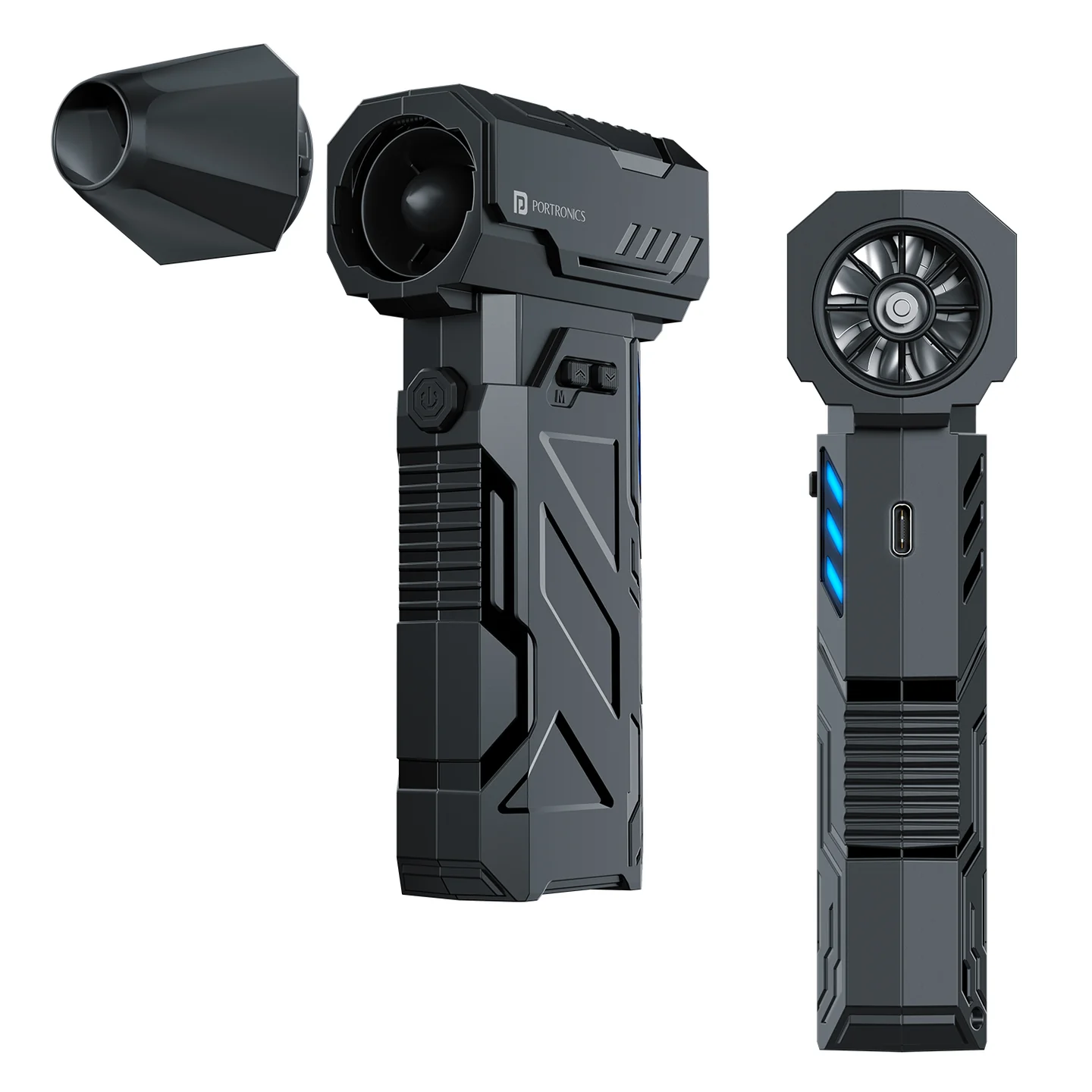
The Portronics Tornado (POR 3077) is a rechargeable handheld high-speed air duster designed to remove dust from electronics, keyboards, computer equipment, car interiors and other hard-to-reach areas. It features a brushless motor, three adjustable speed levels, a detachable round air nozzle and USB Type-C charging.
Quick Reference
| Feature | Details |
|---|---|
| Product | Portronics Tornado |
| Product Code | POR 3077 |
| Colour | Black |
| Motor | Copper brushless motor |
| Speed | 3 levels, up to 130,000 RPM |
| Rated Power | Max. 160W |
| Battery | 3000mAh lithium battery |
| Rated Voltage | 8.4V |
| Charging Input | DC 5V/2A |
| Charging Port | USB Type-C |
| Charging Time | Approx. 3 hours |
| Noise Level | ≤80 dB(A) |
| Dimensions | 158.2 × 42.3 × 111.7mm |
| Weight | Approx. 315g |
| Warranty | 12 months |
What's in the Box
| Item | Quantity |
|---|---|
| Tornado Air Duster | 1 |
| USB Type-C Charging Cable | 1 |
Parts & Controls
| Part / Control | Function |
|---|---|
| Round Air Nozzle | Directs the airflow |
| Air Outlet | Releases high-speed air |
| Air Inlet | Allows air to enter the device |
| Start Key (A) | Starts or stops the device |
| Speed Increase Key (B) | Increases the airflow speed |
| Speed Reduction Key (C) | Decreases the airflow speed |
| Battery Indicator | Shows charging, full-charge or low-battery status |
Installing the Air Nozzle
- Align the air nozzle with the air outlet.
- Insert the nozzle body while matching it with the mounting position.
- Rotate the nozzle to the right until it reaches the correct locked position.
- Check that the nozzle is fitted securely before operating the device.
Important: Do not block the air inlet or air outlet while the device is running. Blocking either opening may damage the machine.
Operating the Tornado
- Make sure the device is charged and the air nozzle is fitted correctly.
- Briefly press the Start Key (A) to switch the device ON.
- Press the Speed Increase Key (B) to increase the speed.
- Press the Speed Reduction Key (C) to reduce the speed.
- Briefly press the Start Key (A) again to switch the device OFF.
The device has three adjustable speed levels. Select the speed according to the cleaning task.
Charging Instructions
- Connect the USB-A end of the charging cable to a compatible 5V/2A power adapter.
- Connect the Type-C end to the Tornado charging port.
- Allow approximately 3 hours for a full charge.
- Check the indicator light to understand the charging status.
Indicator Light Guide
| Indicator Behaviour | Status |
|---|---|
| Slowly blinking | Charging |
| Steady / constant | Working status or fully charged |
| Flashing | Low battery, about to shut down or needs charging |
Cleaning & Maintenance
- Switch OFF the device before cleaning.
- Wipe the outer surface with a clean, dry, soft cloth.
- Do not use water or cleaning fluids.
- Keep the air nozzle free from dust and debris.
- Remove attachments from the air outlet and air inlet regularly.
- Do not press or rub the air inlet or outlet with fingernails or sharp objects.
- Store the device in a cool, dry place when not in use.
- Do not overcharge or over-discharge the battery.
The Tornado is not waterproof. Never wash or immerse the device.
Safety Precautions
- Do not use the device with wet hands.
- Do not expose it to splashing water or immerse it in water.
- Do not block the air inlet or outlet during operation.
- Do not insert foreign objects into either opening.
- Keep the device away from heat sources such as stoves.
- Do not operate it near petrol stations, petroleum gas, paint thinner, volatile agents, sprays or other flammable products.
- Do not drop, strike or collide the device with hard surfaces.
- Do not pull, twist, squeeze or modify the charging cable.
- Stop using the cable if it is damaged or becomes abnormally hot.
- Stop using the device if it makes abnormal noise, produces an unusual odour, becomes excessively hot or if the fan blades do not rotate normally.
- Do not disassemble the device.
Troubleshooting
| Issue | Possible Cause | Recommended Action |
|---|---|---|
| Device does not turn ON | Battery is not charged | Charge the device fully |
| Weak airflow | Low battery or blocked nozzle | Recharge the device and clean the nozzle |
| Short operation time | Device is running at high speed | Use a lower speed for longer operation |
| Device becomes unusually hot or makes abnormal noise | Abnormal operation | Stop using the device and contact support |
Still stuck?
If the issue persists after performing all troubleshooting steps, please raise a support request.
Our support team will assist you further.
Support
- Visit: www.portronics.com
- Support Portal: support.portronics.com
Was this article helpful?
That’s Great!
Thank you for your feedback
Sorry! We couldn't be helpful
Thank you for your feedback
Feedback sent
We appreciate your effort and will try to fix the article