TABLE OF CONTENTS
- Product Overview
- Quick Reference
- What's in the Box
- Parts & Controls
- Installing a Nozzle
- Operating the Tornado Plus
- Charging Instructions
- Suitable Cleaning Uses
- Care & Maintenance
- Safety Precautions
- Troubleshooting
- Still stuck?
Product Overview
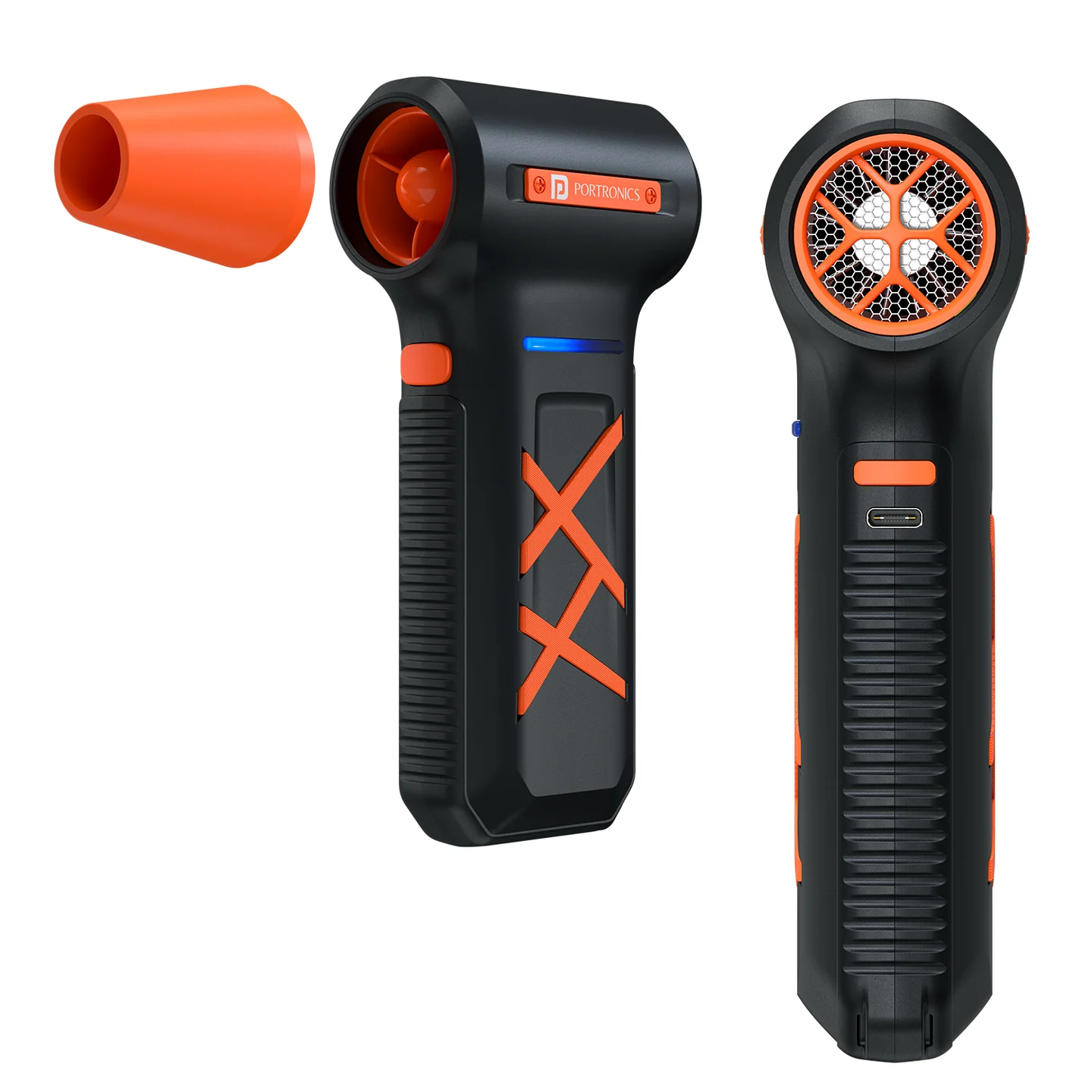
The Portronics Tornado Plus (POR 3512) is a cordless handheld high-speed air duster designed to remove dust and debris from keyboards, electronics, car interiors and hard-to-reach areas. It features a high-efficiency brushless motor, three adjustable speed modes, three interchangeable nozzle attachments and dual rechargeable batteries.
Quick Reference
| Feature | Details |
|---|---|
| Product | Portronics Tornado Plus |
| Product Code | POR 3512 |
| Colour | Black |
| Body Material | ABS |
| Motor | High-efficiency brushless motor |
| Maximum Speed | Up to 130,000 RPM |
| Speed Modes | 3 |
| Battery | Dual rechargeable batteries |
| Battery Capacity | 2 × 3000mAh |
| Charging Input | 5V/2A |
| Charging Port | USB Type-C |
| Warranty | 12 months |
What's in the Box
| Item | Quantity |
|---|---|
| Tornado Plus Air Duster | 1 |
| Nozzle Attachments | 3 |
| Charging Cable | 1 |
| Lanyard | 1 |
Parts & Controls
| Part / Control | Function |
|---|---|
| Nozzle Attachment | Directs airflow towards the cleaning area |
| Start Button (A) | Switches the device ON; a short press switches it OFF |
| Gear Shift Button (B) | Cycles through Low, Medium and High speed, then OFF |
| Indicator Lights | Show normal operation / full charge, low battery or charging |
| Type-C Charging Port | Connects the charging cable |
Installing a Nozzle
- Select the nozzle attachment appropriate for the cleaning task.
- Align the nozzle with the front slot of the device.
- Push the nozzle firmly into place until it fits securely.
- Check that the nozzle is properly attached before switching ON.
The package includes three nozzle attachments.
Operating the Tornado Plus
Switching ON and Selecting a Speed
- Briefly press the Start Button (A) to switch ON the device.
- Press the Gear Shift Button (B) once to start at Low speed.
- Press the Gear Shift Button (B) again to change to Medium speed.
- Press the Gear Shift Button (B) again to change to High speed.
- Press the Gear Shift Button (B) again to switch the device OFF.
Switching OFF
- Briefly press the Start Button (A) to switch OFF the device in any speed mode.
- Alternatively, continue pressing the Gear Shift Button (B) until the OFF step is reached.
Charging Instructions
- Use a compatible 5V/2A USB Type-C adapter.
- Connect the charging cable securely to the device's Type-C charging port.
- Connect the adapter to a working power outlet.
- Check the indicator light to confirm that charging is in progress.
Indicator Lights Guide
| Indicator Behaviour | Status |
|---|---|
| Solid light | Fully charged / normal operation |
| Flashing quickly | Low battery / needs charging |
| Slow blinking | Charging in progress |
Suitable Cleaning Uses
The Tornado Plus is described for removing dust, debris and dirt from:
- Keyboards and computer equipment.
- CPUs and laptops.
- Cameras and electronics.
- Car interiors and air vents.
- Other hard-to-reach areas.
Use an appropriate speed and nozzle for the cleaning task. Keep the nozzle at a suitable distance from the item being cleaned.
Care & Maintenance
- Switch OFF the device before cleaning or changing a nozzle.
- Keep the nozzle and air openings free from dust and debris.
- Wipe the exterior with a clean, dry, soft cloth.
- Do not use water or cleaning fluids.
- Do not insert objects into the air outlet.
- Do not block the air inlet or outlet during operation.
- Store the device in a cool, dry place when not in use.
- Do not use damaged charging cables or low-quality adapters.
Safety Precautions
- Do not use the device with wet hands or near water.
- Do not expose it to splashing water or immerse it in water.
- Avoid blocking the air inlet or outlet while the device is running.
- Do not insert objects into the air outlet.
- Keep the device away from flammable gases or liquids.
- Keep it away from children.
- Do not drop or disassemble the product.
- Stop using the device if it overheats or produces unusual noise or odour.
- Use a 5V/2A Type-C power adapter for charging.
- Do not use damaged cables or low-quality adapters.
Troubleshooting
| Issue | Possible Cause | Recommended Action |
|---|---|---|
| Device does not work | Battery may be low | Charge the device and try again |
| Indicator light does not turn ON | Adapter not connected correctly or charging cable not secured | Check the power outlet, adapter and Type-C connection |
| Device does not charge | Charging connection may be loose | Reconnect the cable securely and check the adapter |
| Nozzle does not fit | Nozzle is not aligned with the front slot | Align it with the front slot and push firmly until secure |
Still stuck?
If the issue persists after performing all troubleshooting steps, please raise a support request.
Our support team will assist you further.
Support
- Visit: www.portronics.com
- Support Portal: support.portronics.com
Was this article helpful?
That’s Great!
Thank you for your feedback
Sorry! We couldn't be helpful
Thank you for your feedback
Feedback sent
We appreciate your effort and will try to fix the article