TABLE OF CONTENTS
- Product Overview
- Quick Reference
- What's in the Box
- Parts & Controls
- Before Using the Lint X Lite
- How to Use
- Fabric-Care Precautions
- Cleaning & Maintenance
- Troubleshooting
- Safety Precautions
- Still stuck?
Product Overview
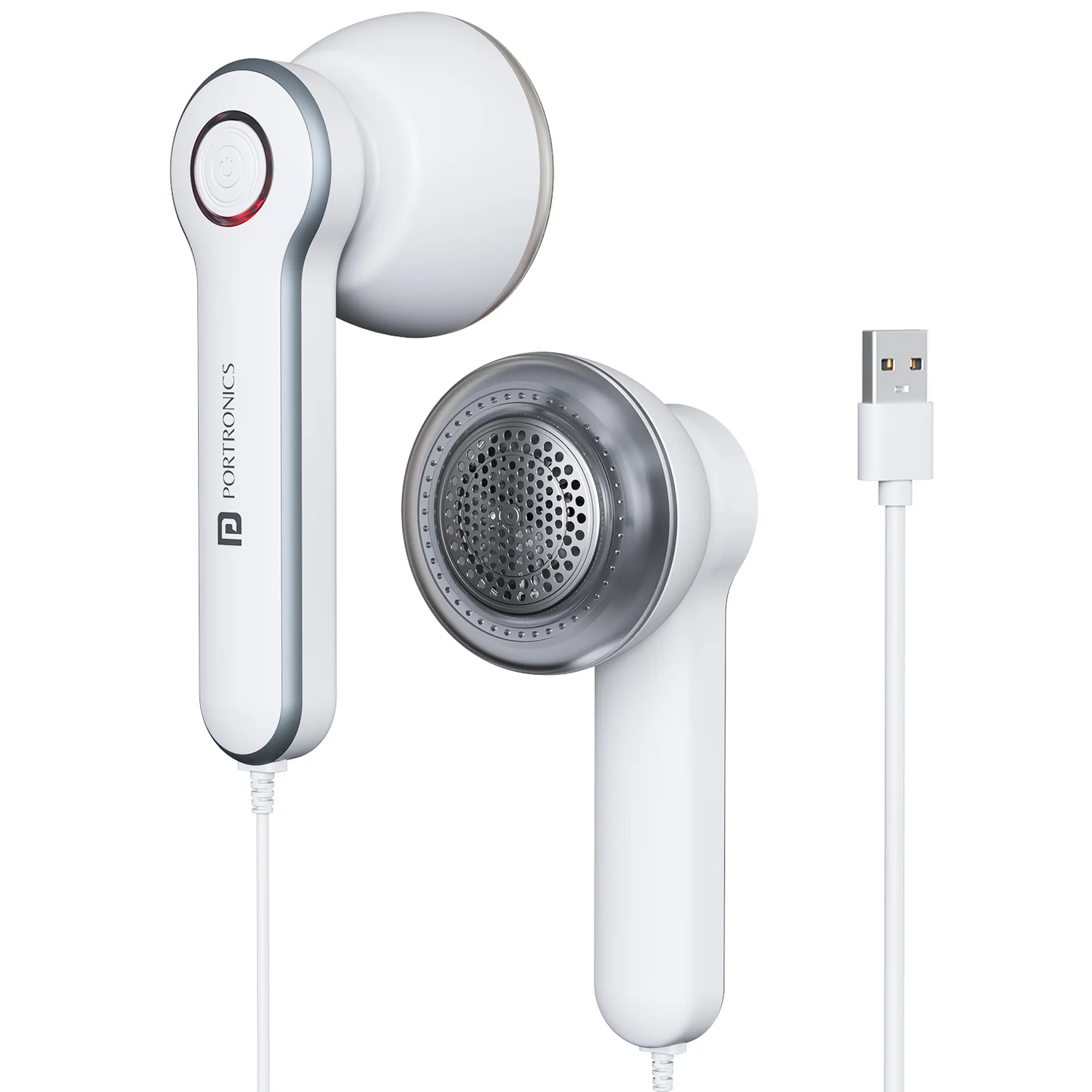
The Portronics Lint X Lite (POR 3566) is a compact USB-powered fabric lint remover designed to remove lint, fuzz and fabric pills from suitable clothes, sofas and blankets. It uses six stainless-steel blades, a honeycomb mesh cover and a detachable lint container.
The device has a high-speed motor operating up to 7200 RPM and a single-button control.
Quick Reference
| Feature | Details |
|---|---|
| Product | Portronics Lint X Lite |
| Product Code | POR 3566 |
| Colour | White |
| Product Type | USB-Powered Cloth Lint Remover |
| Power Source | USB-A |
| Motor Speed | Up to 7200 RPM |
| Blade Type | 6 stainless-steel blades |
| Mesh Cover | Honeycomb mesh |
| Body Material | ABS with metal mesh |
| Operation | Single-button control |
| Lint Container | Detachable |
| Supported Use | Clothes, sofas and blankets |
What's in the Box
| Item | Quantity |
|---|---|
| Lint X Lite | 1 |
| USB Power Cable | 1 |
| Cleaning Brush | 1 |
Parts & Controls
| Part | Function |
|---|---|
| Honeycomb Mesh Cover | Helps protect fabric from snags and damage while lint is removed |
| Six Stainless-Steel Blades | Cut and remove lint, fuzz and fabric pills |
| Detachable Lint Container | Collects removed lint and can be removed for emptying |
| Power Button | Turns the lint remover ON or OFF |
| USB-A Power Cable | Connects the device to a USB power source |
Before Using the Lint X Lite
- Spread the garment or fabric flat on a stable surface.
- Remove or avoid hard objects such as buttons, zippers and decorative attachments in the area to be treated.
- Check that the lint container and honeycomb mesh cover are attached properly.
- Connect the USB cable to a suitable USB power source.
- Keep the fabric flat before starting the device.
Do not use the lint remover on clothes while wearing them. Avoid delicate fabrics such as silk or lace.
How to Use
- Ensure the lint container and mesh cover are properly attached.
- Connect the USB cable to a suitable USB power source, such as a USB adapter, laptop or power bank.
- Spread the garment on a flat surface.
- Press the Power Button to start the device.
- Gently move the device over the fabric in circular motions.
- Do not press hard against the fabric.
- After use, switch OFF the device and unplug the USB cable.
Fabric-Care Precautions
- Test on a small, inconspicuous area before treating the full garment.
- Do not use on delicate fabrics such as silk or lace.
- Do not use on clothes while they are being worn.
- Avoid buttons, zippers and decorative attachments.
- Keep the mesh cover securely fitted during operation.
- Do not press hard against the fabric.
- Stop using the device if the mesh cover or blades become damaged or detached.
Cleaning & Maintenance
- Switch OFF the lint remover and unplug the USB cable before cleaning.
- Remove the lint container.
- Empty collected lint regularly.
- Use the supplied cleaning brush to clean the blades and mesh cover.
- Check that lint or debris is not blocking the blade area.
- Refit the lint container and mesh cover securely before using the device again.
Do not wash the device with water. Keep the electrical and motor sections dry.
Troubleshooting
| Issue | Possible Cause | Recommended Action |
|---|---|---|
| Machine does not work | Mesh cover not installed properly | Check that the mesh cover is securely fitted |
| Machine does not work | Blade area blocked by lint or debris | Switch OFF, unplug and clear the obstruction with the cleaning brush |
| Machine does not work | USB power connection is loose | Check the USB cable and power source |
| Lint is not removed completely | Blade may be dull or incorrectly installed | Stop using the device and check the blade assembly |
| Lint is not removed completely | Lint container is full | Empty the container and clean the mesh cover |
| Fabric catches or snags | Fabric is delicate or hard objects are in the treatment area | Stop, check the fabric and remove obstructions |
Safety Precautions
- Do not use the product on clothes while wearing them.
- Avoid delicate fabrics such as silk or lace.
- Keep the device away from children.
- Do not insert fingers or sharp objects into the mesh or blade area.
- Do not use the device if the mesh cover or blades are damaged or detached.
- Switch OFF and unplug before cleaning.
- Do not wash the device with water.
- Use a suitable USB power source and keep the cable and device dry.
Still stuck?
If the issue persists after performing all troubleshooting steps, please raise a support request.
Our support team will assist you further.
Support
- Visit: www.portronics.com
- Support Portal: support.portronics.com
Was this article helpful?
That’s Great!
Thank you for your feedback
Sorry! We couldn't be helpful
Thank you for your feedback
Feedback sent
We appreciate your effort and will try to fix the article