TABLE OF CONTENTS
- Product Overview
- Quick Reference
- What's in the Box
- Parts & Controls
- Before Using the Lint X
- Powering ON and Selecting a Speed
- How to Remove Lint
- Fabric-Care Precautions
- Charging the Lint X
- Cleaning and Maintenance
- LED Display and Battery Status
- Battery Care
- Safety Precautions
- Troubleshooting
- Still stuck?
Product Overview
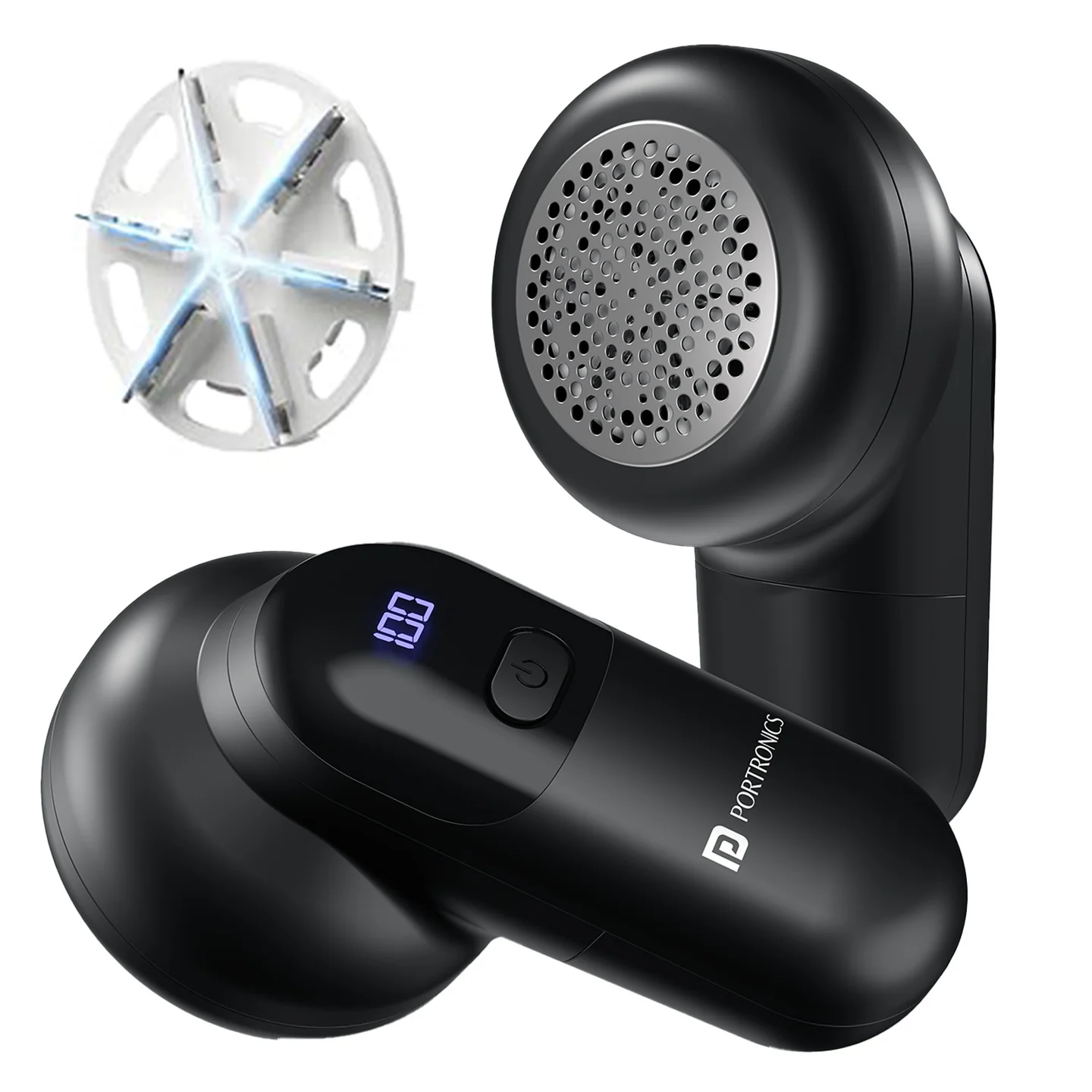
The Portronics Lint X (POR 3358) is a rechargeable fabric and cloth lint remover designed to remove lint, fuzz and fabric pills from suitable garments and upholstery. It uses a high-speed BLDC motor, six stainless-steel blades and a protective honeycomb mesh cover to help restore fabric to a smoother appearance.
The device has three speed settings, an LED display for speed and battery status, a detachable lint container and USB Type-C charging.
Quick Reference
| Feature | Details |
|---|---|
| Product | Portronics Lint X |
| Product Code | POR 3358 |
| Colour | Black |
| Product Type | Rechargeable Fabric & Cloth Lint Remover |
| Motor | BLDC |
| Maximum Speed | Up to 7200 RPM |
| Blade System | 6 stainless-steel blades |
| Blade Design | 120° angled cutting design |
| Speed Modes | 3 |
| Mesh Cover | Honeycomb protective mesh |
| Lint Container | Detachable |
| Display | LED display for speed level and battery status |
| Battery Type | Rechargeable lithium-ion |
| Charging Port | USB Type-C |
| Charging Input | 5V/1A |
| Rated Power | 5W |
| Charging Time | Approx. 90 minutes |
| Runtime | Up to 70 minutes |
| Material | ABS + electronic components |
| Warranty | 12 months |
Actual runtime may vary depending on operating conditions and usage.
What's in the Box
| Item | Quantity |
|---|---|
| Lint X Remover | 1 |
| USB Type-C Charging Cable | 1 |
| Cleaning Brush | 1 |
Parts & Controls
| Part / Control | Function |
|---|---|
| Honeycomb Mesh Cover | Protects fabric from snags and damage while allowing lint to reach the blades |
| Six-Blade Cutting Assembly | Trims lint, fuzz and fabric pills |
| Detachable Lint Container | Collects removed lint and can be detached for emptying |
| Power / Speed Button | Turns the device ON and cycles through three speed levels, then OFF |
| LED Display | Shows the selected speed and battery status |
| USB Type-C Port | Connects the charging cable |
Before Using the Lint X
- Spread the garment or fabric flat on a smooth, stable surface.
- Remove hard objects from the area to be treated, such as buttons, zippers or other accessories.
- Check that the mesh cover is fitted securely.
- Make sure the lint container is not full.
- Select a suitable speed for the fabric.
Do not use the Lint X on down jackets, thin lace or embellished fabrics. Avoid fabrics with loose decorative parts or delicate surfaces that may be damaged by the blade system.
Powering ON and Selecting a Speed
Use the Power / Speed Button to operate the device.
| Button Press | Operation |
|---|---|
| Press once | Device ON — Speed 1 |
| Press twice | Speed 2 |
| Press three times | Speed 3 — Maximum |
| Press again | Device OFF / Standby |
The LED display indicates the selected speed level.
How to Remove Lint
- Spread the garment flat and smooth out the area to be treated.
- Make sure the mesh cover is fitted correctly.
- Switch ON the Lint X and select the required speed.
- Gently move the device over the fabric in circular motions.
- Keep the device level against the fabric.
- Do not press hard or apply excessive pressure.
- Switch OFF the device after use.
For light lint, begin with a lower speed. Use a higher speed only when suitable for the fabric being treated.
Fabric-Care Precautions
- Always test on a small, inconspicuous area first.
- Do not press hard against the fabric.
- Do not use on down jackets, thin lace or embellished fabrics.
- Avoid buttons, zippers, decorative items and other hard objects.
- Keep the mesh cover securely installed while operating.
- Do not insert fingers or metal objects into the blade area.
Charging the Lint X
- Switch OFF the device.
- Connect the USB Type-C cable to the charging port.
- Connect the other end to a 5V/1A USB adapter.
- During charging, the LED numeric display shows the battery status.
- When the display shows 100, the battery is fully charged.
- Disconnect the charging cable after charging.
The approximate full charging time is 90 minutes.
Important: Do not use the Lint X while it is charging.
Cleaning and Maintenance
- Switch OFF the device and disconnect it from the charging cable.
- Detach the mesh cover carefully.
- Empty the lint container.
- Use the supplied cleaning brush to remove trapped lint or debris from the mesh and blade area.
- Refit the mesh cover securely before using the device again.
- Wipe the exterior with a slightly damp cloth if needed.
Do not wash the machine with water. Do not pour water or cleaning liquid into the device.
LED Display and Battery Status
The LED display shows the selected speed level and battery status. During charging, the numeric display indicates battery progress. A reading of 100 indicates that charging is complete.
Battery Care
- Do not remove or replace the internal battery yourself.
- If the product is not used, charge it at least once every 6 months.
- Avoid exposing the battery to high temperatures or moisture.
- Do not charge the device outside a room-temperature environment of 5°C–35°C.
- Dispose of the battery through an authorised recycling centre.
Safety Precautions
- Do not use the Lint X while charging.
- Keep it away from water, fire and direct sunlight.
- Do not insert fingers or metal objects into the blade area.
- Do not disassemble or modify the product.
- Keep the device out of reach of children.
- Charge only in a room-temperature environment of 5°C–35°C.
- Do not use the device on delicate or embellished fabrics that may be damaged.
- Always check that the mesh cover is installed securely before operation.
Troubleshooting
| Issue | Possible Cause | Recommended Action |
|---|---|---|
| Machine does not work | Mesh cover not installed properly | Check that the mesh cover is securely installed |
| Machine does not work | Battery drained | Recharge the device fully |
| Machine does not work | Blade area blocked by debris | Switch OFF and remove trapped lint or foreign objects using the cleaning brush |
| Hairballs / lint are not removed completely | Blade is dull or not installed correctly | Check the blade assembly and ensure it is installed correctly |
| Hairballs / lint are not removed completely | Lint container is full | Empty the lint container and clean the mesh cover |
| Machine does not charge | Faulty adapter or loose connection | Check the adapter and ensure the cable is firmly connected |
| Machine does not charge | Type-C cable not connected properly | Reconnect the cable and check whether the charging display lights up |
Still stuck?
If the issue persists after performing all troubleshooting steps, please raise a support request.
Our support team will assist you further.
Support
- Visit: www.portronics.com
- Support Portal: support.portronics.com
Was this article helpful?
That’s Great!
Thank you for your feedback
Sorry! We couldn't be helpful
Thank you for your feedback
Feedback sent
We appreciate your effort and will try to fix the article