TABLE OF CONTENTS
- Product Overview
- Quick Reference
- What's in the Box
- Parts & Controls
- Powering ON & Speed Modes
- Charging Instructions
- Using as a Vacuum
- Using as an Air Blower
- Cleaning & Maintenance
- Safety Precautions
- Troubleshooting
- Still stuck?
- Support
Product Overview
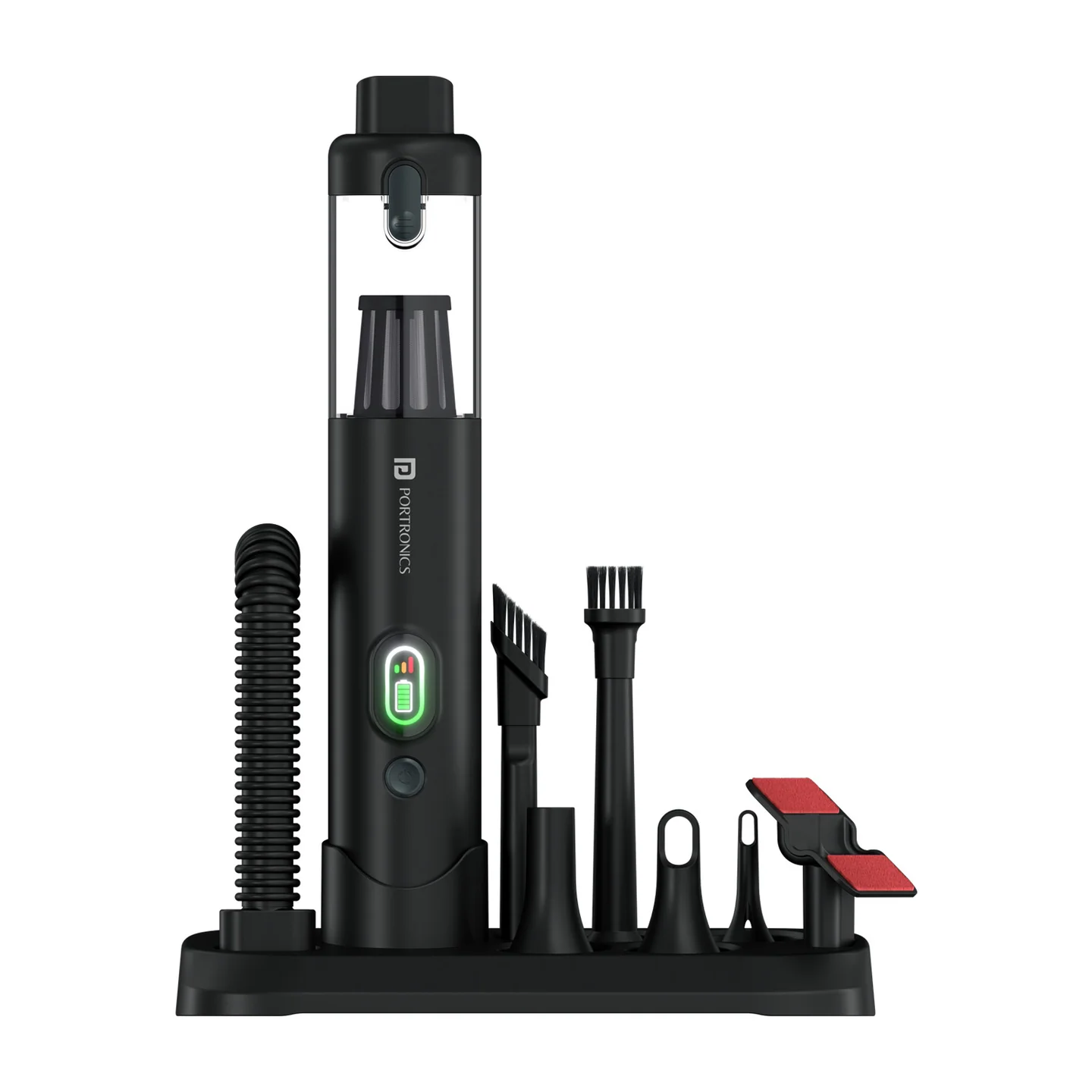
The Portronics MopCop Ultra (POR 3714) is a compact, cordless 2-in-1 vacuum cleaner and air blower designed for cleaning cars, desks, keyboards, sofas, electronic devices, narrow gaps, and other hard-to-reach areas. It features a 65,000 RPM brushless motor, three suction/blowing speed modes up to 18,000 Pa, a washable HEPA filter, and multiple attachments.
Quick Reference
| Feature | Details |
|---|---|
| Product | Portronics MopCop Ultra |
| Model Code | POR 3714 |
| Product Type | 2-in-1 Cordless Vacuum Cleaner & Air Blower |
| Colour | Black |
| Motor Type | Brushless Motor (BLDC) |
| Motor Speed | Up to 65,000 RPM |
| Suction Power | 8,000 / 14,000 / 18,000 Pa (3 Speed Modes) |
| Working Time | 1st Mode: Approx. 50 min / 2nd Mode: Approx. 23 min / 3rd Mode: Approx. 15 min |
| Noise Level | Approx. 74.5 dB (3rd Mode) |
| Battery Type | Lithium-ion 3.7V 2000mAh × 3 Cells (6000mAh) |
| Charging Input | DC 5V / 2A (Type-C) |
| Charging Time | Approx. 3–4 hours |
| Dust Cup Capacity | 0.35L |
| Material | ABS |
| Dimensions | 5.2 × 5.2 × 31.5cm |
| Warranty | 1 year |
What's in the Box
| Item | Quantity |
|---|---|
| MopCop Ultra Main Unit | 1 |
| Charging Base | 1 |
| User Manual | 1 |
| Brush | 1 |
| Flat Nozzle with Brush | 1 |
| Blowing Nozzle with Brush | 1 |
| Small Blowing Nozzles | 3 |
| Flexible Extension Hose | 1 |
Parts & Controls
Main Unit Layout
| Part | Description |
|---|---|
| Digital Display | Displays status and mode/battery level |
| Switch (Power Button) | Long-press to turn ON/OFF; single-press to switch between the 3 suction/blowing speed levels |
| Type-C Port | Connects a 5V/2A Type-C cable for direct charging |
| Air Outlet | Exhaust / air blowing port (attach blower nozzles here) |
| HEPA Filter | Washable filter that protects the main body from dust particles |
| Dust Compartment | 0.35L bin that collects dust during vacuuming |
| Push Button | Releases the dust compartment for emptying and cleaning |
Powering ON & Speed Modes
- Long-press the Power Button to turn the device ON or OFF.
- Single-press the Power Button to cycle through the 3 suction/blowing speed levels:
- 1st Mode: 8,000 Pa (Approx. 50 minutes runtime)
- 2nd Mode: 14,000 Pa (Approx. 23 minutes runtime)
- 3rd Mode: 18,000 Pa (Approx. 15 minutes runtime)
Charging Instructions
- Charge the device using the Charging Base or directly via a 5V/2A Type-C cable.
- Make sure the device is properly aligned when placing it on the charging base.
- When charging directly with a Type-C cable, disconnect the cable once the device is fully charged (charging time is approx. 3–4 hours).
- Do not use the device while it is charging.
Using as a Vacuum
- Attach the HEPA filter and dust compartment at the top of the main unit.
- Ensure the dust bin is securely locked in place before operating.
- Mount the desired vacuum attachment (such as the flat nozzle with brush, brush, or flexible extension hose) onto the top of the dust compartment.
- Long-press the Power Button to start vacuuming and single-press to adjust speed.
Always keep the HEPA filter attached when using the device as a vacuum to prevent dust particles from entering the main body.
Using as an Air Blower
- Remove the HEPA filter and dust compartment from the main unit.
- Attach the desired blower nozzle (blowing nozzle with brush or small blowing nozzles) to the air outlet.
- Long-press the Power Button to start blowing and single-press to adjust speed.
Cleaning & Maintenance
- Turn OFF the device before cleaning.
- Press the Push Button to release and empty the collected dust from the dust compartment.
- Rotate the dust compartment and HEPA filter gently in an anti-clockwise direction to remove them.
- Wash the dust compartment and HEPA filter with water, then let both dry completely before reassembling and using again.
- Do not clean the main body with water; wipe off dirt using a dry or slightly damp cloth.
Safety Precautions
- Do not use the product in water, on wet surfaces, or near flames and flammable substances.
- Keep the device out of the reach of children.
- Always check for small valuable objects nearby before using the vacuum.
- Do not use the blower or vacuum near your face.
- Do not attempt to disassemble the device.
- Do not use the device while it is charging.
Troubleshooting
| Issue | Possible Cause | Recommended Action |
|---|---|---|
| Device does not turn ON | Battery is drained or device is charging | Charge via 5V/2A Type-C or base for 3–4 hours; disconnect from charger before turning ON |
| Weak suction power | Dust bin is full, HEPA filter is clogged, or low speed mode is selected | Empty the dust bin, wash and fully dry the HEPA filter, or press Power to select a higher speed |
| Device turns OFF quickly | Battery is low or running in 3rd mode | Charge the device fully; note 3rd mode runtime is approx. 15 minutes |
| Dust enters main motor body | HEPA filter is missing or not locked properly | Always attach and securely lock the HEPA filter before vacuuming |
| Device won't charge on base | Misaligned on the charging base | Reseat the unit on the base for proper alignment, or charge directly via Type-C |
Still stuck?
If the issue persists after following the relevant steps, please raise a support request.
Our support team will assist you further.
Support
- Website: www.portronics.com
- Support Portal: support.portronics.com
Was this article helpful?
That’s Great!
Thank you for your feedback
Sorry! We couldn't be helpful
Thank you for your feedback
Feedback sent
We appreciate your effort and will try to fix the article