TABLE OF CONTENTS
- Product Overview
- Key Features
- Box Contents
- Product Controls
- Initial Setup
- Usage Guide
- Troubleshooting
- Common Queries
- Safety Guidelines
- Maintenance Tips
- Warranty & Support
- Still Facing Issues?
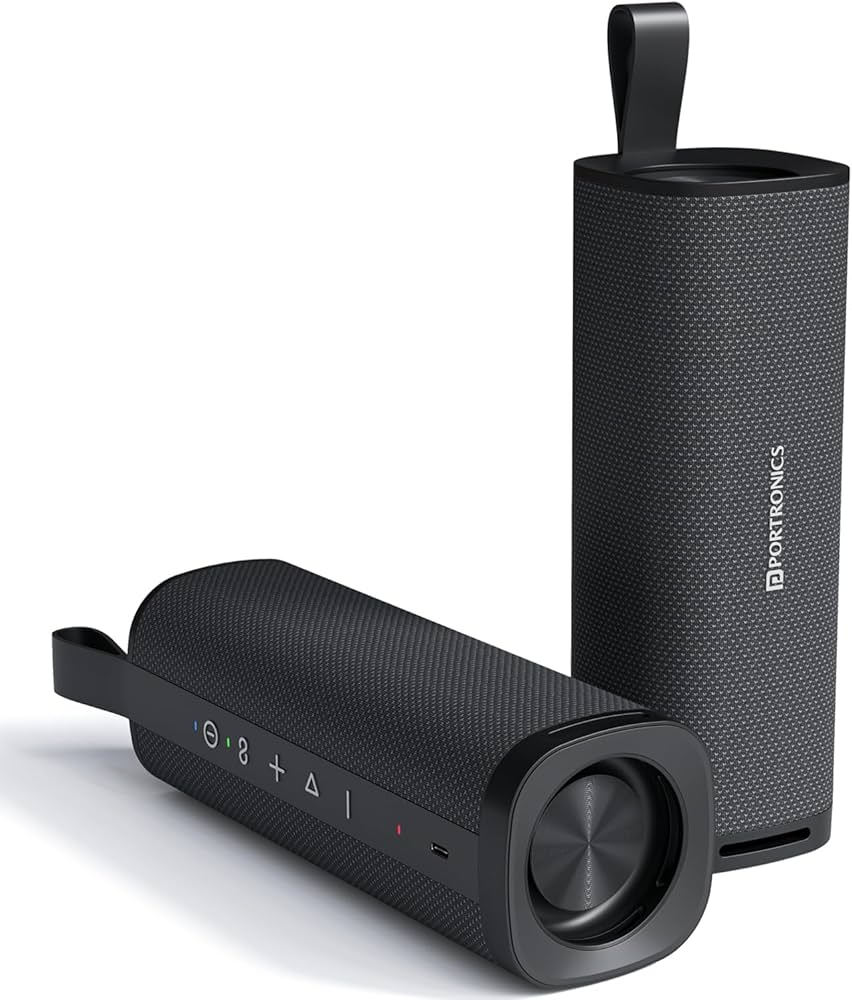
Product Overview
The Portronics Fynix Bluetooth Speaker is a portable Bluetooth speaker designed for indoor and outdoor use, offering powerful sound in a compact design.
Key Features
- 30W high-output sound
- Dual passive radiators for enhanced bass
- Bluetooth 5.3 connectivity
- TWS (True Wireless Stereo) support
- 4500 mAh Battery
- Up to 6 hours playback
- USB Type-C charging
- Built-in microphone for hands-free calling
- Splash-resistant design
Box Contents
Confirm the following items with the customer:
- 1 × Fynix Bluetooth Speaker
- 1 × Type-C Charging Cable
- 1 × User Manual
Product Controls
Buttons available on the rubberized side strip:
- Power button
- Bluetooth pairing button
- Volume + / -
- Play / Pause
- TWS pairing button
Initial Setup
- Charge the speaker using the Type-C cable
- Press and hold the Power button to turn it on
- Enable Bluetooth on your device
- Select “Portronics Fynix” from available devices
- Start playing audio
Usage Guide
Bluetooth Mode
- Turn on the speaker
- Pair with your device
- Play music wirelessly
TWS Mode (Dual Speaker Pairing)
- Turn on both speakers
- Press and hold the infinity (TWS) button on the master speaker first. Once it enters pairing mode, press and hold the infinity (TWS) button on the secondary speaker. The two speakers will automatically connect to each other.
- Speakers will connect to each other
- Connect one speaker to your phone
Note: Both speakers must be from the same batch for pairing functionality.
Calling Feature
- Incoming calls can be answered via the speaker
- A built-in mic that allows hands-free calling
Troubleshooting
Speaker Not Turning On
Possible causes:
- Battery drained
- Charging issue
Resolution steps:
- Charge the device for at least 30 minutes
- Check charging cable and adapter
- Try a different power source
Bluetooth Not Connecting
Possible causes:
- Device already paired elsewhere
- Range issue
Resolution steps:
- Turn Bluetooth OFF and ON
- Forget device and reconnect
- Keep within 10-meter range
- Restart speaker and phone
No Sound / Low Volume
Possible causes:
- Low volume
- Playback paused
Resolution steps:
- Increase volume on both devices
- Check if music is playing
- Reconnect Bluetooth
Distorted or Poor Sound
Possible causes:
- High-volume distortion
- Low battery
Resolution steps:
- Reduce volume slightly
- Charge the speaker
- Keep device within range
TWS Not Working
Resolution steps:
- Ensure both speakers are the same batch
- Restart both speakers
- Reconnect TWS pairing
Speaker Not Charging
Possible causes:
- Faulty cable
- Power issue
Resolution steps:
- Use another Type-C cable
- Try a different adapter or socket
Common Queries
Battery Backup
- Up to 6 hours depending on usage
- High volume may reduce battery life
Water Resistance
- Splash-resistant, not waterproof
Outdoor Usage
- Suitable for small gatherings and outdoor use
Safety Guidelines
- Do not expose to heavy water or submerge
- Avoid dropping or physical damage
- Do not overcharge
- Keep away from extreme heat
Maintenance Tips
- Clean with a dry cloth
- Keep charging port dust-free
- Store in a cool, dry place
- Charge regularly if not in use
Warranty & Support
- 1-year warranty
- Covers manufacturing defects only
- Physical or water damage is not covered
Still Facing Issues?
If the issue persists after performing all troubleshooting steps, please Click here raise a support request.
Our support team will assist you further.
Was this article helpful?
That’s Great!
Thank you for your feedback
Sorry! We couldn't be helpful
Thank you for your feedback
Feedback sent
We appreciate your effort and will try to fix the article