TABLE OF CONTENTS
- Product Overview
- Quick Reference
- What's in the Box
- Parts & Controls
- Charging the Fan
- Filling the Water Tank
- Turning ON the Fan and Adjusting Speed
- Using the Mist Spray Function
- Battery and Runtime
- Care & Safety
- Troubleshooting
- Still stuck?
Product Overview
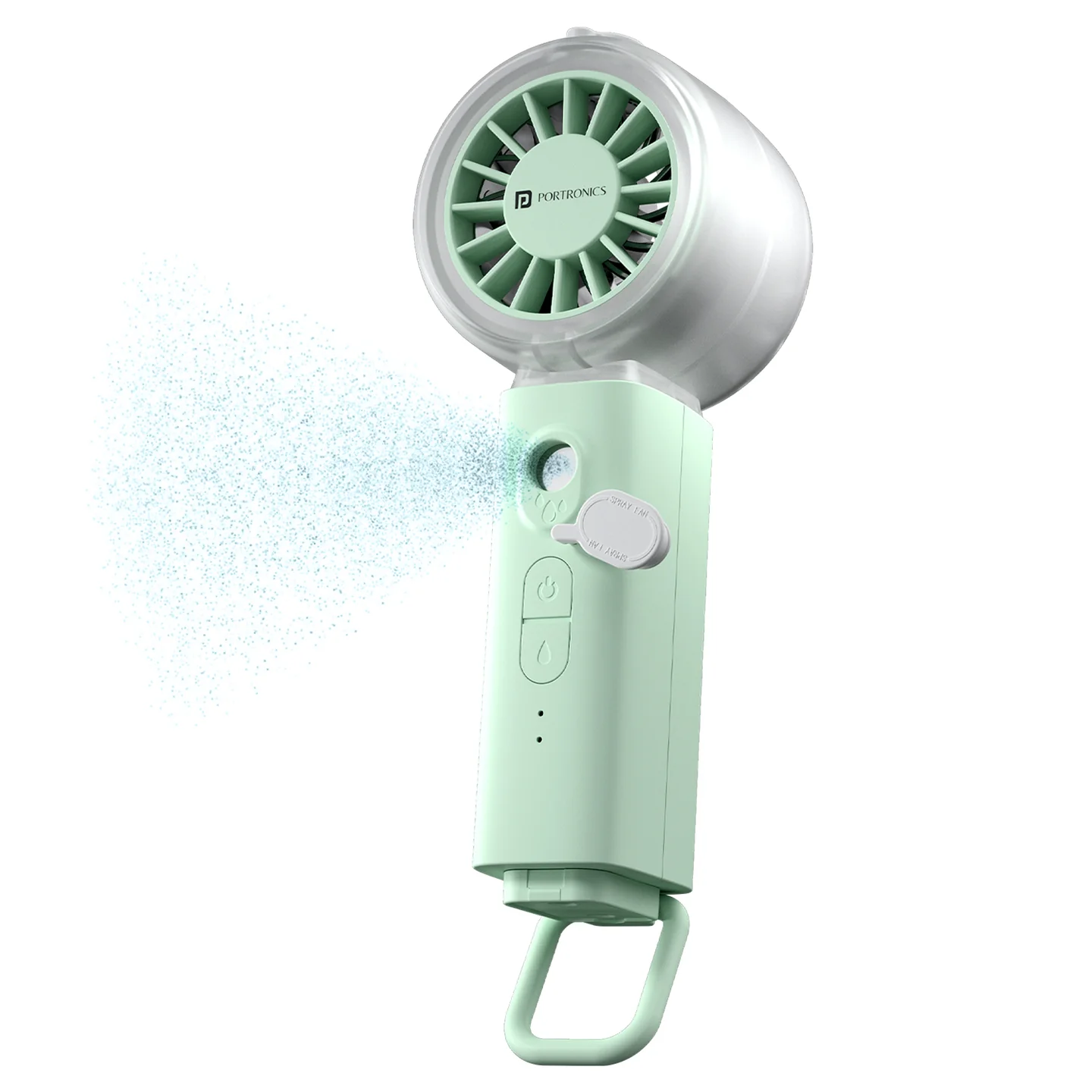
The Portronics ToofanX Mist is a portable rechargeable handheld fan with a built-in mist spray function. It combines adjustable airflow with a fine water mist for personal cooling during travel, outdoor activities, office work and everyday use.
It features five fan speed levels, a 30ml water tank, a 2000mAh rechargeable lithium battery and USB Type-C charging.
Quick Reference
| Feature | Details |
|---|---|
| Product | Portronics ToofanX Mist |
| Product Codes | POR 3570 (Green), POR 3571 (Beige) |
| Product Type | Mini Handheld Mist Fan |
| Motor | BLDC |
| Maximum Motor Speed | 10,800 RPM |
| Speed Levels | 5 |
| Water Tank Capacity | 30ml |
| Battery Type | Rechargeable lithium battery |
| Battery Capacity | 2000mAh |
| Charging Input | 5V/2A |
| Charging Port | USB Type-C |
| Body Material | ABS + electronic components |
| Listed Runtime | Up to 7 hours |
The runtime is a maximum figure. Actual operating time may vary depending on the fan speed and use of the mist function.
What's in the Box
| Item | Quantity |
|---|---|
| ToofanX Mist Fan | 1 |
| Water Filling Bottle | 1 |
| Type-C Charging Cable | 1 |
Note: The charging adapter is not included in the box.
Parts & Controls
| Part | Function |
|---|---|
| Water Tank Plug | Opens the water tank for filling |
| Water Tank | Holds water for the mist function |
| Spray Outlet | Releases the cooling mist |
| Fan Power Button | Turns the fan ON/OFF and cycles through speed levels |
| Spray Button | Turns the mist spray ON/OFF |
| Fan Working / Charging Indicator | Shows fan and charging status |
| Spray Working Indicator | Indicates spray operation |
| Type-C Charging Port | Connects the charging cable |
| Metal Hanging Buckle | Provides a hanging / carrying attachment point |
Charging the Fan
- Connect the supplied Type-C cable to the charging port on the fan.
- Connect the other end to a compatible 5V/2A USB adapter.
- The red indicator light blinks while the fan is charging.
- When the fan is fully charged, the indicator stops blinking.
- Disconnect the charging cable after charging.
Important: The adapter is not included inside the box. Use a suitable 5V/2A USB adapter.
Filling the Water Tank
- Locate the water tank plug.
- Open the plug carefully.
- Use the included water filling bottle to add clean water to the tank.
- Close the tank securely after filling.
Important: Do not allow water to enter the internal body or charging port. Stop using the product immediately if liquid enters the device.
If Spray Performance Becomes Weak
Gently shake the water tank as directed in the product instructions. Check that water is present in the tank and that the tank plug is closed securely.
Turning ON the Fan and Adjusting Speed
Use the Fan Power Button to turn the fan ON and select the airflow level.
| Button Action | Fan Setting |
|---|---|
| 1st press | Fan ON — Low Speed |
| 2nd press | Medium-Low Speed |
| 3rd press | Medium Speed |
| 4th press | High Speed |
| 5th press | Maximum Speed |
| 6th press | Fan OFF |
The fan has five adjustable speed levels. The listed motor speed is up to 10,800 RPM.
Using the Mist Spray Function
The mist spray has a separate Spray Button, independent of the fan speed button.
- Make sure the water tank contains water.
- Press and hold the Spray Button to turn ON the mist spray.
- Press and hold the Spray Button again to turn OFF the mist spray.
Automatic safety shut-off: The spray function automatically turns OFF after 5 minutes for safety and battery optimisation. To use mist again, press and hold the Spray Button.
The fan and mist have separate controls, so select the fan speed and mist operation using their respective buttons.
Battery and Runtime
| Specification | Details |
|---|---|
| Battery | 2000mAh rechargeable lithium battery |
| Charging Input | 5V/2A |
| Charging Port | USB Type-C |
| Listed Runtime | Up to 7 hours |
Actual runtime may vary with fan speed, mist usage, battery condition and operating conditions.
Care & Safety
- Do not use the product in extremely humid or high-temperature environments.
- Keep the fan away from fire, water and flammable materials.
- Do not insert fingers or objects into the fan while it is operating.
- Children should use the product only under adult supervision.
- Stop using the product immediately if liquid enters the device.
- If charging fails, try another suitable cable or adapter.
- Fully charge the fan before first use.
- Keep the Type-C charging port dry.
- Close the water tank plug securely after filling.
Troubleshooting
| Issue | Possible Cause | Recommended Action |
|---|---|---|
| Fan does not turn ON | Battery is low | Recharge the battery fully |
| Spray does not work | Water tank is empty or spray needs priming | Refill the tank and gently shake it |
| Charging indicator does not light | Cable or adapter connection issue | Check the Type-C cable and 5V/2A adapter |
| Weak airflow | Battery is low or fan vents need cleaning | Recharge the battery or clean the fan vents |
| Mist stops after 5 minutes | Automatic safety shut-off | Press and hold the Spray Button again to restart mist |
| Liquid enters the device | Water has reached the internal body | Stop using the product immediately |
Still stuck?
If the issue persists after performing all troubleshooting steps, please raise a support request.
Our support team will assist you further.
Support
- Visit: www.portronics.com
- Support Portal: support.portronics.com
Was this article helpful?
That’s Great!
Thank you for your feedback
Sorry! We couldn't be helpful
Thank you for your feedback
Feedback sent
We appreciate your effort and will try to fix the article