TABLE OF CONTENTS
Product Overview
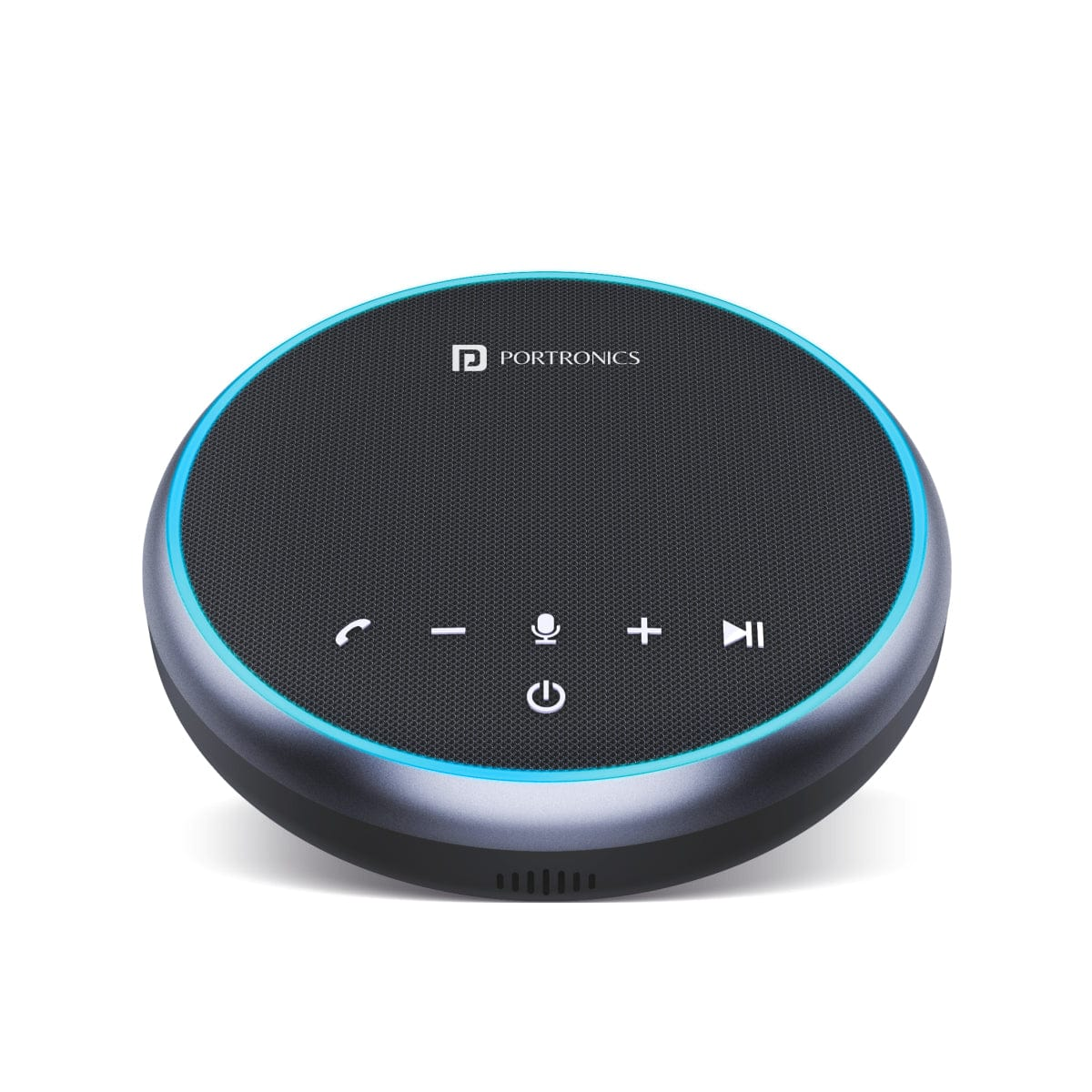
The Portronics Talk One is a portable conference speakerphone designed for meetings at home, in the office or on the go. It supports Bluetooth, USB and AUX connectivity, with 3 omnidirectional microphones for voice pickup.
Quick Reference
| Feature | Details |
|---|---|
| Product | Portronics Talk One |
| Product Code | POR 1386 |
| Bluetooth | 5.1 |
| Bluetooth Range | Up to 10 meters |
| Microphones | 3 × omnidirectional microphones |
| Microphone Coverage | Up to 5 meters |
| Battery | 2600mAh rechargeable battery |
| Talk Time | Up to 12 hours |
| Music Playback | Up to 10 hours |
| Connectivity | Bluetooth / USB / AUX |
| Speaker | Ø52 × 23mm, 4Ω, 3W |
| Weight | 300g |
| Charging Time | Approx. 3 hours |
What's in the Box
| Item | Quantity |
|---|---|
| Talk One | 1 |
| Carry Case | 1 |
| Data Cable | 1 |
| AUX Cable | 1 |
Buttons & Ports
| Control | Function |
|---|---|
| Phone Call button | Answer/end calls; press and hold for 2 seconds to reject a call |
| Volume Down | Decrease volume |
| Power button | Turn the speaker on/off; check battery level |
| Mute button | Mute or restore the microphone |
| Volume Up | Increase volume |
| Pause/Play | Play or pause music |
| USB Type-C port | Charging and USB connection to a computer |
| Audio input port | AUX audio input |
| Status LED | Shows connection, charging and operating status |
Important Before First Use
The speakerphone is shipped from the factory in deep sleep mode to conserve battery.
Before first use, connect the USB cable to a power source to activate the speakerphone.
Powering On / Off
- Press and hold the Power button for 3 seconds to turn the speaker ON.
- Press and hold the Power button for 3 seconds to turn it OFF.
- When connected to a computer by USB, the speaker can power on automatically.
- When Bluetooth is not paired, the speaker automatically powers off after 4 minutes of inactivity.
Bluetooth Mode
- Turn on the Talk One.
- On first use, it automatically enters Bluetooth pairing mode.
- Open Bluetooth settings on your phone, tablet or computer.
- Search for the speaker and select the displayed Talk One pairing name.
- Once paired, the status LED flashes blue every 5 seconds.
The speaker automatically reconnects to the last successfully connected device when available.
USB Mode
Connect the Talk One to a computer using a USB-C data cable.
This allows you to use the speaker for music and calling through the computer.
AUX Mode
- Connect an external audio source to the AUX port using the supplied AUX cable.
- Start playback on the connected device.
- Audio will play through the Talk One speaker.
Note: The microphone does not work in AUX mode.
Button Controls
| Button | Action | Function |
|---|---|---|
| + / − | Press | Increase / decrease volume |
| Phone | Press | Answer / end a call |
| Phone | Press and hold for 2 seconds | Reject a call |
| Microphone | Press | Mute / restore microphone |
| Play/Pause | Press | Play / pause music |
Status LED Guide
| LED Behaviour | Meaning |
|---|---|
| Flashing blue quickly | Bluetooth pairing mode |
| Flashing blue every 5 seconds | Bluetooth paired |
| Steady blue | AUX connected |
| Steady red | Microphone muted |
| Steady purple | USB connected to computer / charging |
| Red flashing | Low battery |
| Blue light movement clockwise/counter-clockwise | Volume being increased/decreased |
| No LED flash + beep | Incoming call |
Charging
| LED Behaviour | Charging Status |
|---|---|
| Steady purple | Being charged |
| Light off | Fully charged |
| Red flashing | Low battery |
Charge the speaker for approximately 3 hours for a full charge.
Battery & Usage
- Up to 12 hours talk time under maximum-volume conditions.
- Up to 10 hours music streaming under maximum-volume conditions.
- 2600mAh rechargeable battery.
Actual runtime may vary with volume, connection type and usage conditions.
Safe Use
- Place the speaker in a safe location.
- Avoid excessive pressure on the speaker.
- Switch off the speaker when not in use and unplug it from the power source where applicable.
- Do not attempt to repair a defective product yourself.
- Keep the speaker away from water to avoid internal damage.
Still stuck?
If the issue persists after performing all troubleshooting steps, please raise a support request.
Our support team will assist you further.
Support
- Visit: www.portronics.com
- Support Portal: support.portronics.com
Was this article helpful?
That’s Great!
Thank you for your feedback
Sorry! We couldn't be helpful
Thank you for your feedback
Feedback sent
We appreciate your effort and will try to fix the article