TABLE OF CONTENTS
Product Overview
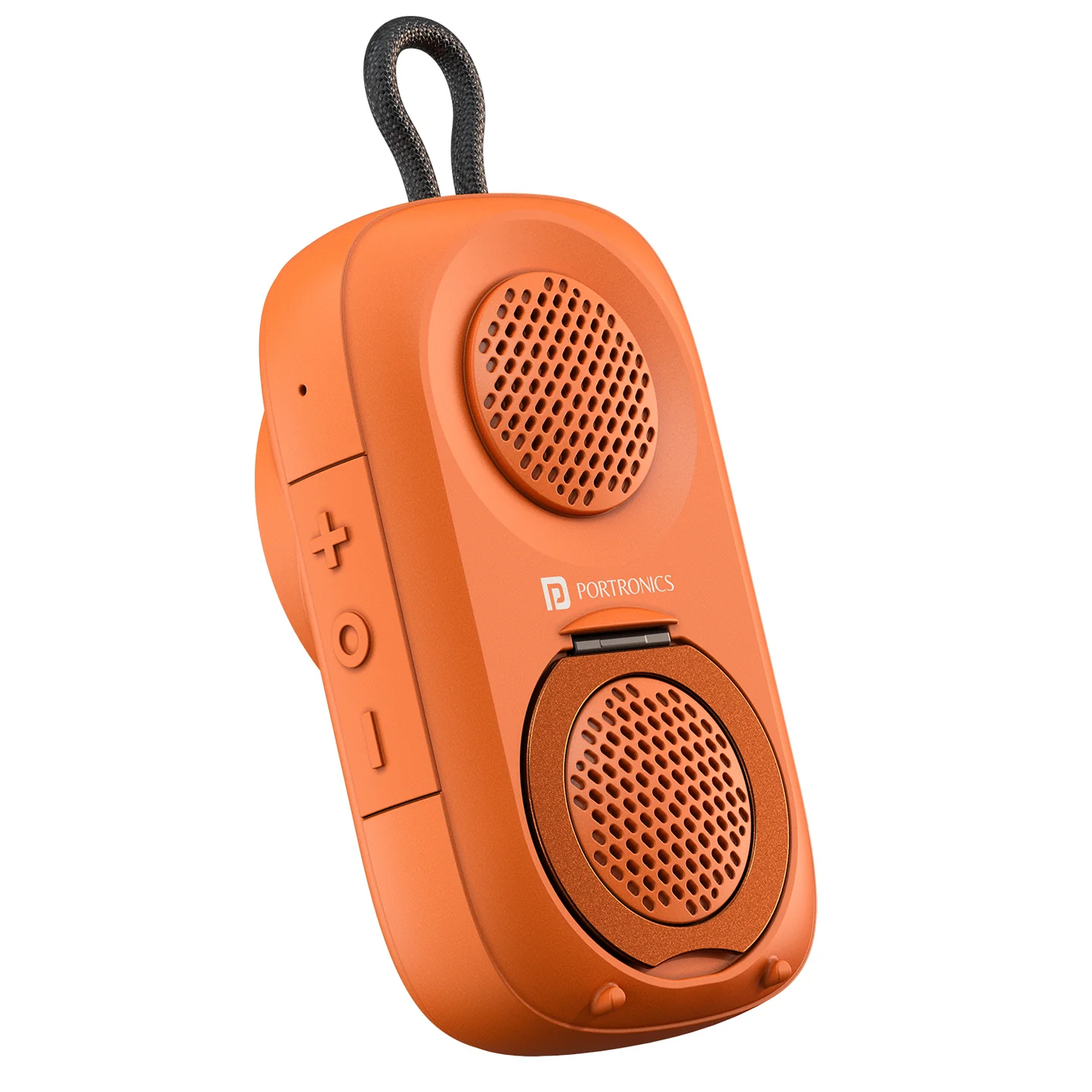
The Portronics Talk Seven is a 5W magnetic Bluetooth speaker designed for portable music, calls and hands-free use. It includes a built-in phone stand, TWS pairing, voice-assistant support, a built-in strap and a 1000mAh rechargeable battery.
Quick Reference
| Feature | Details |
|---|---|
| Product | Portronics Talk Seven |
| Speaker Output | 5W |
| Bluetooth | V6.0 |
| Bluetooth Range | Up to 10 metres |
| Audio Format | SBC / AAC |
| Battery | 3.7V / 1000mAh lithium polymer |
| Charging Time | Approx. 1.5 hours |
| Playtime | Up to 6 hours at 50% volume |
| Water Resistance | IPX5 |
| Charging Port | Type-C |
| TWS | Supported |
| Voice Assistant | Supported |
| Phone Stand | Built-in |
What's in the Box
| Item | Quantity |
|---|---|
| Talk Seven | 1 |
| Type-C Charging Cable | 1 |
| Magnetic Ring | 1 |
| User Manual | 1 |
Controls
| Control | Function |
|---|---|
| Power button | Power ON/OFF, calls, voice assistant and TWS functions |
| + button | Increase volume / next track |
| − button | Decrease volume / previous track |
| Type-C port | Charging |
| Indicator light | Shows power, Bluetooth and battery status |
| Phone holder | Holds a compatible phone for viewing |
| Magnet | Magnetic attachment |
| Lanyard | Carrying/attachment |
| Microphone | Voice pickup for calls |
First-Time Activation
The speaker is shipped in a deep sleep mode to conserve battery.
Before first use:
- Connect the supplied charging cable to the speaker.
- Connect the cable to a suitable power source.
- Allow the speaker to activate.
- You can then switch it on and pair it with your device.
Power ON / OFF
- Press and hold the Power button for 2 seconds to turn the speaker ON.
- Press and hold the Power button for approximately 4 seconds to turn it OFF.
- The speaker can automatically power off after a period of inactivity when no music is playing or no buttons are being used.
Bluetooth Pairing
- Turn on the Talk Seven.
- Turn on Bluetooth on your phone or other device.
- Search for Talk Seven.
- Select Talk Seven to pair.
- Once connected, the Bluetooth indicator remains steady.
The speaker supports automatic reconnection with a previously connected device.
Music Controls
| Action | Control |
|---|---|
| Increase volume | Short press + |
| Next track | Press and hold + |
| Decrease volume | Short press − |
| Previous track | Press and hold − |
| Play / Pause | Short press the Power button |
Phone Calls
The built-in microphone can be used for hands-free calling.
| Action | Control |
|---|---|
| Answer call | Tap the Power button |
| Reject incoming call | Press and hold the Power button |
| End call | Tap the Power button |
| Voice assistant | Triple-click the Power button |
TWS Pairing
Talk Seven supports TWS pairing for wireless stereo sound.
- Turn on both Talk Seven speakers.
- Enter TWS pairing by double-clicking the Power button.
- Follow the pairing behaviour until the speakers connect to each other.
- Connect the main speaker to your phone through Bluetooth.
- Play audio for stereo output.
Important: TWS pairing is only guaranteed to work reliably between two Talk Seven units from the same production batch. Pairing speakers from different batches may fail or behave inconsistently. Check the batch/date code on both units if TWS pairing doesn't work.
Voice Assistant
Triple-click the Power button to activate the supported voice assistant, such as Google Assistant or Siri, when connected to a compatible device.
Phone Stand
Talk Seven includes a built-in phone stand for activities such as:
- Watching videos
- Video calls
- Listening to audio books
- Podcasts
Place the phone securely in the holder before use.
Battery & Charging
The speaker uses a 3.7V / 1000mAh lithium polymer battery.
- Charging time: approximately 1.5 hours
- Playtime: up to 6 hours at 50% volume
Actual battery life can vary depending on volume, Bluetooth connection and usage conditions.
LED Indicator Guide
| LED Status | Meaning |
|---|---|
| White — Steady | Speaker is powered on |
| White — Flashing | Speaker is not connected to Bluetooth |
| White — Steady after connection | Bluetooth connection successful |
| Red — Flashing rapidly | Low battery |
| Red — Steady | Speaker is charging |
| Red — Off | Charging complete / speaker turned off |
Water & Outdoor Use
The Talk Seven has an IPX5 water-resistant rating and is designed for use in places such as kitchens, bathrooms and outdoor environments.
For safe use:
- Do not place the speaker underwater.
- Keep it away from prolonged direct sunlight and high temperatures.
- Do not charge it while the charging area is wet.
Safety
- Do not use the speaker in wet or underwater conditions.
- Keep it away from heaters and high-temperature environments.
- Avoid prolonged direct sunlight.
- Do not dismantle the product without permission.
- Keep the speaker and charging accessories in good condition.
Still stuck?
If the issue persists after performing all troubleshooting steps, please raise a support request.
Our support team will assist you further.
Support
- Visit: www.portronics.com
- Support Portal: support.portronics.com
Was this article helpful?
That’s Great!
Thank you for your feedback
Sorry! We couldn't be helpful
Thank you for your feedback
Feedback sent
We appreciate your effort and will try to fix the article