TABLE OF CONTENTS
- 1. Introduction
- 2. Packing List
- 3. Speaker Controls (Top Panel)
- 4. Speaker Ports (Back Panel)
- 5. Wireless Microphone Controls
- 6. Getting Started
- 7. Charging
- 8. Specifications
- 9. Safety Instructions
- 10. Support
1. Introduction
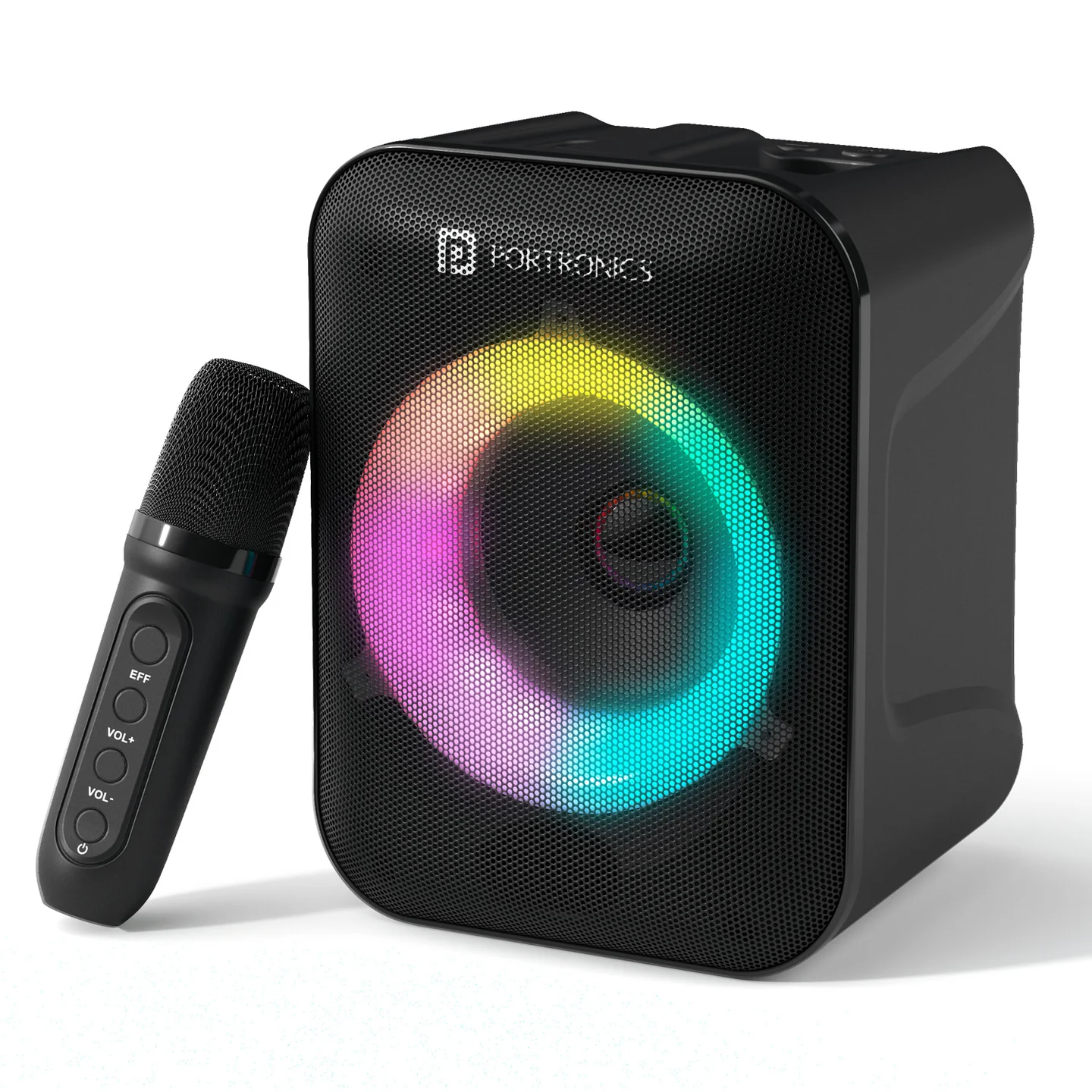
Thank you for choosing the Portronics Apollo One. Apollo One pairs a 20W Bluetooth speaker with a wireless karaoke microphone, music-synced RGB LED lights, up to 5 hours of playtime, and an easy-grip handle — with Bluetooth, USB drive, AUX, and TF card connectivity.
2. Packing List
- User Manual — 1 pc
- Speaker — 1 pc
- Wireless Microphone — 1 pc
- Type-C Cable — 1 pc
- Audio Cable — 1 pc
3. Speaker Controls (Top Panel)
| Button | Function |
|---|---|
| Input Button | Single press to enter operational mode and cycle between modes (Bluetooth, AUX, USB drive, TF drive) |
| Previous Track | Single press: previous track · Long press: reduce volume |
| Next Track | Single press: next track · Long press: increase volume |
| Play/Pause | Single press to play or pause |
4. Speaker Ports (Back Panel)
| Port | Function |
|---|---|
| USB Drive | Insert a USB flash drive to play stored audio |
| Charging (Type-C 5V) | Connect the supplied Type-C cable to charge the speaker |
| On/Off | Powers the speaker on or off |
| AUX | Connect a 3.5mm audio cable to play from a compatible device |
| TF Card | Insert a TF/microSD card to play stored audio |
5. Wireless Microphone Controls
| Button | Function |
|---|---|
| Voice Changer | Cycles through voice-changing effects |
| Volume Up | Long press to increase volume |
| Volume Down | Long press to reduce volume |
| Power | Turns the microphone on or off |
| Charging Port | Type-C, 5V — charges the microphone |
6. Getting Started
- Press the On/Off button on the back of the speaker to power it on.
- Single-press the input button to cycle to your preferred mode: Bluetooth, AUX, USB drive, or TF drive.
- For Bluetooth: open Bluetooth settings on your phone or device, and select "Apollo One" from the list to pair.
- For USB/TF Card: insert your USB drive or TF card into the corresponding port; playback should begin automatically or via the Play/Pause button.
- For AUX: connect the supplied audio cable between your device and the speaker's AUX port.
- Power on the wireless microphone separately using its Power button, and use the Voice Changer button to add effects to your singing.
7. Charging
- Charge the speaker via its Type-C (5V) port using the supplied Type-C cable.
- Charge the wireless microphone separately via its own Type-C (5V) port.
- Apollo One offers up to 5 hours of continuous playtime on a full charge.
8. Specifications
| Specification | Details |
|---|---|
| Model | Apollo One |
| Product Code | POR 2735 |
| Colour | Black |
| Output | 20W |
| Bluetooth Version | 5.3 |
| Playtime | Up to 5 hours |
| Charging | Type-C |
| Wireless Karaoke Mic | Yes |
| Connectivity | Bluetooth, USB drive, AUX, TF card |
9. Safety Instructions
- Read Instructions: read all instructions carefully before operation and follow them.
- Environment: keep the speaker away from heat sources such as radiators, ensure proper ventilation, and don't expose it to moist air or water.
- Power Sources: connect the speaker only to a power supply of the type described in this manual or marked on the speaker, using the accessories provided.
- Electric Shock: to avoid shock hazard, do not remove the cover or dismantle the unit, and do not insert anything into it.
- Mending: do not attempt to repair the speaker yourself—contact us.
- Cleaning: disconnect the main plug before cleaning; use only a soft cloth — harsh abrasives or chemicals will damage the surface finish.
- Non-Use Periods: unplug the power cord when the speaker will be left unused for a long period.
10. Support
If the issue persists after performing all troubleshooting steps, please raise a support request.
Our support team will assist you further.
Support
- Visit: www.portronics.com
- Support Portal: support.portronics.com
Was this article helpful?
That’s Great!
Thank you for your feedback
Sorry! We couldn't be helpful
Thank you for your feedback
Feedback sent
We appreciate your effort and will try to fix the article