TABLE OF CONTENTS
- Product Overview
- Quick Reference
- What's in the Box
- Controls & Buttons
- First-Time Pairing
- Reconnecting to Bluetooth
- Dual-Device Pairing
- Music Controls
- Hands-Free Calling
- Voice Assistant
- Music Mode and Game Mode
- Charging
- Resetting / Re-pairing
- Care & Safety
- Still stuck?
Product Overview
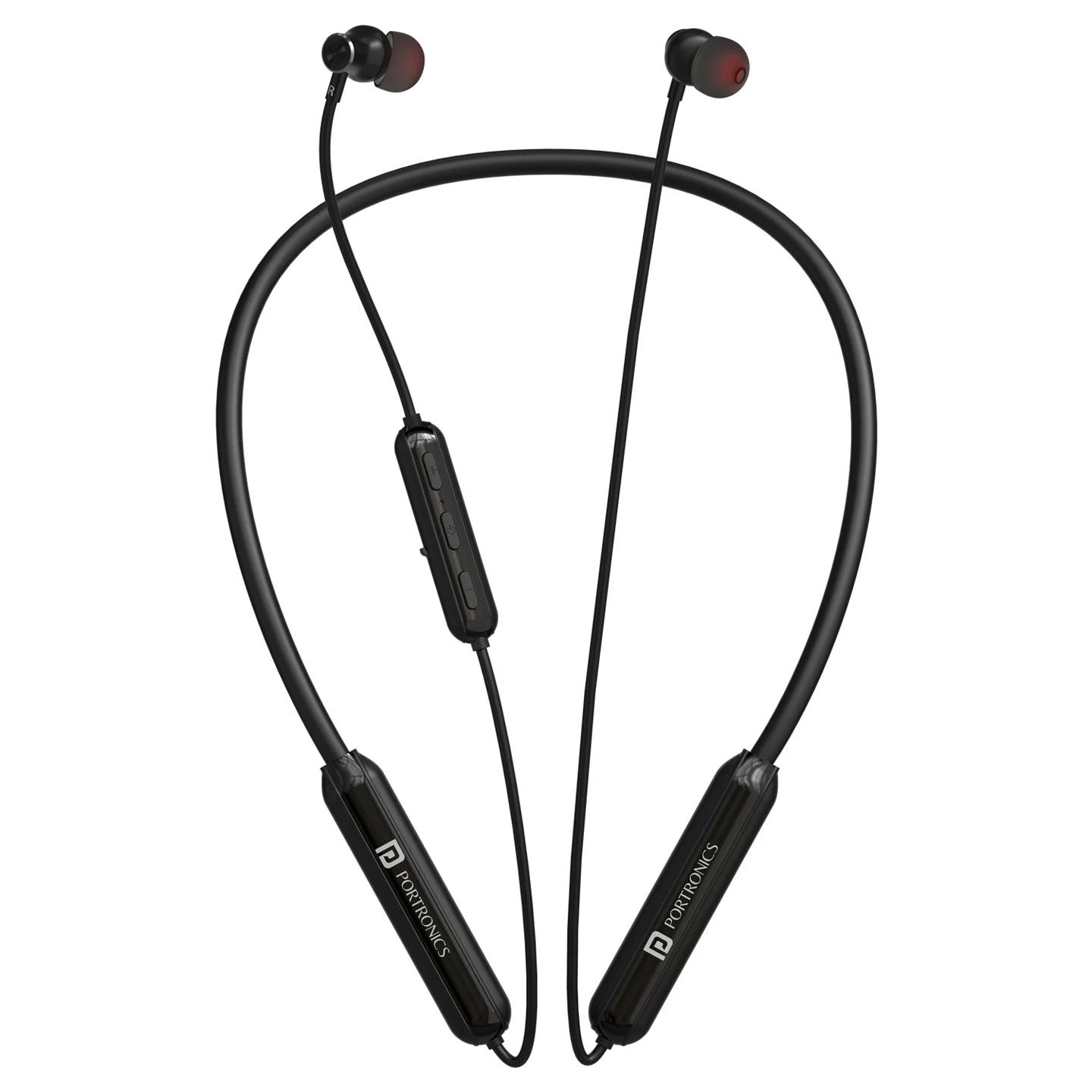
The Portronics Harmonics Y2 is a wireless neckband headset with an in-line microphone, magnetic earbuds, dual-device pairing and Music/Game modes. It supports hands-free calling, voice-assistant access and USB Type-C charging.
Quick Reference
| Feature | Details |
|---|---|
| Product | Portronics Harmonics Y2 |
| Product Code | POR 3109 |
| Bluetooth | 5.4 in the supplied manual; current listing also uses “5.3V” |
| Driver Size | 10mm |
| Bluetooth Profiles | A2DP, AVRCP, Hands-Free, Headset |
| Bluetooth Frequency | 2402–2480MHz |
| Wireless Range | Up to 10 metres |
| Battery | 500mAh |
| Playtime | Up to 70 hours |
| Charging Port | USB Type-C |
| Charging Input | 5V / 1A |
| Controls | In-line multi-function button and volume buttons |
| Dual Pairing | Supported |
| Operating Temperature | −10°C to 50°C |
What's in the Box
| Item | Quantity |
|---|---|
| Harmonics Y2 Neckband | 1 |
| Charging Cable | 1 |
| Earbuds | 1 pair |
| User Manual | 1 |
Controls & Buttons
| Action | Control |
|---|---|
| Power ON | Press and hold the MFB until the headset turns on |
| Power OFF | Press and hold the MFB for about 4 seconds |
| Play / Pause | Short press the MFB |
| Answer / End Call | Short press the MFB |
| Reject Call | Press and hold the MFB for about 2 seconds |
| Redial Last Number | Double press the MFB |
| Voice Assistant | Press and hold the MFB for about 2 seconds |
| Next Track | Press and hold Volume Up |
| Previous Track | Press and hold Volume Down |
| Volume Up | Short press Volume Up |
| Volume Down | Short press Volume Down |
| Music / Game Mode | Triple-click the MFB |
First-Time Pairing
- Press and hold the Multi-Function Button (MFB) for about 2 seconds to enter pairing mode, as described in the manual.
- The LED flashes red and blue alternately, and a voice prompt indicates pairing mode.
- Turn on Bluetooth on your phone.
- Search for Harmonics Y2.
- Select the headset to connect.
- Once connected, the LED and voice prompt indicate the connection status.
If the headset is not paired within approximately 5 minutes, it automatically switches off.
Reconnecting to Bluetooth
- Turn on the headset.
- Enable Bluetooth on the phone.
- Select Harmonics Y2 from the saved Bluetooth devices.
- Keep the phone within approximately 10 metres for a stable connection.
Dual-Device Pairing
Harmonics Y2 supports connecting to two devices.
- Pair the headset with Device 1.
- Turn Bluetooth off on Device 1.
- Pair the headset with Device 2.
- Turn Bluetooth back on on Device 1.
- Both devices should remain paired with the headset.
If both devices do not remain connected, disconnect unused Bluetooth devices and repeat the pairing steps.
Music Controls
| Action | Control |
|---|---|
| Play / Pause | Short press the MFB |
| Volume Up | Short press Volume Up |
| Volume Down | Short press Volume Down |
| Next Track | Press and hold Volume Up |
| Previous Track | Press and hold Volume Down |
| Music / Game Mode | Triple-click the MFB |
Hands-Free Calling
| Action | Control |
|---|---|
| Answer an incoming call | Short press the MFB |
| End a call | Short press the MFB |
| Reject an incoming call | Press and hold the MFB for about 2 seconds |
| Redial the last number | Double press the MFB |
For the best call experience, keep the phone within the headset's operating range and make sure the microphone is not covered.
Voice Assistant
Press and hold the MFB for about 2 seconds to activate the supported voice assistant. The voice assistant must be enabled on your phone.
Music Mode and Game Mode
Triple-click the MFB to switch between Music Mode and Game Mode.
Use Music Mode for regular listening and Game Mode when you want the headset's gaming audio mode.
Charging
- Connect a USB Type-C cable to the headset's charging port.
- Connect it to a suitable 5V/1A USB power source.
- Check the LED indicator for charging status.
- Allow sufficient time for charging to complete.
LED Indicator Guide
| Status | LED / Prompt |
|---|---|
| Charging | Red LED stays on |
| Fully charged | Blue LED stays on |
| Pairing mode | Red and blue LEDs flash alternately; voice prompt indicates pairing |
| Powered on | Blue LED flashes |
| Powered off | LED turns off; voice prompt indicates power-off |
| Disconnected / out of range | LED flashes red and blue alternately; voice prompt indicates disconnection |
| Low battery | Low-battery voice prompt |
The battery life varies with volume, call usage and connection conditions.
Resetting / Re-pairing
If the headset does not connect properly:
- Turn the headset off.
- Press and hold the MFB to power it on and then continue until it powers off again, following the reset sequence in the manual.
- Check for the reset LED indication.
- Remove the old Harmonics Y2 entry from the phone's Bluetooth list.
- Enter pairing mode and pair again.
Care & Safety
- Avoid extreme heat, cold and humidity.
- Do not drop or crush the headset.
- Do not pull, sharply bend or put excessive strain on the neckband cable.
- If you experience discomfort or dizziness, lower the volume or stop listening temporarily.
- Keep the phone within approximately 10 metres for stable connection.
- Use a suitable quality-certified charger with the Type-C port.
- Do not use damaged charging accessories.
- Avoid prolonged listening at maximum volume.
Still stuck?
If the issue persists after performing all troubleshooting steps, please raise a support request.
Our support team will assist you further.
Support
- Visit: www.portronics.com
- Support Portal: support.portronics.com
Was this article helpful?
That’s Great!
Thank you for your feedback
Sorry! We couldn't be helpful
Thank you for your feedback
Feedback sent
We appreciate your effort and will try to fix the article