TABLE OF CONTENTS
- Product Overview
- Quick Reference
- What's in the Box
- Parts & Controls
- Getting Started
- How to Wear the Earphones
- In-line Button Controls
- Detachable Cable
- Type-C Compatibility
- Care & Safety
- Still stuck?
Product Overview
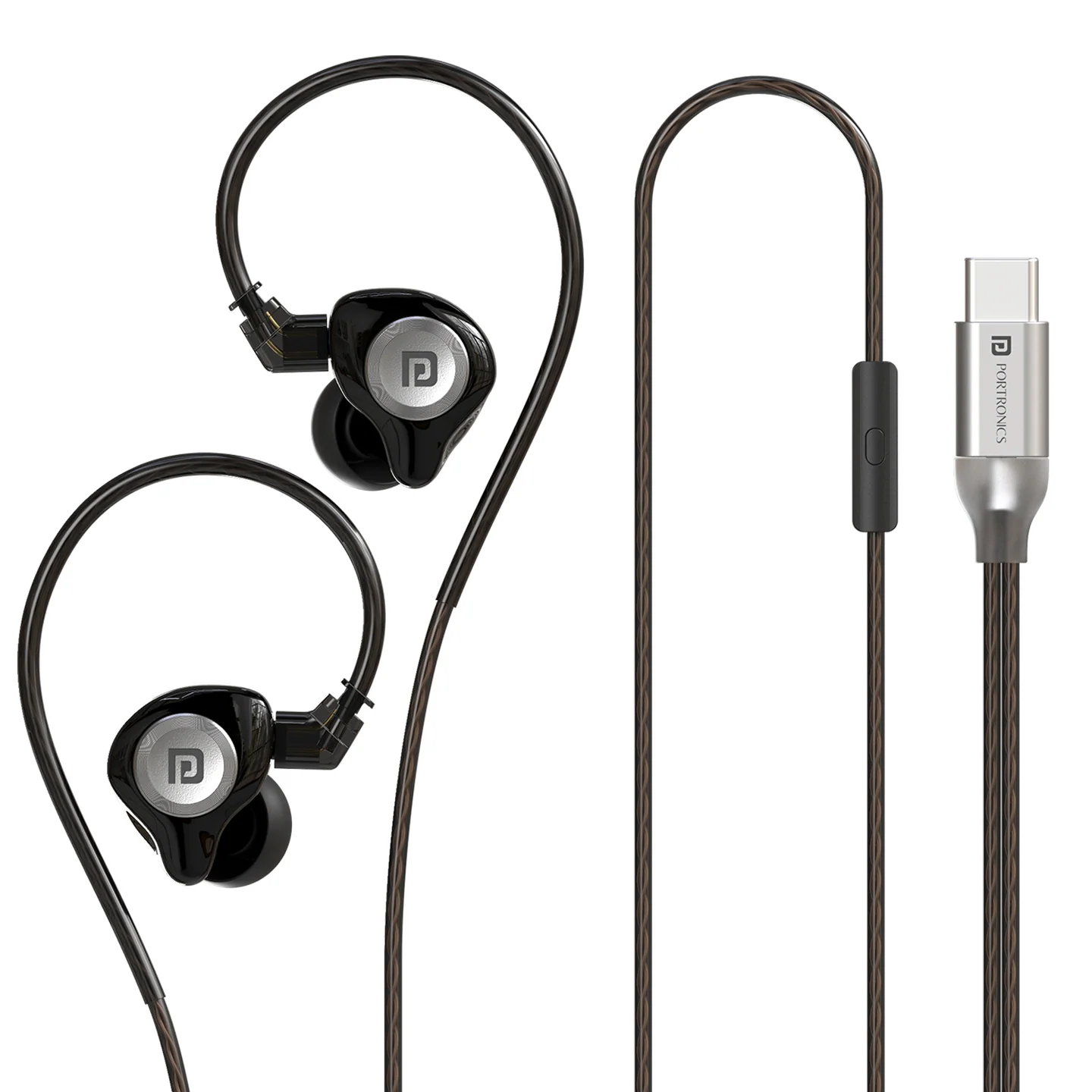
The Portronics Rythm is a wired Type-C in-ear monitor earphone with an in-line microphone and detachable cable. It is designed for music, calls and everyday listening on compatible USB Type-C devices that support wired audio.
Quick Reference
| Feature | Details |
|---|---|
| Product | Portronics Rythm |
| Product Code | POR 3640 |
| Connection | Wired USB Type-C |
| Driver Size | 11mm dynamic driver |
| Impedance | 32Ω |
| Frequency Response | 20Hz–20kHz |
| Cable Length | 120cm ± 3cm |
| Cable | Detachable 5N OFC cable |
| Microphone | In-line microphone |
| Weight | approximately 22.6 ± 5g |
| Warranty | 6 months |
What's in the Box
| Item | Quantity |
|---|---|
| Rythm Earphones | 1 |
| User Manual | 1 |
Parts & Controls
| Part / Control | Function |
|---|---|
| Left Earbud | Fits the left ear; marked L |
| Right Earbud | Fits the right ear; marked R |
| Detachable Cable Connection | Connects the earphones to the cable |
| In-line Multi-Function Button | Playback and call control |
| In-line Microphone | Captures your voice during calls |
| Type-C Connector | Connects to a compatible USB Type-C audio port |
Getting Started
- Check that your phone, tablet, laptop or other device has a USB Type-C port that supports wired audio.
- Connect the Type-C plug to the device.
- Make sure the plug is fully inserted.
- Play music or open the app you want to use.
- If your device asks for an audio output, select the connected wired earphones.
Rythm uses a wired Type-C connection and does not require Bluetooth pairing, charging or a separate wireless receiver.
How to Wear the Earphones
- Identify the left and right earbud using the L and R markings.
- Place each earbud in the corresponding ear.
- Adjust the fit until the earphones sit comfortably and securely.
- Avoid pulling the cable while adjusting the earbuds.
In-line Button Controls
| Action | Button Operation |
|---|---|
| Play / Pause | Press once |
| Next Song | Press twice |
| Previous Song | Press three times |
| Answer an incoming call | Press once |
| End a call on Android | Press and hold |
| End a call on iPhone | Press once during the call |
| Reject an incoming call | Press and hold for about 2 seconds |
| Mute a call on Android | Press once during the call |
| Mute a call on iPhone | Not supported |
| Activate Voice Assistant | Press and hold for 3 seconds |
Note: Some button functions depend on the phone or tablet. Call handling may vary with the device's operating system and app.
Detachable Cable
The Rythm cable is detachable.
- Hold the connector housing rather than pulling the cable itself.
- Disconnect the cable carefully if you need to replace or store it.
- Align the connector correctly before reconnecting it.
- Make sure the connection is secure before using the earphones.
Do not twist the connector forcefully or pull the cable from the wire.
Type-C Compatibility
Rythm requires a USB Type-C port that supports wired audio. A Type-C charging port does not always support audio output, so check the device's specifications if the earphones are not detected.
Some devices may require suitable wired-audio or OTG support. The need for such support depends on the connected device.
Care & Safety
- Avoid listening at high volume for long periods; this may damage your hearing.
- This product is not a toy. Keep it away from children under 3 years because small parts can present a choking hazard.
- Supervise children when using audio equipment.
- Do not store the product below 0°C or above 45°C.
- Do not use chemicals or detergents to clean the earphones.
- Do not drop or knock the product against hard surfaces.
- Do not scrape the product with sharp objects.
- Do not attempt to disassemble the product.
- Keep the Type-C connector and earbud outlets clean and dry.
- Avoid pulling, sharply bending or twisting the cable.
Still stuck?
If the issue persists after performing all troubleshooting steps, please raise a support request.
Our support team will assist you further.
Support
- Visit: www.portronics.com
- Support Portal: support.portronics.com
Was this article helpful?
That’s Great!
Thank you for your feedback
Sorry! We couldn't be helpful
Thank you for your feedback
Feedback sent
We appreciate your effort and will try to fix the article